

Kubernetes Persistent Volumes, PVC and StorageClass: Complete Guide
Why pods need volumes #
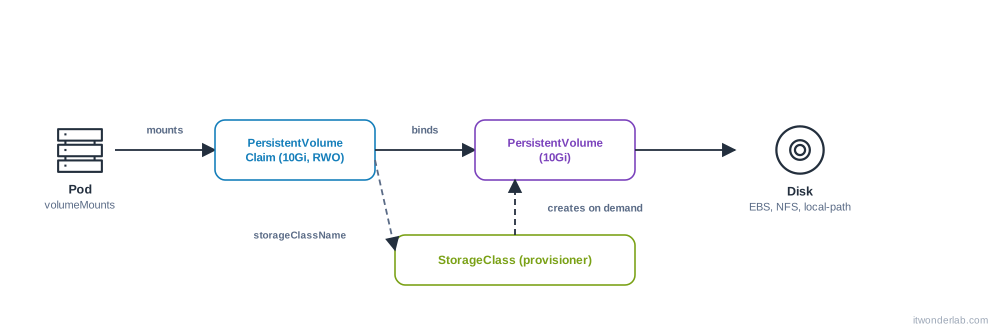
The filesystem of a container is erased when the container restarts. Anything you want to keep (a database, uploads) needs a volume that lives longer than the pod. Kubernetes separates three roles:
- A PersistentVolume (PV) is a piece of storage in the cluster: an EBS disk, an NFS export, a local directory. It is cluster wide.
- A PersistentVolumeClaim (PVC) is a request for storage by an application: "10 GiB, read-write by one node". It lives in a namespace and pods mount it.
- A StorageClass says how to create PVs on demand (which driver, which disk type). With it, creating a PVC provisions the disk automatically (dynamic provisioning).
Volume types at a glance #
| Type | Lifetime | Use |
|---|---|---|
emptyDir |
The pod | Scratch space, cache, sharing files between containers of a pod. medium: Memory uses RAM |
configMap, secret |
Object | Configuration files |
hostPath |
The node | Reading node files (logs). Avoid for data: it ties the pod to the node and is a security risk |
persistentVolumeClaim |
The PVC | Databases and anything that must survive |
| NFS, CSI drivers | The PV | Shared or cloud disks, see Kubernetes with NFS |
StorageClass #
kubectl get storageclass
kubectl describe storageclass <name>
Every cluster comes with a default one (marked (default)): local-path in K3s and Rancher Desktop, standard in kind and minikube, gp2/gp3 through the EBS CSI driver in EKS. A custom one:
apiVersion: storage.k8s.io/v1
kind: StorageClass
metadata:
  name: fast
provisioner: ebs.csi.aws.com             # depends on your cluster
parameters:
  type: gp3
reclaimPolicy: Delete                    # or Retain
allowVolumeExpansion: true
volumeBindingMode: WaitForFirstConsumer  # create the disk where the pod is scheduled
WaitForFirstConsumer delays the creation of the disk until a pod uses the claim, so the disk is created in the same zone as the pod. Without it, a disk in zone a and a pod forced to zone b is a classic cause of a pod Pending.
Claim and use a volume #
apiVersion: v1
kind: PersistentVolumeClaim
metadata:
  name: data
spec:
  accessModes: ["ReadWriteOnce"]
  storageClassName: fast        # omit to use the default class
  resources:
    requests:
storage: 10Gi spec:
containers:
- name: db
image: postgres:16
env:
- { name: PGDATA, value: /var/lib/postgresql/data/pgdata }
volumeMounts:
- name: data
mountPath: /var/lib/postgresql/data
volumes:
- name: data
persistentVolumeClaim:
claimName: datakubectl apply -f pvc.yaml
kubectl get pvc,pvWith WaitForFirstConsumer the claim shows Pending until a pod uses it. That is normal. Once bound, it shows Bound and the name of the volume.
The PGDATA subdirectory avoids the lost+found directory that a fresh ext4 disk has in its root, which makes PostgreSQL refuse to initialize. A full example with a database is in PostgreSQL on Kubernetes with an NFS volume.
Access modes #
| Mode | Meaning | Notes |
|---|---|---|
ReadWriteOnce (RWO) |
One node reads and writes | Block disks (EBS). Several pods on the same node can share it |
ReadOnlyMany (ROX) |
Many nodes read | |
ReadWriteMany (RWX) |
Many nodes read and write | Needs NFS, EFS, CephFS... |
ReadWriteOncePod (RWOP) |
Exactly one pod | Stricter than RWO |
A Deployment with a RWO volume and 2 replicas often ends with the second pod in ContainerCreating or Multi-Attach error, if it lands on another node. Use RWX storage or a StatefulSet.
StatefulSets: one volume per replica #
A Deployment shares one claim. For a database cluster, each replica needs its own disk. A StatefulSet creates one PVC per pod from volumeClaimTemplates:
apiVersion: apps/v1
kind: StatefulSet
metadata:
  name: db
spec:
  serviceName: db                # headless Service for stable DNS: db-0.db
  replicas: 3
  selector:
    matchLabels: { app: db }
  template:
    metadata:
      labels: { app: db }
    spec:
      containers:
        - name: db
          image: postgres:16
          volumeMounts:
            - { name: data, mountPath: /var/lib/postgresql/data }
  volumeClaimTemplates:
    - metadata:
        name: data
      spec:
        accessModes: ["ReadWriteOnce"]
        resources:
          requests:
            storage: 10Gi
The PVCs are data-db-0, data-db-1, data-db-2. They are not deleted when you delete the StatefulSet or scale it down, so data is not lost by accident.
Reclaim policy and deletion #
reclaimPolicy |
When the PVC is deleted |
|---|---|
Delete |
The PV and the disk are deleted too. Default of dynamic classes |
Retain |
The PV becomes Released and the disk stays. An admin must clean it |
For important data, use Retain (change a live PV with kubectl patch pv <name> -p '{"spec":{"persistentVolumeReclaimPolicy":"Retain"}}') and take snapshots.
Resize a volume #
kubectl patch pvc data -p '{"spec":{"resources":{"requests":{"storage":"20Gi"}}}}'
kubectl describe pvc data      # Conditions: FileSystemResizePending
It needs allowVolumeExpansion: true in the StorageClass and a driver that supports it. Many resize the filesystem online; some need a pod restart. You can only grow, never shrink.
Backups and snapshots #
Volumes are not backups: deleting the PVC can delete the data. Options: the application's own dump (pg_dump), VolumeSnapshot objects when the CSI driver supports them, cloud snapshots or a tool such as Velero.
kubectl exec db-0 -- pg_dump -U postgres app > app-$(date +%F).sqlCommon errors #
| Symptom | Cause | Fix |
|---|---|---|
PVC Pending |
No default StorageClass, wrong storageClassName, no provisioner, or WaitForFirstConsumer with no pod yet |
kubectl describe pvc (Events), kubectl get sc |
Pod Pending: pod has unbound immediate PersistentVolumeClaims |
The claim cannot bind | Fix the PVC first |
Pod Pending: 1 node(s) had volume node affinity conflict |
The disk lives in another zone or node | Use WaitForFirstConsumer, schedule in that zone |
Multi-Attach error for volume "pvc-..." Volume is already exclusively attached to one node |
RWO volume still attached to the old node | Wait for the old pod to terminate, use Recreate strategy or RWX |
MountVolume.MountDevice failed or mount.nfs: Connection timed out |
NFS server unreachable, missing nfs-common on the node |
Check network and packages on every node |
AttachVolume.Attach failed ... AccessDenied (EKS) |
The EBS CSI driver role lacks permissions | Fix the IAM role of the driver |
permission denied writing to the volume |
The files belong to another user | Set securityContext.fsGroup and runAsUser in the pod |
initdb: directory "/var/lib/postgresql/data" exists but is not empty |
lost+found in the root of the volume |
Use a PGDATA subdirectory |
PVC stuck in Terminating |
A pod still uses it (kubernetes.io/pvc-protection finalizer) |
Delete the pod first |
persistentvolumeclaims "x" is forbidden: exceeded quota |
ResourceQuota | kubectl describe quota |
field is immutable editing a PVC |
Only the size can change | Create a new PVC |
| Data is gone after the pod restarted | It was written to the container filesystem or an emptyDir |
Mount a PVC where the app writes |
How to debug storage #
kubectl get pvc,pv,sc
kubectl describe pvc data              # Events say why it is Pending
kubectl describe pv <pv-name>          # node affinity, source, reclaim policy
kubectl describe pod <pod>             # Events: FailedMount, FailedAttachVolume
kubectl get events --sort-by=.lastTimestamp | grep -i -E "volume|mount|pvc"
kubectl get pods -n kube-system | grep -i csi     # the CSI driver pods
kubectl exec <pod> -- df -h /var/lib/postgresql/data
kubectl exec <pod> -- sh -c 'touch /data/x && echo ok'
If the pod is ContainerCreating, the problem is almost always a mount or attach error in its events. If the pod runs but cannot write, it is permissions (fsGroup) or a full disk. See How to debug Kubernetes.
Frequently asked questions #
What is the difference between a PV and a PVC? The PV is the disk, the PVC is the request. Developers write PVCs, storage provides PVs (or a StorageClass creates them).
Do I need to create PVs by hand? Not with dynamic provisioning. You only do it for static storage such as an existing NFS export.
Why is my PVC Pending in a local cluster? The StorageClass uses WaitForFirstConsumer (it binds when a pod uses it) or the cluster has no default class. Run kubectl get sc.
Can two pods share a volume? With RWX storage, yes. With RWO, only pods on the same node.
What happens to the data when I delete the Deployment? Nothing: the PVC remains. It is deleted when you delete the PVC (and the PV, with reclaimPolicy: Delete).
Should I run databases in Kubernetes? It works well with StatefulSets, good storage, backups and an operator (CloudNativePG, for example). For many teams a managed database such as RDS is simpler.
Next steps #
Add liveness and readiness probes to the database, restrict access with RBAC and read Kubernetes with NFS for shared storage.