

Kubernetes Services and Ingress: ClusterIP, NodePort, LoadBalancer and Routing
Why Services exist #
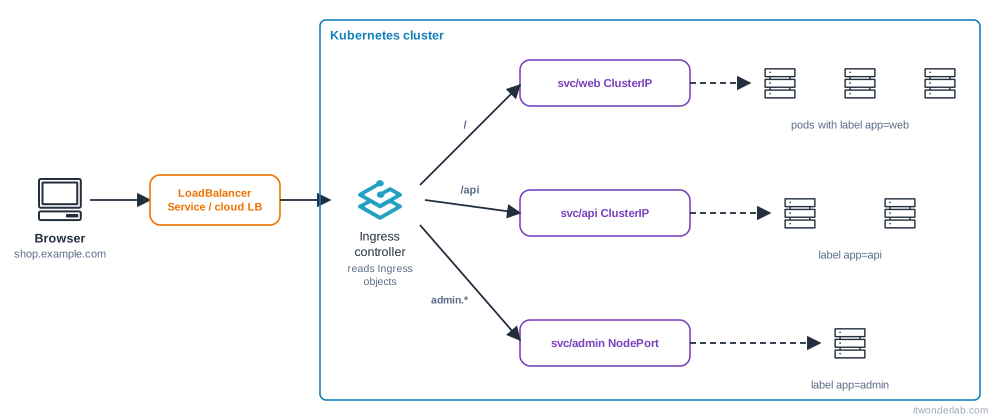
Pods come and go and every new pod has a new IP. A Kubernetes Service is a stable name and virtual IP in front of a changing set of pods, chosen by labels. Traffic to the Service is load balanced to the pods that are Ready. On top of Services, an Ingress routes HTTP and HTTPS by host name and path, so many apps share one entry point.
Start from the Deployment of Pods and Deployments (label app: web, port 80).
Service types #
| Type | Reachable from | How | Typical use |
|---|---|---|---|
ClusterIP (default) |
Inside the cluster | Virtual IP and DNS name | Service to service traffic, behind an Ingress |
NodePort |
Outside, <node-ip>:30000-32767 |
Opens the same port on every node | Labs, bare metal, see NodePort tutorial |
LoadBalancer |
Outside, through a cloud or MetalLB address | Asks the cloud controller for a load balancer | One service per public IP, TCP/UDP |
ExternalName |
Inside | DNS CNAME to an outside name | Point to an external database |
Headless (clusterIP: None) |
Inside | DNS returns the pod IPs, no virtual IP | StatefulSets, client-side balancing |
ClusterIP Service #
apiVersion: v1
kind: Service
metadata:
  name: web
spec:
  type: ClusterIP
  selector:
    app: web            # pods with this label
  ports:
    - name: http
      port: 80          # port of the Service
      targetPort: 80    # port of the container (a number or the name of containerPort)
kubectl apply -f web-svc.yaml
kubectl get svc web
kubectl get endpointslices -l kubernetes.io/service-name=web
kubectl get endpoints webThe endpoints are the list of ready pod IPs behind the Service. If it is empty, nothing works: the selector matches no pods, or no pod is Ready. This is the first thing to check.
Test it from inside the cluster #
kubectl run tmp --rm -it --image=curlimages/curl --restart=Never -- curl -sv http://web
kubectl run tmp --rm -it --image=busybox:1.36 --restart=Never -- nslookup web
The DNS names, from the same namespace: web. From another namespace: web.<namespace>. The full name: web.<namespace>.svc.cluster.local. Pods also get environment variables such as WEB_SERVICE_HOST, but DNS is the way to go.
From your computer, without exposing anything: kubectl port-forward svc/web 8080:80 and open http://localhost:8080.
NodePort and LoadBalancer #
spec:
  type: NodePort
  selector: { app: web }
  ports:
    - port: 80
      targetPort: 80
      nodePort: 30080      # optional, 30000-32767
spec:
type: LoadBalancer
selector: { app: web }
ports:
- port: 80
targetPort: 80On EKS, GKE and AKS a LoadBalancer creates a cloud load balancer and EXTERNAL-IP shows its address after a minute or two. On a local cluster it stays <pending> forever unless something implements it: MetalLB, the ServiceLB of K3s (it uses the node IP), cloud-provider-kind for kind, or minikube tunnel.
A LoadBalancer per app is expensive in the cloud: use one Ingress controller with one load balancer and route to ClusterIP Services.
Ingress #
An Ingress is only a set of routing rules. An Ingress controller (NGINX Ingress, Traefik, HAProxy, a cloud controller such as the AWS Load Balancer Controller) reads them and does the work. Without a controller, Ingress objects do nothing.
kubectl get ingressclass
kubectl get pods -A | grep -i -E "ingress|traefik"
K3s and Rancher Desktop already include Traefik. On kind or kubeadm install one, for example with Helm:
helm upgrade --install ingress-nginx ingress-nginx \
  --repo https://kubernetes.github.io/ingress-nginx \
  --namespace ingress-nginx --create-namespace
Then the rules:
apiVersion: networking.k8s.io/v1
kind: Ingress
metadata:
  name: shop
spec:
  ingressClassName: nginx            # traefik on K3s
  tls:
    - hosts: [shop.example.com]
      secretName: shop-tls           # a kubernetes.io/tls Secret
  rules:
    - host: shop.example.com
      http:
        paths:
          - path: /api
            pathType: Prefix
            backend:
              service:
                name: api
                port:
                  number: 80
          - path: /
            pathType: Prefix
            backend:
              service:
                name: web
                port:
                  name: http
kubectl apply -f ingress.yaml
kubectl get ingress
kubectl describe ingress shop
curl -H "Host: shop.example.com" http://<ingress-address>/pathType:Prefixmatches/apiand/api/users;Exactmatches only that path;ImplementationSpecificdepends on the controller.- The longest matching path wins, so
/apigoes toapiand/is the fallback. - Annotations (rewrite, timeouts, body size) are specific to each controller.
- For free, automatic certificates use cert-manager with Let's Encrypt and an annotation or a
Certificateobject. - For local tests without editing
/etc/hosts, use a name such asshop.localtest.me, which resolves to 127.0.0.1.
The newer Gateway API (Gateway, HTTPRoute) is the successor of Ingress, with roles and richer routing. Ingress is still the most used and fully supported.
How a request travels #
- DNS resolves
shop.example.comto the load balancer or node IP. - The load balancer forwards to the Ingress controller pods.
- The controller matches the host and path and sends the request to a pod IP of the Service (it reads the endpoints directly).
- For plain Service traffic inside the cluster,
kube-proxyrules translate the Service IP to a pod IP.
Common errors #
| Symptom | Cause | Fix |
|---|---|---|
Service has <none> endpoints |
The selector does not match the pod labels, or pods are not Ready | kubectl get pods --show-labels, compare with kubectl get svc web -o yaml, check readiness |
curl: (7) Failed to connect / connection refused |
targetPort is not the port the app listens on, or the app listens on 127.0.0.1 only |
kubectl exec <pod> -- ss -ltnp; bind to 0.0.0.0 |
curl: (6) Could not resolve host: web |
Wrong namespace or CoreDNS problem | Use web.<namespace>, kubectl get pods -n kube-system -l k8s-app=kube-dns |
EXTERNAL-IP <pending> forever |
No load balancer implementation | Install MetalLB or use NodePort or port-forward |
Ingress has no ADDRESS |
No controller, wrong ingressClassName |
kubectl get ingressclass, check the controller pods |
404 page not found from the controller |
Host or path does not match any rule | Use -H "Host: ...", check pathType |
503 Service Temporarily Unavailable |
The backend Service has no ready endpoints | Fix the endpoints |
502 Bad Gateway |
The pod answers badly: wrong port, protocol (HTTPS backend), crash | Controller logs, kubectl logs of the app |
504 Gateway Timeout |
Slow app, or a NetworkPolicy or security group blocks it | Raise timeouts, check policies |
Invalid value: "NodePort": provided port is already allocated |
Duplicated nodePort |
Remove the field to get a free one |
The Service "x" is invalid: spec.ports: Required value |
Missing ports |
Add ports |
| TLS shows the "Kubernetes Ingress Controller Fake Certificate" | The Secret is missing or in another namespace | Create it in the same namespace as the Ingress |
| Ingress works by IP but not from other networks | Cloud firewall or security group | Allow 80/443 to the load balancer |
How to debug networking #
# 1. Is the pod OK and Ready?
kubectl get pods -l app=web -o wide
# 2. Does the Service select it?
kubectl get endpoints web
# 3. Does it answer from inside the cluster?
kubectl run tmp --rm -it --image=curlimages/curl --restart=Never -- curl -sv http://web
# 4. Bypass the Service and the Ingress
kubectl port-forward pod/<pod> 8080:80
# 5. Ingress: rules and controller logs
kubectl describe ingress shop
kubectl logs -n ingress-nginx deploy/ingress-nginx-controller --tail=50
# 6. Ephemeral debug container with network tools
kubectl debug -it <pod> --image=nicolaka/netshoot --target=web
Go from the inside out: pod, Service, Ingress, load balancer, DNS. The first layer that fails is the culprit. The complete method is in How to debug Kubernetes.
Frequently asked questions #
What is the difference between port, targetPort and nodePort? port is where the Service listens, targetPort is where the container listens, nodePort is the port opened on every node for NodePort services.
Service or Ingress? A Service gives a stable address to pods (L4). An Ingress adds HTTP routing, host names and TLS on top of Services (L7).
Can I expose a database? Do not put it on the Internet. Keep it as a ClusterIP, use kubectl port-forward for admin access and a NetworkPolicy to limit who can reach it.
Why does my LoadBalancer cost money? Each one is a cloud load balancer. Share one through an Ingress controller.
How do I keep the client IP? externalTrafficPolicy: Local on the Service and the controller, or the PROXY protocol/X-Forwarded-For headers.
Do Services balance by round robin? kube-proxy picks a pod at random in iptables mode and uses round robin in IPVS. Long-lived connections (gRPC, HTTP/2) stay on one pod. Use a mesh or a headless Service with client-side balancing.
Can two apps share a host? Yes, with different paths. Or use a separate host per app.
Next steps #
Keep configuration out of the image with ConfigMaps and Secrets, add probes so only healthy pods are in the endpoints, and see traffic splitting in Istio patterns.