

Kubernetes Namespaces and RBAC: Roles, ServiceAccounts, Quotas and kubectl auth can-i
Namespaces #
A namespace is a named partition of a Kubernetes cluster. Names are unique inside a namespace, so two teams can both have a Deployment called web. Namespaces also scope permissions (RBAC), quotas and network policies. They are for organization and policy, not a hard security boundary: pods in different namespaces share nodes and, by default, the network.
kubectl get namespaces
kubectl create namespace dev
kubectl get pods -n dev
kubectl get pods -A                                   # all namespaces
kubectl config set-context --current --namespace=dev  # default namespace for kubectl
Starting namespaces: default, kube-system (cluster components), kube-public and kube-node-lease. Do not deploy your apps into default or kube-system. Some objects are cluster-wide and have no namespace: nodes, PersistentVolumes, StorageClasses, Namespaces and ClusterRoles (kubectl api-resources --namespaced=false).
Deleting a namespace deletes everything inside it: kubectl delete namespace dev.
DNS crosses namespaces with the full name: db.prod.svc.cluster.local, see Services.
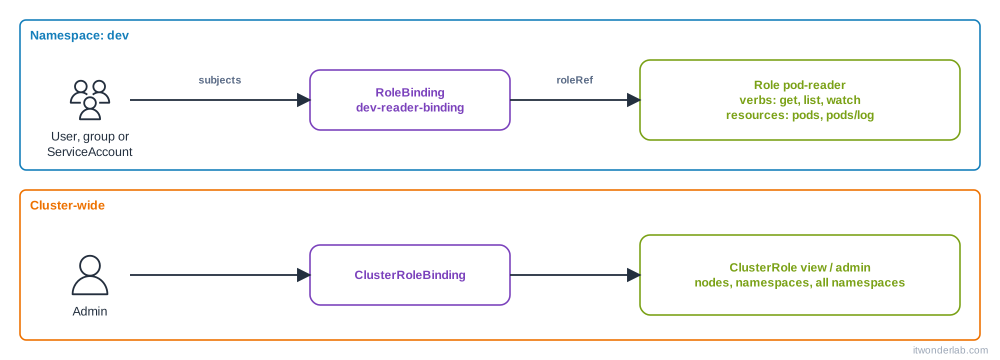
RBAC in one picture #
Role-Based Access Control answers "may this subject do this verb on this resource?". Everything is allowed only if a rule says so: there are no deny rules.
| Object | Scope | Meaning |
|---|---|---|
Role |
One namespace | A list of rules: API groups, resources, verbs |
ClusterRole |
Cluster | Same, but also for cluster resources (nodes) and reusable across namespaces |
RoleBinding |
One namespace | Grants a Role or a ClusterRole to subjects in that namespace |
ClusterRoleBinding |
Cluster | Grants a ClusterRole in every namespace |
Subjects are User, Group (both come from the authenticator: certificates, OIDC, or on EKS the aws-auth/Access Entries mapping) and ServiceAccount (an identity for pods).
Verbs: get, list, watch, create, update, patch, delete, plus exec, portforward (as subresources) and impersonate.
Give a user read access to a namespace #
apiVersion: rbac.authorization.k8s.io/v1
kind: Role
metadata:
  name: pod-reader
  namespace: dev
rules:
  - apiGroups: [""]                 # "" is the core group (pods, services, configmaps...)
    resources: ["pods", "pods/log"]
    verbs: ["get", "list", "watch"]
  - apiGroups: ["apps"]
    resources: ["deployments"]
    verbs: ["get", "list", "watch"]
---
apiVersion: rbac.authorization.k8s.io/v1
kind: RoleBinding
metadata:
  name: dev-reader-binding
  namespace: dev
subjects:
  - kind: User
    name: maria@example.com
    apiGroup: rbac.authorization.k8s.io
roleRef:
  kind: Role
  name: pod-reader
  apiGroup: rbac.authorization.k8s.io
roleRef cannot be changed after creation: delete and recreate the binding.
The quick way, with the imperative commands:
kubectl create role pod-reader --verb=get,list,watch --resource=pods,pods/log -n dev
kubectl create rolebinding dev-reader-binding --role=pod-reader --user=maria@example.com -n dev
The built-in ClusterRoles #
Do not write everything from scratch. Reuse them with a RoleBinding:
| ClusterRole | Gives |
|---|---|
view |
Read most objects of a namespace, not Secrets |
edit |
Read and write most objects, including Secrets, but no RBAC |
admin |
edit plus Roles and RoleBindings in the namespace |
cluster-admin |
Everything, everywhere |
kubectl create rolebinding maria-edit --clusterrole=edit --user=maria@example.com -n dev
kubectl create clusterrolebinding ops-admin --clusterrole=cluster-admin --group=ops
Give cluster-admin to as few subjects as possible.
ServiceAccounts: identities for pods #
Pods call the API (an operator, a CI runner, Argo CD) with a ServiceAccount. Every namespace has default, but create one per app and give it only what it needs.
kubectl create serviceaccount deployer -n dev
kubectl create rolebinding deployer-edit --clusterrole=edit --serviceaccount=dev:deployer -n dev
spec:
serviceAccountName: deployer
automountServiceAccountToken: false # if the pod does not call the APIThe token is projected into /var/run/secrets/kubernetes.io/serviceaccount/token, short-lived and rotated. For an external system, create one on demand: kubectl create token deployer -n dev --duration=1h. Do not use long-lived Secret tokens unless you must.
Check permissions: kubectl auth can-i #
kubectl auth can-i create deployments -n dev
kubectl auth can-i delete pods -n prod
kubectl auth can-i get secrets --as=maria@example.com -n dev
kubectl auth can-i list pods --as=system:serviceaccount:dev:deployer -n dev
kubectl auth can-i --list -n dev                 # everything you may do
kubectl get rolebindings,clusterrolebindings -A -o wide | grep maria
kubectl describe clusterrole view
--as needs impersonation rights, which cluster admins have. It is the best way to test a Role before giving it to someone.
Quotas and limits per namespace #
Namespaces are also where you stop one team from using the whole cluster:
apiVersion: v1
kind: ResourceQuota
metadata:
  name: dev-quota
  namespace: dev
spec:
  hard:
    requests.cpu: "4"
    requests.memory: 8Gi
    limits.memory: 16Gi
    pods: "30"
    persistentvolumeclaims: "10"
---
apiVersion: v1
kind: LimitRange
metadata:
  name: defaults
  namespace: dev
spec:
  limits:
    - type: Container
      defaultRequest: { cpu: 100m, memory: 128Mi }
      default: { memory: 256Mi }
When a quota covers CPU or memory, every pod must declare them, and the LimitRange supplies defaults so manifests without resources do not fail. See requests and limits.
kubectl describe quota -n devCommon errors #
| Symptom | Cause | Fix |
|---|---|---|
Error from server (Forbidden): pods is forbidden: User "maria" cannot list resource "pods" in API group "" in the namespace "dev" |
No Role grants it | Read the message: user, verb, resource, group and namespace are all there. Add the rule |
... cannot list resource "pods" in API group "" at the cluster scope |
kubectl get pods -A needs a ClusterRole and ClusterRoleBinding |
Use -n, or bind cluster-wide |
Forbidden on pods/exec, pods/log or pods/portforward |
Subresources need their own rule | Add pods/exec with verb create |
error: unable to upgrade connection: Forbidden |
Same: exec or port-forward |
Same |
Error from server (NotFound): namespaces "dve" not found |
Typo in the namespace | kubectl get ns |
Error from server (AlreadyExists) after changing a binding |
A binding roleRef is immutable |
Delete and create the binding |
escalating privileges: user "x" is attempting to grant RBAC permissions not currently held |
You cannot give more than you have | Use someone with the rights, or the escalate and bind verbs |
exceeded quota: dev-quota, requested: pods=1, used: pods=30, limited: pods=30 |
ResourceQuota full | Delete unused objects or raise the quota |
must specify limits.memory |
A quota requires them, and there is no LimitRange | Add resources or a LimitRange |
Pod cannot call the API: serviceaccount "x" not found or Forbidden ... system:serviceaccount:dev:default |
Missing SA or binding | Create it and bind a Role |
Namespace stuck in Terminating |
Objects with finalizers, or an unavailable API (metrics-server) | kubectl get all -n x, kubectl api-resources, fix the APIService, then remove the finalizer as the last resort |
Unauthorized (not Forbidden) |
Authentication failed: expired token or certificate | Renew credentials. See architecture errors |
Remember: Unauthorized (401) means "who are you?" and Forbidden (403) means "I know you, but no".
How to debug RBAC #
- Read the Forbidden message: it names the exact user, verb, resource and namespace.
kubectl auth can-i <verb> <resource> --as=<user> -n <ns>to reproduce it.- Find the bindings of the subject:
kubectl get rolebindings,clusterrolebindings -A -o json | jq -r '.items[] | select(.subjects[]?.name=="maria@example.com") | .metadata.namespace + "/" + .metadata.name'. kubectl describe role|clusterrole <name>to see the rules.- For a pod, check which ServiceAccount it uses:
kubectl get pod <pod> -o jsonpath='{.spec.serviceAccountName}'. - The API server audit log (on a managed cluster, the cloud audit logs) shows the denied request.
More in How to debug Kubernetes.
Frequently asked questions #
Where do users come from? Kubernetes has no User object. Identities come from client certificates, OIDC tokens (Google, Okta, Entra ID) or the cloud (IAM on EKS). Only ServiceAccounts are objects.
Role or ClusterRole? Role for permissions in one namespace. ClusterRole for cluster resources, or to define a set once and bind it in many namespaces with RoleBindings.
Can I deny something? No. RBAC is additive. Grant less.
Are namespaces secure isolation? Not alone. Add RBAC, ResourceQuota, NetworkPolicies and Pod Security Admission (pod-security.kubernetes.io/enforce: restricted label on the namespace). For hard multi-tenancy use separate clusters.
How many namespaces should I have? One per team and environment or per application is common (shop-dev, shop-prod). Avoid hundreds without automation.
How do I set the namespace for a whole manifest? kubectl apply -n dev -f file.yaml, or metadata.namespace, or Kustomize namespace:, or Helm --namespace.
Is default ServiceAccount dangerous? It has no permissions by default, but pods get its token mounted. Set automountServiceAccountToken: false where not needed.
Next steps #
Protect values with ConfigMaps and Secrets, scale with the Horizontal Pod Autoscaler and read the cluster layout in Kubernetes architecture.