

Kubernetes ConfigMaps and Secrets: Environment Variables, Files and Best Practices
Configuration outside the image #
A container image should be the same in every environment. What changes (log level, URLs, passwords) goes into objects of the cluster:
- A ConfigMap holds non-sensitive settings: strings and whole files.
- A Secret holds sensitive values: passwords, tokens, TLS certificates, registry credentials.
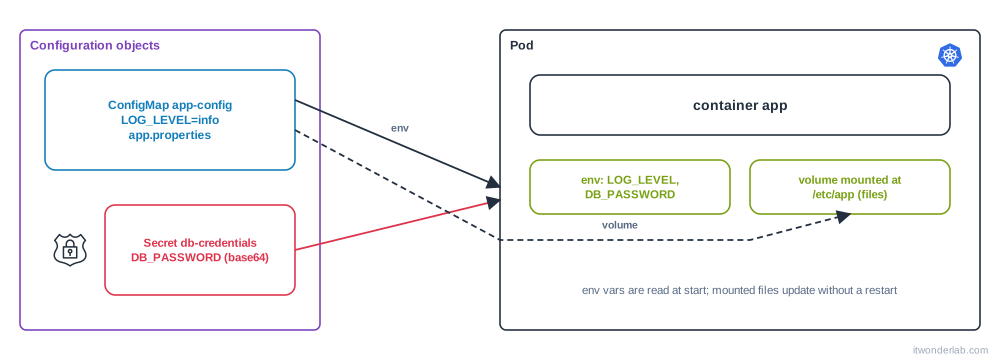
Both are consumed by pods as environment variables or as files in a volume. They live in a namespace and a pod can only use those of its own namespace. This is the Kubernetes version of the .env file of Docker Compose.
Create a ConfigMap #
kubectl create configmap app-config \
  --from-literal=LOG_LEVEL=info \
  --from-literal=FEATURE_X=true \
  --from-file=app.properties
kubectl get configmap app-config -o yaml
Or as YAML (what you keep in Git):
apiVersion: v1
kind: ConfigMap
metadata:
  name: app-config
data:
  LOG_LEVEL: "info"
  FEATURE_X: "true"          # values are always strings: quote booleans and numbers
  app.properties: |
    server.port=8080
    cache.ttl=60
Create a Secret #
kubectl create secret generic db-credentials \
  --from-literal=DB_USER=app \
  --from-literal=DB_PASSWORD='S3cr3t!'
kubectl create secret tls shop-tls --cert=tls.crt --key=tls.key
kubectl create secret docker-registry regcred \
  --docker-server=registry.example.com --docker-username=me --docker-password='...'
In YAML, data is base64 and stringData is plain text that the API server encodes for you:
apiVersion: v1
kind: Secret
metadata:
  name: db-credentials
type: Opaque
stringData:
  DB_USER: app
  DB_PASSWORD: S3cr3t!
Base64 is not encryption. Anyone who can kubectl get secret -o yaml can read it: kubectl get secret db-credentials -o jsonpath='{.data.DB_PASSWORD}' | base64 -d. See "Protect your Secrets" below, and never commit a plain Secret to Git.
Use them as environment variables #
    spec:
      containers:
        - name: app
          image: myapp:1.0
          envFrom:
            - configMapRef:
                name: app-config          # every key becomes a variable
          env:
            - name: DB_PASSWORD
              valueFrom:
                secretKeyRef:
                  name: db-credentials
                  key: DB_PASSWORD
            - name: LOG_LEVEL_OVERRIDE
              valueFrom:
                configMapKeyRef:
                  name: app-config
                  key: LOG_LEVEL
                  optional: true          # do not fail if missing
kubectl exec deploy/app -- env | sortEnvironment variables are read when the container starts. If you change the ConfigMap, nothing happens until the pods restart: kubectl rollout restart deployment/app.
Use them as files #
    spec:
      containers:
        - name: app
          volumeMounts:
            - name: config
              mountPath: /etc/app
              readOnly: true
            - name: creds
              mountPath: /etc/secrets
              readOnly: true
      volumes:
        - name: config
          configMap:
            name: app-config
            items:                       # optional: only some keys
              - key: app.properties
                path: app.properties
        - name: creds
          secret:
            secretName: db-credentials
            defaultMode: 0400
Each key is a file. The kubelet refreshes mounted ConfigMaps and Secrets after a while (about a minute) without a restart, but your application must re-read the file. Two exceptions: a volume mounted with subPath is never updated, and objects marked immutable: true cannot change at all.
Mounting the whole volume on /etc/app hides the existing content of that directory in the image. To add a single file, use subPath and accept that it will not update.
Update safely #
| Goal | Do |
|---|---|
| Apply a change to pods that read env vars | kubectl rollout restart deployment/app |
| Roll out only when the config changes | Put a hash of the ConfigMap in a pod annotation (Helm: checksum/config) or give the ConfigMap a new name per version with Kustomize configMapGenerator |
| Prevent accidental changes | immutable: true and create a new object for each version |
Protect your Secrets #
- Enable encryption at rest for Secrets in etcd (
EncryptionConfiguration). Managed clusters offer it with a KMS key, for example EKS with KMS. - Limit access with RBAC:
get,listandwatchonsecretsgive access to every value in the namespace. Few people and few service accounts need it. - Do not store them in Git in clear. Use an external store and sync it: External Secrets Operator with AWS Secrets Manager or Vault, Sealed Secrets, or SOPS.
- Prefer files over environment variables for very sensitive values: environment variables leak into crash dumps, debug endpoints and child processes.
- Never print them in logs and rotate them. See also Terraform secrets management.
Common errors #
| Symptom | Cause | Fix |
|---|---|---|
Pod stuck in CreateContainerConfigError |
secret "x" not found, configmap "x" not found or couldn't find key K in Secret |
kubectl describe pod shows which. Create it in the same namespace, fix the name or key, or use optional: true |
Pod ContainerCreating for a long time with MountVolume.SetUp failed ... configmap "x" not found |
The volume source does not exist | Create it. The pod starts by itself when it appears |
| App uses the old value after editing the ConfigMap | Env vars are not refreshed, or the app does not re-read the file | Restart the pods, or make the app reload |
error: failed to create secret: Secret "x" is invalid: data[k]: Invalid value |
Key names may only contain letters, digits, -, _ and . |
Rename the key |
ConfigMap "x" is invalid: metadata.annotations: Too long: must have at most 262144 bytes |
The limit of a ConfigMap or Secret is 1 MiB | Use a volume, an object store or split it |
cannot unmarshal number into Go struct field ... of type string |
An unquoted number or boolean in data |
Quote it: "8080", "true" |
A file in the container shows \n at the end of a password |
echo added a newline before base64 |
Use echo -n, or stringData, or kubectl create secret |
ImagePullBackOff with pull access denied |
The registry Secret is missing or not referenced | Create docker-registry Secret and set imagePullSecrets, see ImagePullBackOff |
secrets is forbidden: User "x" cannot get resource "secrets" |
RBAC | Add a Role with get on that secret only |
| The mounted directory is empty or the image files vanished | The volume hides the image directory | Mount in another path, or use subPath |
How to debug configuration problems #
kubectl describe pod <pod>                         # Events: CreateContainerConfigError, mount errors
kubectl get configmap app-config -o yaml
kubectl get secret db-credentials -o jsonpath='{.data}' | jq 'map_values(@base64d)'
kubectl exec <pod> -- env | grep DB_
kubectl exec <pod> -- ls -l /etc/app /etc/secrets
kubectl exec <pod> -- cat /etc/app/app.properties
kubectl get pod <pod> -o yaml | grep -n -A6 -E "envFrom|volumes:"
The jq cheat sheet has more patterns for kubectl JSON. Compare what the object contains with what the container sees: if they differ, it is a restart or a reload problem. The general method is in How to debug Kubernetes.
Frequently asked questions #
ConfigMap or Secret? If a leak would matter, a Secret. Secrets get separate RBAC, can be encrypted at rest and are not shown in kubectl describe output. The size limit and the API are the same.
Are Secrets encrypted? Base64 encoded only, unless you enable encryption at rest. Treat read access to Secrets as access to the secret.
Can I share a Secret between namespaces? No. Copy it, or use a tool that syncs it (External Secrets, Reflector).
How do I load a .env file? kubectl create configmap app-config --from-env-file=.env (or create secret generic ... --from-env-file).
How do I see a Secret decoded? kubectl get secret NAME -o go-template='{{range $k,$v := .data}}{{$k}}={{$v | base64decode}}{{"\n"}}{{end}}'.
Should I put a large config file in a ConfigMap? Up to 1 MiB, yes. Bigger files belong in an image, a volume or object storage.
Do pods restart when a ConfigMap changes? No. You restart them, or use a tool such as Reloader.
Next steps #
Give the app a disk with Persistent Volumes, restrict who can read Secrets with Namespaces and RBAC and package configuration per environment with Kustomize or Helm.