Convert Docker Compose to Kubernetes: Kompose and Manual Migration
From Compose to Kubernetes #
Docker Compose is perfect for a laptop or a single server. When you need several nodes, rolling updates, self-healing, autoscaling or a managed platform such as EKS, the application moves to Kubernetes. The concepts are similar but the files are not: one compose.yaml becomes many manifests.
In this tutorial we migrate the stack of the Compose tutorial (a Node.js app, PostgreSQL and Redis) in two steps: first let Kompose generate a draft, then fix what a tool cannot decide for you. We run the result on the cluster of Rancher Desktop.
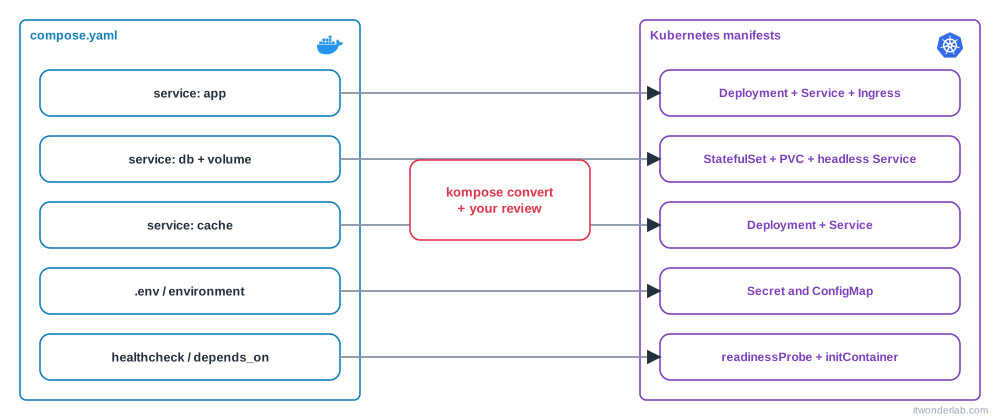
How Compose concepts map to Kubernetes #
| Compose | Kubernetes | Notes |
|---|---|---|
services.app |
Deployment (stateless) or StatefulSet (databases) |
Plus a Service to give it a stable name and address |
image: |
containers[].image |
The cluster must be able to pull it: a registry, or local images in Rancher Desktop |
build: |
Nothing | Kubernetes does not build images. Build in CI and push to a registry |
ports: "3000:3000" |
Service port, and Ingress for HTTP from outside |
The host port mapping has no equivalent |
environment, env_file |
env, ConfigMap, Secret |
Passwords belong in a Secret |
volumes (named) |
PersistentVolumeClaim |
A StatefulSet creates one per replica with volumeClaimTemplates |
volumes (bind mount) |
hostPath, ConfigMap or emptyDir |
Avoid hostPath: it ties the pod to a node |
healthcheck |
readinessProbe and livenessProbe |
|
depends_on |
Nothing: pods start in any order | Use readiness probes, init containers and retries in the application |
restart: unless-stopped |
The controller recreates failed pods | restartPolicy: Always is the default |
deploy.resources |
resources.requests and limits |
|
networks |
One flat cluster network, Service names as DNS |
Use NetworkPolicy to restrict traffic |
secrets |
Secret mounted as a volume or env |
|
profiles |
Nothing | Use separate overlays or Helm values |
container_name, extra_hosts |
Nothing, or hostAliases |
The starting point #
services:
  app:
    image: myapp:1.0
    ports:
      - "3000:3000"
    environment:
      DATABASE_URL: postgres://app:${DB_PASSWORD}@db:5432/app
      REDIS_URL: redis://cache:6379
    depends_on:
      db:
        condition: service_healthy
      cache:
        condition: service_started

  db:
    image: postgres:17
    environment:
      POSTGRES_USER: app
      POSTGRES_PASSWORD: ${DB_PASSWORD}
      POSTGRES_DB: app
    volumes:
      - db-data:/var/lib/postgresql/data
    healthcheck:
      test: ["CMD-SHELL", "pg_isready -U app -d app"]
      interval: 10s
      retries: 5

  cache:
    image: redis:7-alpine

volumes:
  db-data:
Two preparations first. Kubernetes cannot build, so replace build: . with an image: and build it. With Rancher Desktop you do not need a registry (see local images on K3s):
# containerd
$ nerdctl --namespace k8s.io build -t myapp:1.0 .
# dockerd
$ docker build -t myapp:1.0 .
For a cloud cluster, push the image to a registry such as ECR and use its full name in image:. Second, the file uses ${DB_PASSWORD}. Export the variable in your shell so the conversion can substitute it, and check the output because it ends up in the generated files:
$ export DB_PASSWORD=change-meStep 1: generate a draft with Kompose #
Kompose is a Kubernetes project that translates Compose files into Kubernetes resources. Install it:
# macOS
$ brew install kompose
# Windows
> winget install Kubernetes.kompose
# Linux: download the binary from the GitHub releases (check the current version)
$ curl -L https://github.com/kubernetes/kompose/releases/download/v1.38.0/kompose-linux-amd64 -o kompose
$ chmod +x kompose && sudo mv kompose /usr/local/bin/kompose
Convert, writing the files to a directory:
$ mkdir k8s-draft
$ kompose convert -f compose.yaml -o k8s-draft/
Kompose creates one file per object: a Deployment and a Service for each service that publishes a port, a PersistentVolumeClaim for the named volume, and so on. The exact names depend on the version, so list them:
$ ls k8s-draftUseful ways to steer the conversion, using labels in the Compose file:
services:
  app:
    labels:
      kompose.service.type: clusterip        # nodeport, clusterip, loadbalancer or headless
      kompose.service.expose: "app.localtest.me"   # also creates an Ingress for this host
  db:
    labels:
      kompose.volume.size: 2Gi
kompose convert -c generates a Helm chart instead of plain manifests, which can be a convenient starting point if you plan to package the application with Helm. Run kompose convert --help for all the options of your version.
You can already try the draft:
$ kubectl apply -f k8s-draft/Step 2: what the draft gets wrong #
A generated draft is a starting point, never the final result. Review these points every time:
- The database is a Deployment. Databases need a stable identity and storage per replica: use a StatefulSet. Kompose notes that when a service has volumes it switches the update strategy to
Recreateto avoid two pods using the same volume, which is a symptom of that. - Passwords are plain text in the manifests, copied from environment variables. Move them to a
Secret. depends_onis lost. Pods start in any order. The app must tolerate a missing database (retry), and you add a readiness probe to the database and an init container to the app.- Probes are missing or approximated. Define
readinessProbeandlivenessProbeby hand. - No resource requests and limits. The scheduler needs requests to place pods.
- HTTP exposure. Published ports become
Serviceobjects, but a browser needs anIngress. - Namespaces, labels and image tags are not set. Everything lands in
default.
Delete the draft from the cluster (kubectl delete -f k8s-draft/) and write the real manifests.
Step 3: the real manifests #
We use a namespace and a Kustomize file to apply everything in order. Create a k8s/ directory.
apiVersion: v1
kind: Namespace
metadata:
name: myappapiVersion: v1
kind: Secret
metadata:
name: myapp
namespace: myapp
type: Opaque
stringData:
DB_PASSWORD: change-meThe database: StatefulSet #
apiVersion: v1
kind: Service
metadata:
  name: db
  namespace: myapp
spec:
  clusterIP: None            # headless: the name resolves to the pod
  selector:
    app: db
  ports:
    - port: 5432
---
apiVersion: apps/v1
kind: StatefulSet
metadata:
  name: db
  namespace: myapp
spec:
  serviceName: db
  replicas: 1
  selector:
    matchLabels:
      app: db
  template:
    metadata:
      labels:
        app: db
    spec:
      containers:
        - name: postgres
          image: postgres:17
          ports:
            - containerPort: 5432
          env:
            - name: POSTGRES_USER
              value: app
            - name: POSTGRES_DB
              value: app
            - name: POSTGRES_PASSWORD
              valueFrom:
                secretKeyRef:
                  name: myapp
                  key: DB_PASSWORD
            - name: PGDATA
              value: /var/lib/postgresql/data/pgdata   # a subdirectory avoids the lost+found error on a new volume
          readinessProbe:
            exec:
              command: ["pg_isready", "-U", "app", "-d", "app"]
            initialDelaySeconds: 10
            periodSeconds: 10
          resources:
            requests: { cpu: 100m, memory: 256Mi }
            limits: { memory: 512Mi }
          volumeMounts:
            - name: data
              mountPath: /var/lib/postgresql/data
  volumeClaimTemplates:
    - metadata:
        name: data
      spec:
        accessModes: ["ReadWriteOnce"]
        resources:
          requests:
            storage: 2Gi
The healthcheck of Compose became the readinessProbe, and the named volume db-data became a volumeClaimTemplate. K3s provides a default storage class (local-path), so the claim works without extra setup in Rancher Desktop. In the cloud it uses the default storage class of the cluster, such as EBS on EKS.
The cache #
apiVersion: v1
kind: Service
metadata:
  name: cache
  namespace: myapp
spec:
  selector:
    app: cache
  ports:
    - port: 6379
---
apiVersion: apps/v1
kind: Deployment
metadata:
  name: cache
  namespace: myapp
spec:
  replicas: 1
  selector:
    matchLabels:
      app: cache
  template:
    metadata:
      labels:
        app: cache
    spec:
      containers:
        - name: redis
          image: redis:7-alpine
          ports:
            - containerPort: 6379
          resources:
            requests: { cpu: 50m, memory: 64Mi }
            limits: { memory: 128Mi }
The application: Deployment, Service and Ingress #
apiVersion: apps/v1
kind: Deployment
metadata:
  name: app
  namespace: myapp
spec:
  replicas: 2
  selector:
    matchLabels:
      app: app
  template:
    metadata:
      labels:
        app: app
    spec:
      initContainers:            # replaces depends_on: wait until the database accepts connections
        - name: wait-for-db
          image: busybox:1.37
          command: ["sh", "-c", "until nc -z db 5432; do echo waiting for db; sleep 2; done"]
      containers:
        - name: app
          image: myapp:1.0
          imagePullPolicy: IfNotPresent
          ports:
            - containerPort: 3000
          env:
            - name: DB_PASSWORD
              valueFrom:
                secretKeyRef:
                  name: myapp
                  key: DB_PASSWORD
            - name: DATABASE_URL
              value: postgres://app:$(DB_PASSWORD)@db:5432/app   # $(VAR) uses an env var defined above
            - name: REDIS_URL
              value: redis://cache:6379
          readinessProbe:
            httpGet:
              path: /
              port: 3000
          livenessProbe:
            httpGet:
              path: /
              port: 3000
            initialDelaySeconds: 15
          resources:
            requests: { cpu: 100m, memory: 128Mi }
            limits: { memory: 256Mi }
---
apiVersion: v1
kind: Service
metadata:
  name: app
  namespace: myapp
spec:
  selector:
    app: app
  ports:
    - port: 80
      targetPort: 3000
---
apiVersion: networking.k8s.io/v1
kind: Ingress
metadata:
  name: app
  namespace: myapp
spec:
  ingressClassName: traefik
  rules:
    - host: myapp.localtest.me
      http:
        paths:
          - path: /
            pathType: Prefix
            backend:
              service:
                name: app
                port:
                  number: 80
The Compose ports: "3000:3000" became a Service (port 80 to the container port 3000) and an Ingress, because in Kubernetes the way in from the outside is a separate object. The service names db and cache are the same as in Compose, so the connection strings did not change: Kubernetes DNS resolves them inside the namespace.
Apply it all with Kustomize #
apiVersion: kustomize.config.k8s.io/v1beta1
kind: Kustomization
resources:
  - namespace.yaml
  - secret.yaml
  - db.yaml
  - cache.yaml
  - app.yaml
$ kubectl apply -k k8s/
$ kubectl get pods -n myapp -w
NAME READY STATUS RESTARTS AGE
db-0 0/1 Running 0 12s
cache-... 1/1 Running 0 12s
app-... 0/1 Init:0/1 0 12s
...
app-... 1/1 Running 0 40sThe app pods wait in Init until the database is ready, exactly what depends_on: service_healthy did. Test it:
$ curl http://myapp.localtest.me/
$ kubectl logs -n myapp deploy/app
$ kubectl port-forward -n myapp svc/app 8080:80     # if the ingress is not available
Day-two differences to know #
- Rolling updates: change the image tag (
myapp:1.1) andkubectl apply -k k8s/. The Deployment replaces the pods one by one, and the readiness probe stops traffic from reaching a pod that is not ready.kubectl rollout undo deploy/app -n myappgoes back. - Scaling:
kubectl scale deploy/app --replicas=5 -n myapp, or a HorizontalPodAutoscaler. In Compose the fixed host port made scaling awkward: here the Service balances automatically. - Configuration: separate code from configuration with
ConfigMapandSecret, and keep one Kustomize overlay or Helm values file per environment (dev, staging, production). - Data: the database in the cluster is fine for development. In production use a managed service such as RDS and replace the
dbService with anExternalNameService or a connection string. - Debugging:
kubectl describe pod,kubectl logs,kubectl exec -itandkubectl get events -n myappreplacedocker compose ps,logsandexec.
Clean up #
$ kubectl delete -k k8s/
$ kubectl delete pvc -n myapp --all     # the StatefulSet keeps its volume until you delete it
Next steps #
- Package the manifests as a Helm chart or deploy them with Argo CD.
- Manage the cluster and the application from code with the Terraform Helm provider.
- Push the image to Amazon ECR to run it on EKS.
Related tutorials
 Containers and Orchestration
Rancher Desktop
Rancher Desktop is a free open source app with a container engine (containerd or dockerd) and a local K3s Kubernetes cluster for Linux, macOS and Windows.
- Docker & Rancher Desktop Tutorials
Install Traefik with Docker: Reverse Proxy with Automatic Routing
Run Traefik v3 with Docker Compose, route several containers by hostname with labels, add the dashboard, middlewares and automatic Let's Encrypt certificates.
 Containers and Orchestration
Docker Compose
Docker Compose defines and runs multi-container applications from a single YAML file: services, networks and volumes started with one command.