Docker Image Security: Scan with Trivy and Harden Your Containers
Security starts in the image #
A container image is software you did not write (the base image and its packages) plus the software you did. Every package can carry vulnerabilities (CVEs), and a careless Dockerfile can leak secrets or run as root. Docker security has two halves: what is inside the image and how the container runs.
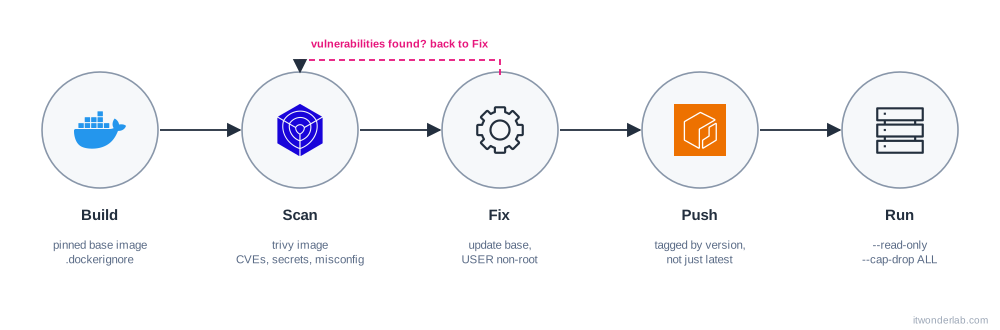
1. Choose and pin the base image #
- Start from official or verified images, as small as your application allows (
-slim,alpine, distroless). Fewer packages mean fewer vulnerabilities. - Do not use
latest. Use a version tag, and for important images pin the digest, which never changes:
FROM alpine:3.21@sha256:<digest-of-the-image>Get the digest with docker buildx imagetools inspect alpine:3.21 or from the registry page. Pull fresh bases when you build with docker build --pull, and let a tool such as Renovate or Dependabot update tag and digest in pull requests.
2. Scan the image #
Trivy #
Trivy is an open source scanner for images, files, Git repositories and infrastructure code. Rancher Desktop bundles it, so you may already have it (trivy --version); otherwise install it from its website.
$ docker build -t myapp:1.0 .
$ trivy image myapp:1.0
$ trivy image --severity HIGH,CRITICAL --exit-code 1 myapp:1.0   # fail a pipeline
$ trivy image --ignore-unfixed myapp:1.0                          # hide CVEs with no fix yet
trivy image finds the OS packages and the language dependencies (npm, pip, Go modules, JAR files) and lists the CVEs with severity, the installed version and the fixed version. It also detects hard-coded secrets in the layers.
It can scan more than images:
$ trivy fs .              # your project directory: dependencies, secrets
$ trivy config .          # Dockerfile, Kubernetes manifests and Terraform misconfigurations
$ trivy image --format cyclonedx --output sbom.json myapp:1.0   # a software bill of materials
trivy config complements the Terraform scanners you may already use.
Docker Scout #
Docker Scout analyzes an image, builds its SBOM and compares it with vulnerability databases. It is part of Docker Desktop and available as a CLI plugin, from Docker Hub and in its own dashboard (you need to log in to Docker):
$ docker scout quickview myapp:1.0
$ docker scout cves myapp:1.0
$ docker scout recommendations myapp:1.0     # suggests a better base image
$ docker scout compare --to myapp:0.9 myapp:1.0
Pick one scanner and run it in CI on every build, and again regularly on the images you already deployed: new CVEs are published every day for old images.
3. Fix what you find #
- Update the base image (the most common fix).
- Remove packages you do not need, or move to a multi-stage build with a distroless or
scratchfinal stage. - Update the application dependencies.
- If there is no fix yet and the vulnerable code is not reachable, document it and ignore it explicitly (
.trivyignore) with an expiry date.
4. Do not run as root #
By default the process in a container is root (inside the container). If it escapes, it is root on the host. Create and use an unprivileged user:
RUN groupadd --system app && useradd --system --gid app --no-create-home app
USER app
Many images already provide one (USER node, USER nobody, the :nonroot tag of distroless).
5. Run with least privilege #
$ docker run -d --name web \
    --read-only --tmpfs /tmp \
    --cap-drop ALL \
    --security-opt no-new-privileges \
    --pids-limit 200 --memory 256m --cpus 0.5 \
    -p 127.0.0.1:8080:8080 \
myapp:1.0| Option | What it does |
|---|---|
--read-only |
The root filesystem cannot be written. Add --tmpfs for the directories that must be writable. |
--cap-drop ALL |
Removes all Linux capabilities. Add back only the ones you need with --cap-add. |
--security-opt no-new-privileges |
Prevents gaining privileges with setuid binaries. |
--pids-limit, --memory, --cpus |
Limits that contain a fork bomb or a memory leak. |
-p 127.0.0.1:... |
Publishes only on your computer, not on the network. |
The same settings in Compose:
services:
  web:
    image: myapp:1.0
    read_only: true
    tmpfs: [/tmp]
    cap_drop: [ALL]
    security_opt: ["no-new-privileges:true"]
Never run --privileged or mount /var/run/docker.sock into a container unless you fully understand it: it gives control of the host.
6. Keep secrets out #
- Not in the Dockerfile (
ENV,ARG,COPY): use BuildKit secret mounts. - Not in the image context: list
.env, keys and credentials in.dockerignore. - At runtime use Compose secrets, Kubernetes Secrets, or a manager such as AWS Secrets Manager and KMS, with an IAM role instead of access keys.
7. Sign, push and promote #
- Tag releases with a version, a Git commit or both, not just
latest. - Turn on scan on push in your registry (ECR supports it) as a second line of defense.
- Sign images (for example with Sigstore cosign) and verify the signature before you deploy.
Checklist #
- [ ] Small, pinned base image, refreshed regularly
- [ ] Multi-stage build, nothing but the runtime in the final image
- [ ]
USERis not root - [ ]
.dockerignoreexcludes secrets and.git - [ ] Vulnerability scan in CI that fails on HIGH and CRITICAL
- [ ] Read-only filesystem, dropped capabilities and resource limits at runtime
Next steps #
Run what you built on Kubernetes: Kubernetes in Rancher Desktop.
Related tutorials
- Terraform & OpenTofu Tutorials
Install HashiCorp Vault with Docker: Secrets, Policies and Terraform
Run Vault in dev mode, store secrets in the KV engine, restrict access with policies and tokens, and read them from the CLI, curl and Terraform.
 Security
Trivy
Trivy is an open source security scanner that finds vulnerabilities, misconfigurations and secrets in container images, code and infrastructure files.
- Docker & Rancher Desktop Tutorials
Install Redis with Docker: Persistence, Basic Commands and Caching
Run Redis in a container with a persistent volume and a password, learn the essential commands, key expiration and the cache-aside pattern, and check memory usage.