Docker Multi-Stage Builds: Smaller and More Secure Images
The problem: build tools in production #
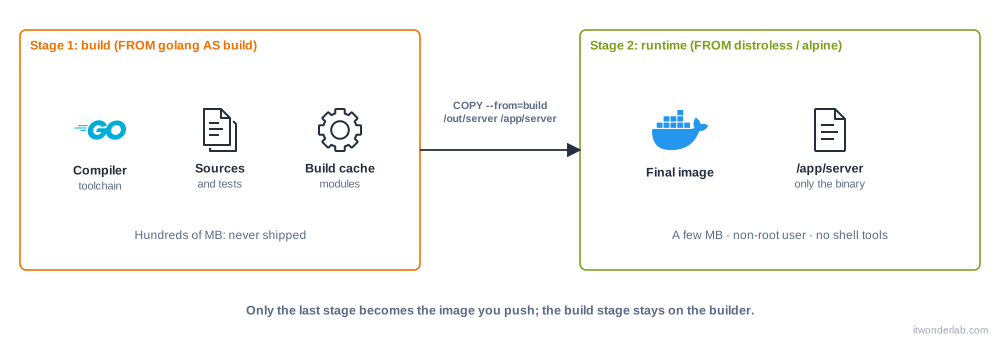
To compile an application you need a compiler, headers, a package manager and test tools. To run it you only need the result. If you build and run in the same image, you ship hundreds of megabytes that you never use, plus a shell and tools an attacker would love to find.
A multi-stage build uses several FROM instructions in one Dockerfile. Each FROM starts a new stage. You build in the first stage and copy only the artifact into the final, small stage. Everything else is discarded.
Example in Go #
package main

import (
	"fmt"
	"net/http"
)

func main() {
	http.HandleFunc("/", func(w http.ResponseWriter, r *http.Request) {
		fmt.Fprintln(w, "Hello from a tiny container")
	})
	http.ListenAndServe(":8080", nil)
}# ---- Stage 1: build
FROM golang:1.24 AS build
WORKDIR /src
COPY go.mod ./
RUN go mod download
COPY . .
# A static binary does not need libc in the final image
RUN CGO_ENABLED=0 go build -trimpath -ldflags="-s -w" -o /out/server .
# ---- Stage 2: runtime
FROM gcr.io/distroless/static-debian12:nonroot
COPY --from=build /out/server /server
EXPOSE 8080
ENTRYPOINT ["/server"]Create the module file and build:
$ go mod init example.com/hello    # or create go.mod by hand
$ docker build -t hello-go:1.0 .
$ docker image ls hello-go
REPOSITORY   TAG   IMAGE ID       CREATED          SIZE
hello-go     1.0   9a1c0f5e1b2d   10 seconds ago   7.4MB
$ docker run --rm -p 8080:8080 hello-go:1.0
Compare it with golang:1.24, which is several hundred megabytes. The final image contains the binary and almost nothing else: no shell, no package manager, and it runs as the non-root user that the :nonroot tag defines.
Example in Node.js #
Interpreted languages still benefit: install the development dependencies and compile in one stage, ship only production dependencies in the other.
FROM node:22-slim AS deps
WORKDIR /app
COPY package*.json ./
RUN npm ci

FROM deps AS build
COPY . .
RUN npm run build

FROM node:22-slim AS prod-deps
WORKDIR /app
COPY package*.json ./
RUN npm ci --omit=dev

FROM node:22-slim AS runtime
ENV NODE_ENV=production
WORKDIR /app
COPY --from=prod-deps /app/node_modules ./node_modules
COPY --from=build /app/dist ./dist
USER node
CMD ["node", "dist/server.js"]
Docker builds only the stages that the final one depends on, and BuildKit builds independent stages (build and prod-deps here) in parallel.
Build one stage: --target #
Name your stages with AS and stop at any of them. This is useful to run tests in CI or to have a debug image:
$ docker build --target build -t myapp:build .
$ docker build --target runtime -t myapp:1.0 .
A common pattern is a test stage that runs the tests, so that docker build --target test . fails the pipeline when a test fails, while the normal build skips it.
Copy from another image #
COPY --from accepts an image as well as a stage. It is a handy way to take a single binary from a published image:
COPY --from=busybox:1.37 /bin/busybox /usr/local/bin/busyboxChoosing the final image #
| Final image | Size | Shell | When to use it |
|---|---|---|---|
scratch |
0 | No | A fully static binary (Go, Rust). You must add CA certificates and users yourself. |
distroless |
Very small | No | Static or language-runtime images (Java, Python, Node) with a minimal attack surface. |
alpine |
About 5 MB | Yes (BusyBox) | Small and with a package manager. It uses musl instead of glibc, which can break some binaries. |
-slim (Debian) |
Tens of MB | Yes | A good default when you need glibc and compatibility. |
Distroless images have no shell, so you cannot docker exec ... sh. For debugging, use a debug tag (:debug) or attach a temporary container with docker run --pid container:<name> --network container:<name> -it nicolaka/netshoot.
Next steps #
- Persist data with volumes and bind mounts.
- Speed up builds with BuildKit cache mounts.
- Scan the result with Trivy.
Related tutorials
 Containers and Orchestration
Dockerfile
A Dockerfile is a text file with the instructions to build a container image: base image, files, commands, user and the command to run.
- Terraform & OpenTofu Tutorials
Install HashiCorp Vault with Docker: Secrets, Policies and Terraform
Run Vault in dev mode, store secrets in the KV engine, restrict access with policies and tokens, and read them from the CLI, curl and Terraform.
- Docker & Rancher Desktop Tutorials
Install Redis with Docker: Persistence, Basic Commands and Caching
Run Redis in a container with a persistent volume and a password, learn the essential commands, key expiration and the cache-aside pattern, and check memory usage.