Dockerfile Tutorial: Build Your First Docker Image Step by Step
What is a Dockerfile #
A Dockerfile is a text file with the instructions to build an image. Each instruction creates a layer. docker build reads the file, executes the instructions in order and produces an image you can run anywhere or push to a registry.
In this tutorial we containerize a small Node.js web server. The ideas are the same for Python, Java, Go or any other language.
The application #
Create a directory with three files.
{
  "name": "hello-docker",
  "version": "1.0.0",
  "main": "server.js",
  "scripts": { "start": "node server.js" },
  "dependencies": {}
}const http = require("http");
const port = process.env.PORT || 3000;
http.createServer((req, res) => {
res.writeHead(200, { "Content-Type": "text/plain" });
res.end(`Hello from ${require("os").hostname()}\n`);
}).listen(port, () => console.log(`listening on ${port}`));The Dockerfile #
FROM node:22-slim

WORKDIR /app

# 1. Dependencies first: this layer changes rarely
COPY package*.json ./
RUN npm install --omit=dev

# 2. Your code last: this layer changes all the time
COPY . .

ENV PORT=3000
EXPOSE 3000

USER node
CMD ["node", "server.js"]
Build and run it:
$ docker build -t hello-docker:1.0 .
$ docker run -d --name hello -p 3000:3000 hello-docker:1.0
$ curl http://localhost:3000
Hello from 3f2a9c1d8b7e
$ docker rm -f hello
-t names and tags the image and the final . is the build context: the directory sent to the builder.
The instructions you need #
| Instruction | What it does |
|---|---|
FROM |
Base image. Every Dockerfile starts with it. FROM scratch is an empty image. |
WORKDIR |
Sets the working directory for the next instructions and for the container. Use absolute paths. |
COPY |
Copies files from the build context into the image. Prefer it to ADD. |
RUN |
Executes a command at build time and saves the result as a layer. |
ENV |
Sets an environment variable that exists at build time and at run time. |
ARG |
A build-time variable, set with --build-arg. It is not available at run time. |
EXPOSE |
Documents the port the application listens on. It does not publish it: use -p. |
USER |
The user for the next instructions and for the container. Use a non-root user. |
CMD |
The default command. It is easy to override: docker run image other-command. |
ENTRYPOINT |
The executable of the container. CMD becomes its default arguments. |
HEALTHCHECK |
A command Docker runs to know whether the container is healthy. |
CMD and ENTRYPOINT #
Always use the exec form (a JSON array) so that your process receives signals such as SIGTERM and stops cleanly. The shell form (CMD node server.js) wraps it in /bin/sh -c, which does not forward signals.
ENTRYPOINT ["python", "app.py"]
CMD ["--port", "8000"]
With this, docker run image runs python app.py --port 8000, and docker run image --port 9000 replaces only the arguments.
Health checks #
HEALTHCHECK --interval=30s --timeout=3s --start-period=10s --retries=3 \
  CMD node -e "require('http').get('http://localhost:3000',r=>process.exit(r.statusCode<500?0:1)).on('error',()=>process.exit(1))"
docker ps then shows (healthy) or (unhealthy), and Docker Compose can wait for it.
The build cache #
Docker caches each layer. If an instruction and everything before it are unchanged, Docker reuses the layer. As soon as one layer changes, all the following layers are rebuilt. That is why the Dockerfile above copies package.json and installs the dependencies before copying the code: when you edit server.js, only the last COPY runs again.
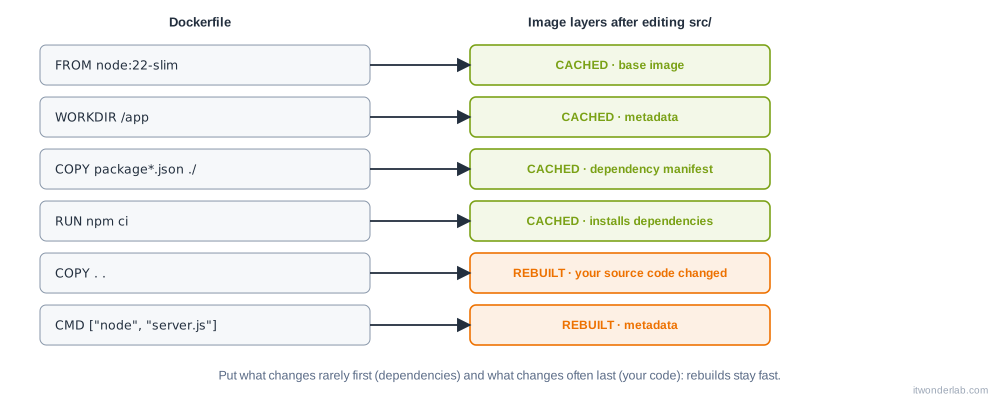
Try it: build twice, then change server.js and build again. The output marks each step as CACHED or executes it.
.dockerignore #
Everything in the build context is sent to the builder, and COPY . . copies all of it. A .dockerignore file keeps out what must not be in the image:
.git
node_modules
npm-debug.log
Dockerfile
.dockerignore
.env
*.md
This makes builds faster, keeps images small and, importantly, keeps secrets such as .env and SSH keys out of the image.
Best practices #
-
Use small, official base images and pin their version:
node:22-slimoralpine:3.21, neverlatest. See image security for pinning by digest. -
One process per container, logging to
stdoutandstderrsodocker logsworks. -
Combine
apt-get updateandinstallin the sameRUNand delete the package lists, or you cache stale packages:RUN apt-get update && apt-get install -y --no-install-recommends curl \ && rm -rf /var/lib/apt/lists/* -
Run as a non-root user with
USER. -
Do not put secrets in the image, not in
ENV,ARGorCOPY. They remain in the layers. Use BuildKit secrets. -
Separate build and runtime with multi-stage builds.
-
Lint your Dockerfiles with Hadolint or
docker build --check.
Next steps #
Make the image smaller and safer with multi-stage builds.
Related tutorials
 Containers and Orchestration
Dockerfile
A Dockerfile is a text file with the instructions to build a container image: base image, files, commands, user and the command to run.
- Docker & Rancher Desktop Tutorials
Install Redis with Docker: Persistence, Basic Commands and Caching
Run Redis in a container with a persistent volume and a password, learn the essential commands, key expiration and the cache-aside pattern, and check memory usage.
- Docker & Rancher Desktop Tutorials
Install Prometheus with Docker: Scrape Metrics and Write PromQL Queries
Run Prometheus in a container, scrape a Node Exporter and your own targets, learn the basic PromQL queries and create an alert rule you can test locally.