Docker Compose Watch: Live Reload for Containers in Development
The development loop problem #
Developing inside containers has a classic annoyance: you edit a file, then you must rebuild the image and recreate the container to see the change. The usual workaround, a bind mount of your source code, works but has costs: slow file sharing on macOS and Windows, node_modules from your computer overwriting the ones in the image, and files owned by root.
Compose Watch solves this. You declare which paths to watch, and Compose reacts to every change with the cheapest action that works.
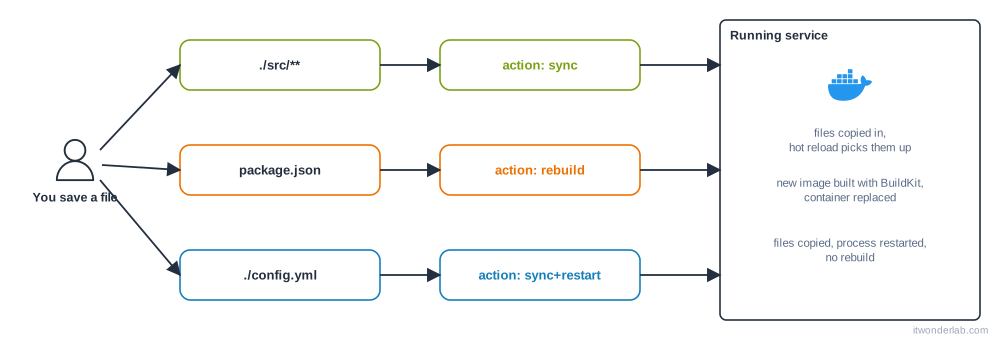
The three actions #
| Action | What Compose does | Use it for |
|---|---|---|
sync |
Copies the changed files into the running container | Source code in frameworks with hot reload (Vite, Next.js, Flask debug mode, nodemon) |
rebuild |
Builds a new image with BuildKit and replaces the container | Dependency manifests: package.json, requirements.txt, go.mod |
sync+restart |
Copies the files and restarts the container, without rebuilding | Configuration files that the application reads only at startup |
Example: a Node.js app #
services:
  web:
    build: .
    ports:
      - "3000:3000"
    command: npx nodemon server.js
    develop:
      watch:
        - action: sync
          path: ./src
          target: /app/src
          ignore:
            - node_modules/
        - action: rebuild
          path: package.json
        - action: sync+restart
          path: ./config.yml
          target: /app/config.yml
The fields of each rule:
path: the file or directory on your computer, relative to the project.target: where to put it in the container (not used byrebuild).ignore: patterns, relative topath, to exclude. Compose also honors your.dockerignore.initial_sync: withtrue, make sure the files in the container match before the watching begins.
The Dockerfile must copy the files to the same place as target:
FROM node:22-slim
WORKDIR /app
COPY package*.json ./
RUN npm install
COPY . .
CMD ["node", "server.js"]
Start watching #
$ docker compose up --watchor, to keep the logs of the application apart from the output of the rebuilds, start the stack and then run the watcher in another terminal:
$ docker compose up -d
$ docker compose watch
Edit src/server.js and save: the file is copied and nodemon reloads. Change package.json (add a dependency) and Compose rebuilds the image and replaces the container. Stop watching with Ctrl+C.
Example: a Python Flask app #
services:
  api:
    build: .
    ports:
      - "8000:8000"
    environment:
      FLASK_DEBUG: "1"
    command: flask --app app run --host 0.0.0.0 --port 8000
    develop:
      watch:
        - action: sync
          path: ./app
          target: /code/app
        - action: rebuild
          path: requirements.txt
With FLASK_DEBUG=1 Flask reloads when a file changes, and Compose Watch puts the changed file in the container. No bind mount is needed.
Watch vs bind mounts #
| Bind mount | Compose Watch | |
|---|---|---|
| Setup | volumes: - ./src:/app/src |
develop.watch rules |
| Speed on macOS and Windows | Depends on the file sharing driver | A copy of only the changed file |
| Dependencies in the image | A mount can hide node_modules |
The image keeps its own |
| Reacts to dependency changes | No: you rebuild by hand | Yes, with rebuild |
| File ownership | Files created by the container may be owned by root on your disk | Not a problem: the host files are not shared |
They can be combined. Keep bind mounts for the data you really want to share, and use Watch for code.
Tips #
- Watch only monitors paths you list, so be specific. Do not watch
.gitornode_modules. - It needs a
buildforrebuildto make sense; with onlyimage:, usesyncrules. - Rebuilds use BuildKit and its cache, so keep the Dockerfile ordered by change frequency and use cache mounts.
- Compose Watch works on any engine that Compose supports, including Rancher Desktop with dockerd.
Next steps #
Make your builds faster and add secrets safely with BuildKit and buildx.
Related tutorials
 Containers and Orchestration
Docker Compose
Docker Compose defines and runs multi-container applications from a single YAML file: services, networks and volumes started with one command.
- Docker & Rancher Desktop Tutorials
Install Redis with Docker: Persistence, Basic Commands and Caching
Run Redis in a container with a persistent volume and a password, learn the essential commands, key expiration and the cache-aside pattern, and check memory usage.
- Docker & Rancher Desktop Tutorials
Install Prometheus with Docker: Scrape Metrics and Write PromQL Queries
Run Prometheus in a container, scrape a Node Exporter and your own targets, learn the basic PromQL queries and create an alert rule you can test locally.