Rancher Desktop: containerd vs dockerd, nerdctl vs Docker CLI
Two engines, one at a time #
Rancher Desktop can run its containers with one of two engines, and only one works at a time:
- containerd with the
nerdctlcommand. containerd is the runtime underneath Docker and Kubernetes.nerdctlis a Docker-compatible CLI for it. - dockerd (moby) with the
dockercommand. This is the Docker Engine, the same one that Docker Desktop uses.
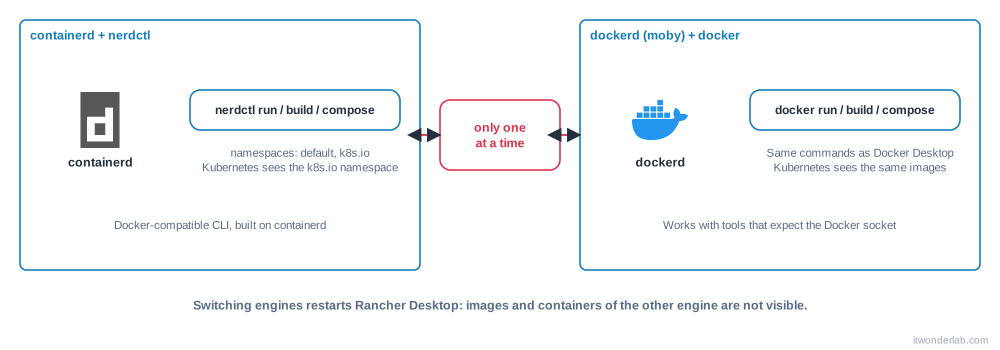
You choose in Preferences > Container Engine > General, or from the command line (see rdctl). Rancher Desktop restarts to apply the change.
Which one should you choose #
| containerd + nerdctl | dockerd + docker | |
|---|---|---|
| CLI | nerdctl (same flags as docker in most commands) |
docker, docker compose, docker buildx |
| Docker socket for tools | No Docker API socket | Yes: IDEs, Testcontainers, Terraform Docker provider and others work |
| Kubernetes images | Images in the k8s.io namespace are visible to the cluster |
Images built with docker are visible to the cluster |
| Builds | BuildKit | BuildKit |
| Closest to production | Kubernetes clusters use containerd | Developer workflows written for Docker |
A simple rule:
- Choose dockerd if you migrate from Docker Desktop, if your scripts or tools talk to the Docker API (
/var/run/docker.sock), or if your team writesdockerin every document. It is the least surprising option. - Choose containerd if you want to run exactly what your Kubernetes nodes run, and you are happy to type
nerdctl.
The same commands in both #
# containerd
$ nerdctl run -d -p 8000:80 nginx
$ nerdctl build -t foo .
$ nerdctl compose up -d

# dockerd
$ docker run -d -p 8000:80 nginx
$ docker build -t foo .
$ docker compose up -d
Both build with BuildKit. To export a build result to a local directory:
$ nerdctl build -o type=local,dest=. .
$ docker build -o type=local,dest=. .
If you use containerd but your muscle memory says docker, add an alias in your shell profile:
alias docker=nerdctlKubernetes and namespaces with nerdctl #
containerd separates images and containers into namespaces. nerdctl uses the default namespace, but the Kubernetes cluster of Rancher Desktop uses k8s.io. To build an image that Kubernetes can use without a registry, select that namespace:
$ nerdctl --namespace k8s.io build -t demo:latest .
$ nerdctl --namespace k8s.io images
With dockerd you do not need this: an image built with docker build is available to the cluster. The Kubernetes tutorial shows both flows.
Expose a port you forgot #
If you started a container without -p, you do not have to recreate it. Start a small proxy container that forwards traffic to its IP address:
$ nerdctl inspect -f '{{range .NetworkSettings.Networks}}{{.IPAddress}}{{end}}' my-container
10.4.0.5
$ nerdctl run --rm -p 8080:80 alpine/socat TCP-LISTEN:80,fork TCP-CONNECT:10.4.0.5:80
The same works with docker.
WebAssembly note #
If you use dockerd and enable the WebAssembly (Wasm) option, Rancher Desktop switches to a different image store. Your images are not lost, but you must rebuild or pull them again, and the old ones come back when you disable Wasm.
Rancher Desktop vs Docker Desktop #
| Rancher Desktop | Docker Desktop | |
|---|---|---|
| License | Apache 2.0, free for any use | Free for personal use, education, open source and small businesses (fewer than 250 employees and less than 10 million USD revenue); paid subscription above |
| Linux, macOS, Windows | Yes | Yes |
| Container engine | containerd or dockerd | dockerd (Docker Engine) |
| Kubernetes | K3s, with a selectable version | Kubernetes (kubeadm or kind) |
docker and Compose |
Yes (with dockerd) | Yes |
| Extras | nerdctl, rdctl, snapshots, Trivy |
Docker Scout, Docker Build Cloud, Docker Hub integration |
Check the current terms of each product before deciding, because licensing conditions change. For the day-to-day workflows in this series (build, Compose, volumes, networks) both tools behave the same when Rancher Desktop uses dockerd.
Next steps #
Learn the commands you will use every day in the Docker CLI cheat sheet.
Related tutorials
 Containers and Orchestration
Rancher Desktop
Rancher Desktop is a free open source app with a container engine (containerd or dockerd) and a local K3s Kubernetes cluster for Linux, macOS and Windows.
- Docker & Rancher Desktop Tutorials
Install Redis with Docker: Persistence, Basic Commands and Caching
Run Redis in a container with a persistent volume and a password, learn the essential commands, key expiration and the cache-aside pattern, and check memory usage.
- Docker & Rancher Desktop Tutorials
Install Prometheus with Docker: Scrape Metrics and Write PromQL Queries
Run Prometheus in a container, scrape a Node Exporter and your own targets, learn the basic PromQL queries and create an alert rule you can test locally.