

Kubernetes CrashLoopBackOff: Causes, How to Debug and How to Fix It
What CrashLoopBackOff means #
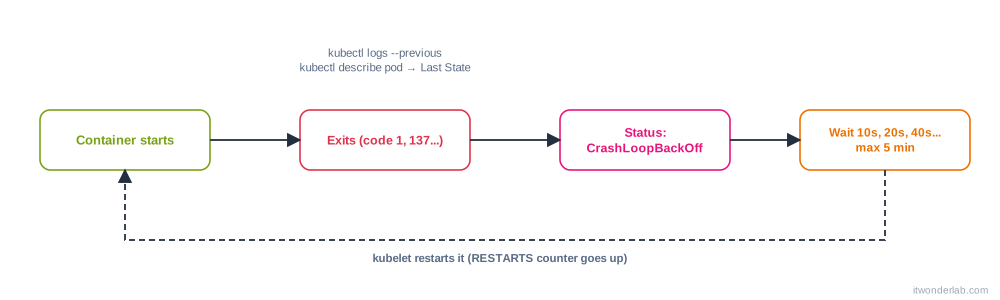
CrashLoopBackOff is not an error by itself: it is the state of a pod whose container keeps starting and exiting. After each crash the kubelet restarts the container (if restartPolicy is Always, the default for Deployments) and waits longer each time: 10 s, 20 s, 40 s, up to 5 minutes. The status flips between Error, Running and CrashLoopBackOff and the RESTARTS counter grows.
NAME                   READY   STATUS             RESTARTS      AGE
web-5d8c6b7c9f-x2k7p   0/1     CrashLoopBackOff   6 (87s ago)   9m
The cause is always inside the container or in what it needs: the application crashes, is killed or is told to exit. Kubernetes only reports it. For the general method see How to debug Kubernetes.
Step 1: get the reason #
kubectl get pod <pod>
kubectl describe pod <pod>
kubectl logs <pod> --previous
In describe pod find the container block:
    State:          Waiting
      Reason:       CrashLoopBackOff
    Last State:     Terminated
      Reason:       Error          # or OOMKilled, Completed, ContainerCannotRun
      Exit Code:    1
      Started:      Wed, 07 Oct 2026 10:12:01 +0200
      Finished:     Wed, 07 Oct 2026 10:12:02 +0200
    Restart Count:  6
The Last State is the key: reason, exit code and how long the container ran. kubectl logs --previous prints what the crashed container wrote. A container that lived 1 second points to a startup error (config, command, missing file). One that lived for minutes points to a crash under load, a memory limit or a failing liveness probe.
Step 2: decide by the exit code and reason #
| Last State | Meaning | Go to |
|---|---|---|
Exit Code: 1 (or another code from the app) |
The application failed: exception, bad config, cannot connect to a dependency | Logs, causes 1-3 |
Exit Code: 0 with Reason: Completed |
The process ended successfully, so it is not a server | Cause 5 |
Exit Code: 126 / 127 |
Command cannot execute / not found | Cause 4 |
Exit Code: 137, Reason: OOMKilled |
Memory limit exceeded | Cause 6 |
Exit Code: 137 without OOMKilled |
Killed by SIGKILL: the liveness probe, or the node |
Cause 7 |
Exit Code: 139 |
Segmentation fault (native code, wrong architecture) | Cause 8 |
Exit Code: 143 |
SIGTERM: someone stopped it |
Normal during rollouts |
Reason: ContainerCannotRun or StartError |
The runtime could not start it (bad entrypoint, permissions) | Cause 4 |
Common causes and fixes #
1. The application throws an error at startup #
Read kubectl logs --previous. Typical lines: a stack trace, Error: Cannot find module, ModuleNotFoundError, panic:, Address already in use. Fix the code or the image. Run the same image locally: docker run --rm myapp:1.0 and see if it fails there too.
2. Missing or wrong configuration #
Wrong environment variables, a missing file, a bad ConfigMap value. If the ConfigMap or Secret does not exist the pod shows CreateContainerConfigError instead, see ConfigMaps and Secrets.
kubectl exec <pod> -- env          # only works while the container is up; or
kubectl debug <pod> -it --copy-to=<pod>-debug --container=<container> -- sh
3. A dependency is not reachable #
The app exits because the database, Redis or an API is not ready, or its address is wrong (connection refused, could not translate host name, dial tcp: lookup db: no such host). Kubernetes does not order pod startup like depends_on in Compose. Make the app retry with back-off, or add an init container that waits:
      initContainers:
        - name: wait-for-db
          image: busybox:1.36
          command: ["sh", "-c", "until nc -z db 5432; do echo waiting; sleep 2; done"]
Check the Service name, namespace and port: kubectl get svc,endpoints.
4. Wrong command, args or entrypoint #
command in Kubernetes replaces the image ENTRYPOINT, and args replaces CMD. A typo, a shell script without execute permission, Windows line endings (/bin/sh^M: bad interpreter) or a missing binary gives exit code 126 or 127 and logs like exec: "app": executable file not found in $PATH or exec format error (wrong CPU architecture: an amd64 image on arm64 nodes).
kubectl get pod <pod> -o jsonpath='{.spec.containers[0].command}{" "}{.spec.containers[0].args}{"\n"}'Fix the manifest, make the file executable in the image (chmod +x), or build a multi-platform image (docker buildx build --platform linux/amd64,linux/arm64).
5. The process is not a long-running server #
A container that finishes its work and exits with 0 is restarted by a Deployment, which expects it to run forever: Completed and then CrashLoopBackOff. Common with an image whose default command is a shell (bash) or a one-shot script. Run a real server process, or use a Job or CronJob (restartPolicy: OnFailure or Never).
6. Out of memory (OOMKilled) #
Reason: OOMKilled, Exit Code: 137. The container used more memory than limits.memory.
kubectl top pod <pod> --containers
kubectl get pod <pod> -o jsonpath='{.spec.containers[0].resources}{"\n"}'
Raise the limit, fix the memory leak and tune the runtime to the limit (Java -XX:MaxRAMPercentage, Node --max-old-space-size, Go GOMEMLIMIT). Details in probes and resource limits.
7. The liveness probe kills a healthy but slow app #
describe pod shows Liveness probe failed and Container ... failed liveness probe, will be restarted, and the app log ends with Received SIGTERM or nothing. The probe path or port is wrong, the timeout is too short for the CPU you gave it, or the app needs longer to start. Add a startupProbe, raise timeoutSeconds and failureThreshold, or fix the path. Test the probe by hand:
kubectl exec <pod> -- wget -qO- http://localhost:8080/healthz8. Permissions and the filesystem #
Permission denied, read-only file system, EACCES: the image runs as non-root (good) but writes to a path it cannot write, or the pod has readOnlyRootFilesystem: true. Mount an emptyDir for the paths that need writes, set securityContext.fsGroup, and check the volume permissions (Persistent Volumes). Also exec format error and Segmentation fault for the wrong architecture.
9. Port or network conflicts #
Address already in use happens when two containers in the same pod listen on the same port (they share the network namespace), or the app binds to a privileged port (<1024) as non-root. Change the port, or use targetPort mapping.
10. Missing secrets for the app itself or bad credentials #
The app exits with authentication failed, invalid API key, or x509: certificate signed by unknown authority. Check the Secret values (echo -n versus a trailing newline) and the CA certificates in the image.
How to debug when there are no logs #
If logs --previous is empty, the container died before writing anything: wrong command, missing binary or permissions. Start a copy with a shell and run the command yourself:
kubectl debug <pod> -it --copy-to=<pod>-debug --container=<container> -- sh
# inside the shell:
env | sort
ls -l /app
/app/start.sh          # the real command, and read the error
exit
kubectl delete pod <pod>-debug
If the image has no shell, use --image to run another image in the copy and mount the same volumes, or build a debug variant of your image.
Other useful checks:
kubectl get events --field-selector involvedObject.name=<pod> --sort-by=.lastTimestamp
kubectl get pod <pod> -o yaml | less               # command, args, env, probes, resources
kubectl logs <pod> -c <init-container>             # if an init container fails: Init:CrashLoopBackOff
kubectl rollout undo deployment/<name>             # go back to the last working version
Prevent it #
- Test the image locally and in CI with the same environment variables.
- Log to stdout and stderr, with the configuration (without secrets) printed at startup.
- Use
readinessProbe,startupProbeand realistic limits. - Make apps retry their dependencies with exponential back-off.
- Pin image versions, so a new
latestdoes not break a running Deployment. - Roll out with
maxUnavailable: 0: a new version that crashes never takes traffic and the old one keeps serving (rolling updates).
Common errors list #
| Message | Cause |
|---|---|
Back-off restarting failed container |
The normal event of this state; look for the reason above it |
Error: failed to create containerd task: ... exec: "x": executable file not found in $PATH |
Wrong command or missing binary |
exec /app/entrypoint.sh: no such file or directory |
Wrong shebang, CRLF line endings, or a missing interpreter (alpine without bash) |
exec format error |
CPU architecture mismatch |
OOMKilled |
Memory limit |
Liveness probe failed: HTTP probe failed with statuscode: 503 |
Probe or application problem |
panic: runtime error / Traceback / Unhandled exception |
Application bug |
Error: connect ECONNREFUSED 10.96.0.15:5432 |
Dependency not available |
Init:CrashLoopBackOff |
An init container fails: kubectl logs <pod> -c <init> |
Frequently asked questions #
How long does the back-off last? It doubles from 10 s and is capped at 5 minutes. It resets after the container runs for 10 minutes without crashing.
How do I force an immediate restart? Delete the pod: kubectl delete pod <pod>. The controller creates a new one with no back-off. If the cause is not fixed, it will crash again.
Is CrashLoopBackOff a Kubernetes bug? No. Kubernetes is doing what it should. Something in the container or its environment makes it exit.
Why does kubectl logs show nothing? Use --previous. If still nothing, the process died before writing: check command and permissions.
Can I stop the restarts to investigate? Set a command that sleeps (command: ["sleep", "infinity"]) in a debug copy and exec into it, or use kubectl debug --copy-to.
Does a Job also get CrashLoopBackOff? With restartPolicy: OnFailure, yes; it retries up to backoffLimit and then the Job fails.
What is RunContainerError or StartError? The runtime could not start the container: bad entrypoint, a mount that fails, a seccomp or permission issue. describe pod has the message.
Next steps #
Read ImagePullBackOff and Pod stuck in Pending for the other frequent states, tune your app with probes and limits and keep the kubectl cheat sheet near.