

Kubernetes Architecture Explained: Control Plane, Nodes and Components
What is the architecture of Kubernetes #
Kubernetes is a cluster of machines split in two roles. The control plane stores the desired state and decides what must happen. The worker nodes run your containers. You never talk to the nodes directly: you describe what you want in YAML, send it to the API server with kubectl, and a set of controllers works until the real state matches it. This loop is the core idea of Kubernetes and the reason most problems can be debugged by comparing "what I asked" with "what exists" (see How to debug Kubernetes).
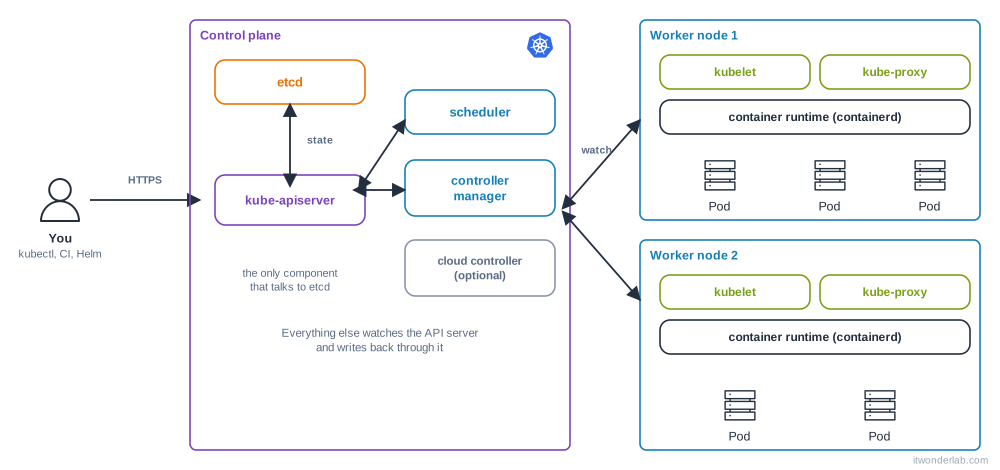
Control plane components #
| Component | What it does | If it fails |
|---|---|---|
| kube-apiserver | The front door. Every client (kubectl, kubelets, controllers, CI) uses its REST API. It authenticates, authorizes, validates and stores objects | kubectl times out or answers connection refused. Running pods keep running |
| etcd | A consistent key-value database with all cluster state. Only the API server talks to it | The cluster cannot change. Back it up |
| kube-scheduler | Picks a node for every pod that has none, using requests, taints, affinity and spread rules | New pods stay Pending. See Pod stuck in Pending |
| kube-controller-manager | Runs the controllers: Deployment, ReplicaSet, Node, Job, EndpointSlice, ServiceAccount... Each one reconciles one kind of object | Nothing self-heals: dead pods are not replaced, rollouts stop |
| cloud-controller-manager | Optional. Talks to the cloud API to create load balancers, routes and read node info (for example on EKS) | LoadBalancer services never get an address |
On managed services (EKS, GKE, AKS) the provider runs the control plane for you and you only see the worker nodes. With K3s or kind all components fit in one process or container.
Worker node components #
| Component | What it does |
|---|---|
| kubelet | The agent of the node. Watches the API server for pods assigned to its node, asks the runtime to start the containers, runs the probes and reports status back |
| Container runtime | Pulls images and runs containers through the CRI interface. Usually containerd or CRI-O. Docker Engine is not used directly since Kubernetes 1.24 |
| kube-proxy | Programs iptables or IPVS rules so that a Service address is load balanced to its pods. Some CNI plugins replace it |
| CNI plugin | Gives each pod an IP and connects pods across nodes (Calico, Cilium, Flannel, the AWS VPC CNI). Not part of Kubernetes itself, but a cluster without one has nodes in NotReady |
| CoreDNS | Cluster DNS: my-service.my-namespace.svc.cluster.local resolves to the Service address. It runs as a Deployment in kube-system |
What happens when you run kubectl apply #
Take kubectl apply -f deployment.yaml with a Deployment of 3 replicas:
- kubectl reads your kubeconfig (server, certificate or token) and sends the object to the API server.
- The API server authenticates you, checks RBAC, runs admission controllers and validation, and writes the Deployment to etcd.
- The Deployment controller sees a new Deployment and creates a ReplicaSet.
- The ReplicaSet controller sees 0 of 3 pods and creates 3 Pod objects with no node assigned.
- The scheduler sees pods without a node, filters the nodes that fit (resources, taints, selectors), scores them and writes the chosen
nodeNameinto each pod. - The kubelet of each chosen node sees a pod assigned to it, pulls the image, creates the containers through the runtime and sets up volumes and networking.
- The kubelet reports
Runningand, when the readiness probe passes,Ready. The EndpointSlice controller adds the pod IP to the Service so it receives traffic.
None of these steps calls the next one. Each component watches the API server and acts on what changed. That is why the system is robust: if a component is down for a minute, it catches up when it returns.
Look at your own cluster #
kubectl cluster-info
kubectl get nodes -o wide
kubectl get pods -n kube-system -o wide
kubectl get --raw='/readyz?verbose' | head -20
kubectl api-resources | head -30
kubectl explain pod.spec.containers.resources
kubectl get pods -n kube-systemshows CoreDNS, kube-proxy, the CNI and, on kubeadm clusters, the static pods of the control plane (kube-apiserver-*,etcd-*...).kubectl explainis the built-in reference of every field. Use--recursiveto see a whole tree.kubectl get events -A --sort-by=.lastTimestampshows what the controllers did recently.
Objects you will use every day #
| Object | Purpose | Tutorial |
|---|---|---|
| Pod | One or more containers sharing network and storage | Pods and Deployments |
| Deployment, ReplicaSet | Keep N identical pods and update them with no downtime | Pods and Deployments |
| Service, Ingress | Stable address and HTTP routing | Services and Ingress |
| ConfigMap, Secret | Configuration and credentials | ConfigMaps and Secrets |
| PersistentVolumeClaim | Disks that survive pod restarts | Persistent Volumes |
| Namespace, Role | Isolation and permissions | Namespaces and RBAC |
| HorizontalPodAutoscaler | Scale replicas with load | HPA |
Common errors #
| Symptom | Likely cause | What to check |
|---|---|---|
The connection to the server localhost:8080 was refused |
kubectl has no kubeconfig, so it uses the default address | echo $KUBECONFIG, ls ~/.kube/config, kubectl config get-contexts |
Unable to connect to the server: dial tcp ...: i/o timeout |
API server not reachable: VPN, firewall, security group or the control plane is down | curl -k https://<server>:6443/healthz, check the server: in the kubeconfig |
Unable to connect to the server: x509: certificate has expired or is not yet valid |
Expired cluster or client certificate, or wrong clock | kubeadm certs check-expiration, date, NTP |
error: You must be logged in to the server (Unauthorized) |
Expired token (common with EKS aws eks get-token) or wrong user |
Renew credentials, kubectl config view --minify |
Error from server (Forbidden) |
Authenticated but not allowed | kubectl auth can-i <verb> <resource>, see RBAC |
Node NotReady |
kubelet stopped, no CNI, disk or memory pressure, network | kubectl describe node, journalctl -u kubelet on the node |
All new pods Pending |
Scheduler down or no node fits | kubectl get pods -n kube-system, Pending |
kubectl works but the cluster is slow |
etcd slow disk, API server throttling | etcd metrics, kubectl get --raw /metrics |
How to debug the cluster itself #
kubectl get nodes: are allReady? If not,kubectl describe node <name>and read Conditions and Events.kubectl get pods -n kube-system: are CoreDNS, the CNI and kube-proxyRunning?- On a node:
systemctl status kubeletandjournalctl -u kubelet -f. Alsocrictl psandcrictl logs <id>to talk to containerd when the API server is down. - On a kubeadm control plane node, the static pod manifests are in
/etc/kubernetes/manifests/and their logs in/var/log/pods/. - For a managed cluster, check the provider console and audit logs.
The general workflow for applications is in How to debug Kubernetes.
Frequently asked questions #
Is Kubernetes the same as Docker? No. Docker builds and runs containers on one machine. Kubernetes schedules containers over many machines and keeps them running. It uses a runtime such as containerd, the same one inside Docker.
How many control plane nodes do I need? One for a lab. Three for production, because etcd needs a majority (quorum) to accept writes. Managed services do this for you.
Can the control plane run my pods? In kubeadm, the control plane nodes have the taint node-role.kubernetes.io/control-plane:NoSchedule so normal pods do not run there. K3s and kind single-node clusters remove it.
Where is the cluster state stored? Only in etcd. Back up etcd with etcdctl snapshot save or use a tool such as Velero for objects and volumes.
What happens to my pods if the control plane goes down? They keep running, because the kubelet and the runtime work with what they already have. You cannot create, update or reschedule anything until it is back.
What is a namespace? A virtual partition of the cluster for names, quotas and permissions. It is not a security boundary by itself. See Namespaces and RBAC.
Next steps #
Install a local cluster with K3s, kind or Rancher Desktop, then continue with Pods and Deployments.