

Kubernetes Pods and Deployments: Replicas, Rolling Updates and Rollbacks
Pods, ReplicaSets and Deployments #
A Pod is the smallest thing you can run in Kubernetes: one or more containers that share an IP address, ports and volumes. Pods are disposable. If a node dies, its pods are gone and nobody recreates them, unless a controller owns them.
- A ReplicaSet keeps N identical pods running.
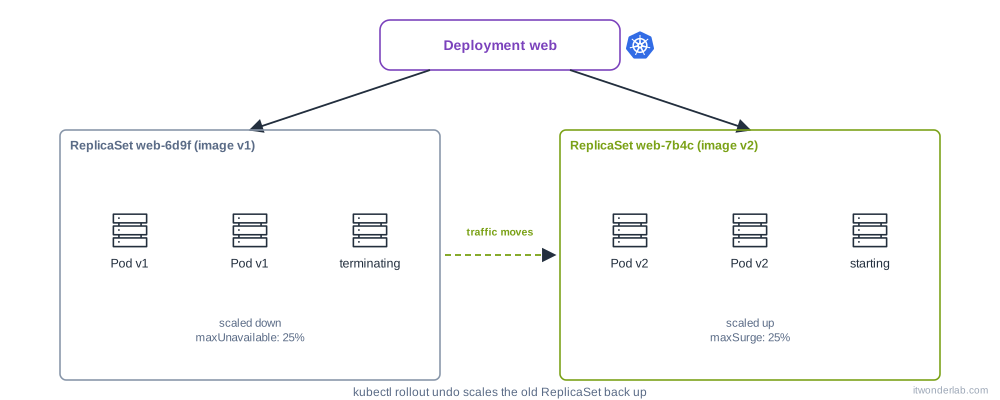
- A Kubernetes Deployment manages ReplicaSets. When you change the image, it creates a new ReplicaSet and moves pods from the old one to the new one, a rolling update. It also remembers the old ReplicaSets so you can roll back.
You almost never create pods or ReplicaSets by hand: you create a Deployment (for stateless apps), a StatefulSet (databases), a DaemonSet (one pod per node) or a Job/CronJob (batch). You need a cluster: K3s, kind or Rancher Desktop.
Create a Deployment #
apiVersion: apps/v1
kind: Deployment
metadata:
  name: web
  labels:
    app: web
spec:
  replicas: 3
  revisionHistoryLimit: 5
  selector:
    matchLabels:
      app: web            # must match the pod template labels, and cannot change later
  strategy:
    type: RollingUpdate
    rollingUpdate:
      maxSurge: 1         # one extra pod during the update
      maxUnavailable: 0   # never go below 3 ready pods
  template:
    metadata:
      labels:
        app: web
    spec:
      containers:
        - name: web
          image: nginx:1.27
          ports:
            - containerPort: 80
          resources:
            requests: { cpu: 50m, memory: 64Mi }
            limits: { memory: 128Mi }
          readinessProbe:
            httpGet: { path: /, port: 80 }
kubectl apply -f web.yaml
kubectl get deployment web
kubectl get pods -l app=web -o wide
kubectl get rs -l app=webThe pod names have the shape web-<replicaset hash>-<random>. The READY 3/3 of the Deployment means 3 pods are ready to receive traffic. To reach them you need a Service, see Services and Ingress. For a quick test: kubectl port-forward deploy/web 8080:80.
Always set resources.requests (the scheduler uses them) and a readinessProbe (the rolling update waits for it). Both are covered in Probes and resource limits.
Create a manifest without writing it #
kubectl create deployment web --image=nginx:1.27 --replicas=3 --dry-run=client -o yaml > web.yaml
kubectl run tmp --image=busybox:1.36 --rm -it --restart=Never -- sh      # throwaway pod
kubectl explain deployment.spec.strategy
--dry-run=client -o yaml generates a correct file to edit. kubectl apply --dry-run=server -f web.yaml validates it against the real API without saving.
Scale #
kubectl scale deployment web --replicas=5
kubectl get deploy web -w
In production, prefer to let the Horizontal Pod Autoscaler decide, and then do not set replicas by hand in Git (Argo CD and kubectl apply would fight the autoscaler).
Rolling update #
Change the image, either editing the YAML and running kubectl apply, or with:
kubectl set image deployment/web web=nginx:1.27.2
kubectl rollout status deployment/web
kubectl get rs -l app=web
The sequence with maxSurge: 1 and maxUnavailable: 0: create 1 new pod, wait until it is Ready, terminate 1 old pod, repeat. If the new pods never become Ready, the update stops and the old pods keep serving. That is the safety net, and also why a broken readiness probe shows up as a stuck rollout.
Only changes in spec.template start a rollout. Changing replicas does not.
kubectl rollout restart deployment/web # new pods with the same image (for example to reload a ConfigMap)Rollback #
kubectl rollout history deployment/web
kubectl rollout history deployment/web --revision=2
kubectl rollout undo deployment/web                  # previous revision
kubectl rollout undo deployment/web --to-revision=1
kubectl annotate deployment/web kubernetes.io/change-cause="upgrade to nginx 1.27.2"
revisionHistoryLimit decides how many old ReplicaSets are kept (default 10). Set the change-cause annotation (or use Git) so the history is readable. Remember that a rollback only restores the pod template, not a ConfigMap or database migration.
Pause a rollout to batch several changes: kubectl rollout pause deployment/web, then kubectl rollout resume deployment/web.
Strategies #
| Strategy | Behavior | Use it for |
|---|---|---|
RollingUpdate (default) |
Replaces pods gradually | Almost everything |
Recreate |
Kills all old pods, then starts the new ones. Short downtime | Apps that cannot run two versions at once, or a ReadWriteOnce volume |
| Blue/green, canary | Not built in. Use two Deployments with a Service or a mesh such as Istio | Controlled traffic shifts |
Graceful shutdown #
When a pod is deleted, Kubernetes sends SIGTERM, waits terminationGracePeriodSeconds (30 s default) and then sends SIGKILL. At the same time the pod is removed from the Service endpoints, but that takes a moment, so some traffic can still arrive. To avoid failed requests:
    spec:
      terminationGracePeriodSeconds: 45
      containers:
        - name: web
          lifecycle:
            preStop:
              exec:
                command: ["sleep", "10"]
Also make the application handle SIGTERM: stop accepting connections and finish requests in flight. Run the app as PID 1 (exec in shell scripts) or the signal never arrives.
Common errors #
| Symptom | Cause | Fix |
|---|---|---|
Invalid value: ... selector does not match template labels |
spec.selector.matchLabels differs from template.metadata.labels |
Make them identical |
field is immutable when changing the selector |
The selector of a Deployment cannot be changed | Delete and recreate the Deployment |
Pods Pending |
No node fits the requests, or no storage | Pod stuck in Pending |
ImagePullBackOff, ErrImagePull |
Wrong image, tag or credentials | ImagePullBackOff |
CrashLoopBackOff |
The container exits | CrashLoopBackOff |
Waiting for deployment "web" rollout to finish: 1 out of 3 new replicas have been updated... for a long time |
New pods are not Ready (probe, crash, resources) | kubectl describe pod, kubectl logs, kubectl rollout undo |
error: deployment "web" exceeded its progress deadline (ProgressDeadlineExceeded) |
The rollout did not progress in progressDeadlineSeconds (600 s) |
Same as above. The old pods still serve |
no matches for kind "Deployment" in version "extensions/v1beta1" |
Removed API version | Use apps/v1 |
| Rollout does not start after editing a ConfigMap | Only the pod template triggers it | kubectl rollout restart, or add a hash annotation (Helm checksum/config) |
forbidden: exceeded quota |
A ResourceQuota in the namespace | kubectl describe quota |
How to debug a Deployment #
kubectl get deploy,rs,pods -l app=web
kubectl describe deployment web            # Conditions: Available, Progressing, ReplicaFailure
kubectl describe rs <name>                 # Events: FailedCreate (quota, security admission)
kubectl describe pod <name>                # Events: scheduling, pulling, probes
kubectl logs deploy/web --all-containers --tail=100
kubectl logs <pod> --previous
kubectl get events --sort-by=.lastTimestamp
Read it top to bottom: Deployment, ReplicaSet, Pod, container. If the ReplicaSet exists but has no pods, the problem is in its events. If the pods exist, it is in theirs. The full method is in How to debug Kubernetes.
Frequently asked questions #
What is the difference between a Pod and a Deployment? A Pod runs containers once. A Deployment keeps a desired number of pods running and updates them in a controlled way.
What is the difference between a Deployment and a StatefulSet? A StatefulSet gives each pod a stable name (db-0, db-1), an ordered start and its own volume. Use it for databases. A Deployment pods are interchangeable.
Can I run several containers in a Pod? Yes, for tightly coupled helpers (sidecars): a log shipper, a proxy. They share localhost and volumes. Do not put the web app and the database in one pod, because they scale together.
How do I update without downtime? Use RollingUpdate with a readinessProbe, at least 2 replicas and maxUnavailable: 0. Add a PodDisruptionBudget so node drains do not remove every pod at once.
Why does my pod get a new IP each time? Pod IPs are not stable. Use a Service and its DNS name.
What does latest do? It is only a tag. With :latest, imagePullPolicy defaults to Always, and nobody knows what version is running. Pin a version or a digest.
How do I delete everything? kubectl delete -f web.yaml. Deleting the Deployment deletes its ReplicaSets and pods. kubectl delete pod on a managed pod only makes the controller create a new one.
Next steps #
Expose the app with Services and Ingress, move its configuration out of the image with ConfigMaps and Secrets and keep it healthy with probes.