

Installing Istio on Kubernetes
What is Istio? #
Running Microservices or any load under a Kubernetes cluster that includes more than one server, under a micro-service architecture or even a traditional application that needs to access other resources requires functionality to:
- Load balance traffic, external or internal
- Control failures, retries, routing
- Apply limits and monitor network traffic between services
- Secure communication
Developing that functionality by ourselves or integrating different solutions to obtain those capabilities requires advanced knowledge of networking protocols, and distributed architectures. It is hard to do right and, in my opinion, pointless.
Be Pragmatic: In IT Wonder Lab we are pragmatic, it is, of course, possible to develop Istio functionality by ourselves, but our efforts should be better used in solving business and people problems instead of reinventing the wheel. Istio is great!
Istio for Kubernetes provides a service mesh for microservices that solves all those problems. Istio is an open-source project created by teams from Google, IBM, and Lyft.
Istio under VirtualBox #
In a previous tutorial, I showed How to Install a Kubernetes Cluster using Vagrant and Ansible, in this tutorial I show how to add Istio as a service mesh for that Kubernetes Cluster.
Installing Istio for Kubernetes under VirtualBox has some peculiarities that need to be addressed to obtain a successful Kubernetes with Istio local development cluster:
- Resource usage: default CPU and Memory requirements for Istio are too high for most VirtualBox configurations.
- Lack of an external or cloud load balancer: By default, it is not possible to access Istio and Helm (a package manager) in a VirtualBox installation as there is no external Cloud Load Balancer.
Updates:
- 10 Nov 2019:
- Upgrade releases:
- Istio release to 1.3.4 (was 1.1.3)
- Helm release to 2.16.0 (was 2.13.1)
- Upgrade releases:
- 3 Aug 2020: upgrade Istio to 1.6.7
Instructions to install Istio in a VirtualBox Kubernetes Cluster #
Modern releases of Istio are really easy to install, this tutorial is based on the official Istio Documentation.
Prerequisites: #
- Follow How to Install a Kubernetes Cluster using Vagrant and Ansible tutorial.
Check that your Kubernetes Cluster is running and connection can be established by running any kubectl command like kubectl get all:
$ kubectl get all
NAME                 TYPE        CLUSTER-IP   EXTERNAL-IP   PORT(S)   AGE
service/kubernetes   ClusterIP   10.96.0.1    <none>        443/TCP   3h9m
Download Istio #
Download Istio by running curl -L https://istio.io/downloadIstio | sh -
$ curl -L https://istio.io/downloadIstio | sh -
  % Total    % Received % Xferd  Average Speed   Time    Time     Time  Current
                                 Dload  Upload   Total   Spent    Left  Speed
100   107  100   107    0     0    183      0 --:--:-- --:--:-- --:--:--   183
100  3896  100  3896    0     0   4809      0 --:--:-- --:--:-- --:--:--  4809
Downloading istio-1.6.7 from https://github.com/istio/istio/releases/download/1.6.7/istio-1.6.7-linux.tar.gz ...Failed.

Trying with TARGET_ARCH. Downloading istio-1.6.7 from https://github.com/istio/istio/releases/download/1.6.7/istio-1.6.7-linux-amd64.tar.gz ...

Istio 1.6.7 Download Complete!
...
Install Istio #
$ cd istio-1.6.7
$ export PATH=$PWD/bin:$PATH
$ istioctl install --set profile=demo
Detected that your cluster does not support third party JWT authentication. Falling back to less secure first party JWT. See https://istio.io/docs/ops/best-practices/security/#configure-third-party-service-account-tokens for details.
✔ Istio core installed
✔ Istiod installed
✔ Egress gateways installed
✔ Ingress gateways installed
✔ Addons installed
✔ Installation complete
Create a NameSpace #
Create a label named istio-injection in the default namespace that tells Istio to automatically inject Envoy sidecar proxies in the deployed applications.
$ kubectl label namespace default istio-injection=enabled
namespace/default labeled
Check Istio Installation #
List all Kubernetes resources to check that all pods are running and replicas ready:
$ kubectl get all -A
NAMESPACE              NAME                                             READY   STATUS    RESTARTS   AGE
istio-system           pod/grafana-b54bb57b9-77mdr                      1/1     Running   0          24m
istio-system           pod/istio-egressgateway-64bc874f5c-nmhcx         1/1     Running   0          24m
istio-system           pod/istio-ingressgateway-6b947b8c5d-rshpl        1/1     Running   0          24m
istio-system           pod/istio-tracing-9dd6c4f7c-j76lb                1/1     Running   0          24m
istio-system           pod/istiod-654b4b468b-hcqbj                      1/1     Running   0          24m
istio-system           pod/kiali-d45468dc4-t2qts                        1/1     Running   0          24m
istio-system           pod/prometheus-77566c9987-nbldb                  2/2     Running   0          24m
kube-system            pod/calico-kube-controllers-578894d4cd-sqtxl     1/1     Running   1          3h29m
kube-system            pod/calico-node-p2ncg                            1/1     Running   1          3h18m
kube-system            pod/calico-node-rzvvk                            1/1     Running   1          3h22m
kube-system            pod/calico-node-z4hn6                            1/1     Running   1          3h26m
kube-system            pod/calico-node-zq8pb                            1/1     Running   1          3h29m
kube-system            pod/coredns-66bff467f8-bm5lb                     1/1     Running   1          3h29m
kube-system            pod/coredns-66bff467f8-km79j                     1/1     Running   1          3h29m
kube-system            pod/etcd-k8s-m-1                                 1/1     Running   1          3h29m
kube-system            pod/kube-apiserver-k8s-m-1                       1/1     Running   1          3h29m
kube-system            pod/kube-controller-manager-k8s-m-1              1/1     Running   3          3h29m
kube-system            pod/kube-proxy-47n62                             1/1     Running   1          3h18m
kube-system            pod/kube-proxy-686dw                             1/1     Running   1          3h22m
kube-system            pod/kube-proxy-6q4mn                             1/1     Running   1          3h29m
kube-system            pod/kube-proxy-z9tz6                             1/1     Running   1          3h26m
kube-system            pod/kube-scheduler-k8s-m-1                       1/1     Running   3          3h29m
kubernetes-dashboard   pod/dashboard-metrics-scraper-6b4884c9d5-dbj7v   1/1     Running   1          161m
kubernetes-dashboard   pod/kubernetes-dashboard-7b544877d5-l2ktx        1/1     Running   1          161m

NAMESPACE              NAME                                      TYPE           CLUSTER-IP       EXTERNAL-IP   PORT(S)                                                                      AGE
default                service/kubernetes                        ClusterIP      10.96.0.1        <none>        443/TCP                                                                      3h29m
istio-system           service/grafana                           ClusterIP      10.98.135.195    <none>        3000/TCP                                                                     24m
istio-system           service/istio-egressgateway               ClusterIP      10.96.179.234    <none>        80/TCP,443/TCP,15443/TCP                                                     24m
istio-system           service/istio-ingressgateway              LoadBalancer   10.107.75.76     <pending>     15021:31787/TCP,80:32232/TCP,443:31880/TCP,31400:31278/TCP,15443:30373/TCP   24m
istio-system           service/istiod                            ClusterIP      10.99.49.194     <none>        15010/TCP,15012/TCP,443/TCP,15014/TCP,853/TCP                                24m
istio-system           service/jaeger-agent                      ClusterIP      None             <none>        5775/UDP,6831/UDP,6832/UDP                                                   24m
istio-system           service/jaeger-collector                  ClusterIP      10.100.144.253   <none>        14267/TCP,14268/TCP,14250/TCP                                                24m
istio-system           service/jaeger-collector-headless         ClusterIP      None             <none>        14250/TCP                                                                    24m
istio-system           service/jaeger-query                      ClusterIP      10.97.77.31      <none>        16686/TCP                                                                    24m
istio-system           service/kiali                             ClusterIP      10.105.199.34    <none>        20001/TCP                                                                    24m
istio-system           service/prometheus                        ClusterIP      10.100.66.206    <none>        9090/TCP                                                                     24m
istio-system           service/tracing                           ClusterIP      10.102.206.3     <none>        80/TCP                                                                       24m
istio-system           service/zipkin                            ClusterIP      10.97.113.137    <none>        9411/TCP                                                                     24m
kube-system            service/kube-dns                          ClusterIP      10.96.0.10       <none>        53/UDP,53/TCP,9153/TCP                                                       3h29m
kubernetes-dashboard   service/dashboard-metrics-scraper         ClusterIP      10.104.13.49     <none>        8000/TCP                                                                     161m
kubernetes-dashboard   service/kubernetes-dashboard              ClusterIP      10.99.231.65     <none>        443/TCP                                                                      161m
kubernetes-dashboard   service/kubernetes-dashboard-service-np   NodePort       10.98.42.164     <none>        8443:30002/TCP                                                               161m

NAMESPACE     NAME                         DESIRED   CURRENT   READY   UP-TO-DATE   AVAILABLE   NODE SELECTOR            AGE
kube-system   daemonset.apps/calico-node   4         4         4       4            4           kubernetes.io/os=linux   3h29m
kube-system   daemonset.apps/kube-proxy    4         4         4       4            4           kubernetes.io/os=linux   3h29m

NAMESPACE              NAME                                        READY   UP-TO-DATE   AVAILABLE   AGE
istio-system           deployment.apps/grafana                     1/1     1            1           24m
istio-system           deployment.apps/istio-egressgateway         1/1     1            1           24m
istio-system           deployment.apps/istio-ingressgateway        1/1     1            1           24m
istio-system           deployment.apps/istio-tracing               1/1     1            1           24m
istio-system           deployment.apps/istiod                      1/1     1            1           24m
istio-system           deployment.apps/kiali                       1/1     1            1           24m
istio-system           deployment.apps/prometheus                  1/1     1            1           24m
kube-system            deployment.apps/calico-kube-controllers     1/1     1            1           3h29m
kube-system            deployment.apps/coredns                     2/2     2            2           3h29m
kubernetes-dashboard   deployment.apps/dashboard-metrics-scraper   1/1     1            1           161m
kubernetes-dashboard   deployment.apps/kubernetes-dashboard        1/1     1            1           161m

NAMESPACE              NAME                                                   DESIRED   CURRENT   READY   AGE
istio-system           replicaset.apps/grafana-b54bb57b9                      1         1         1       24m
istio-system           replicaset.apps/istio-egressgateway-64bc874f5c         1         1         1       24m
istio-system           replicaset.apps/istio-ingressgateway-6b947b8c5d        1         1         1       24m
istio-system           replicaset.apps/istio-tracing-9dd6c4f7c                1         1         1       24m
istio-system           replicaset.apps/istiod-654b4b468b                      1         1         1       24m
istio-system           replicaset.apps/kiali-d45468dc4                        1         1         1       24m
istio-system           replicaset.apps/prometheus-77566c9987                  1         1         1       24m
kube-system            replicaset.apps/calico-kube-controllers-578894d4cd     1         1         1       3h29m
kube-system            replicaset.apps/coredns-66bff467f8                     2         2         2       3h29m
kubernetes-dashboard   replicaset.apps/dashboard-metrics-scraper-6b4884c9d5   1         1         1       161m
kubernetes-dashboard   replicaset.apps/kubernetes-dashboard-7b544877d5        1         1         1       161m
Prometheus, Jaeger, Grafana, and Kiali in Kubernetes #
Istio deploys the following software:
Prometheus #
Scrapes and stores time series data using service discovery. It is used to record status data about every aspect of the Kubernetes Cluster nodes, Istio mesh, and deployments.
Jaeger #
It is a distributed tracing system developed by Uber, it provides context propagation, transaction monitoring, service dependency, performance, and latency analysis for distributed applications.
Grafana #
Uses Prometheus as a data source to visualize different dashboards with metrics from the services deployed in the Kubernetes Cluster.
Kiali #
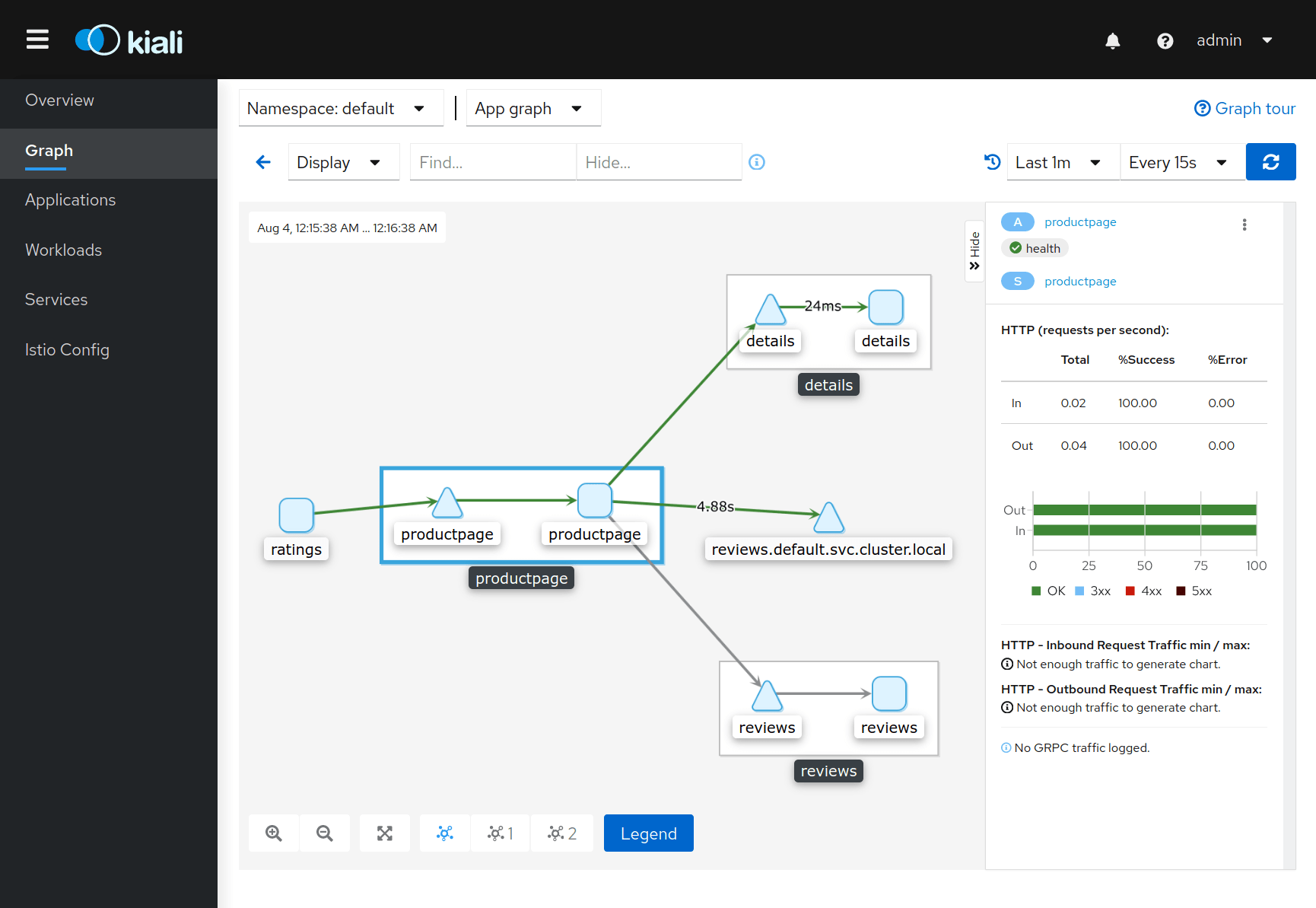
Visualizes the service mesh topology in Kubernetes showing the status of the applications and its individual components and connections. It also provides an interface to edit Istio configuration objects, like virtual services.
Publish Prometheus, Jaeger, Grafana, and Kiali using a NodePort #
To access the dashboards using a web browser from the client machine a proxy is needed as the services listen in a Cluster IP.
During development, a NodePort can be used to insecurely publish each service.
Create the file istio-services-node-port.yaml with the following content:
#Grafana
apiVersion: v1
kind: Service
metadata:
  labels:
    app: grafana
    release: istio
  name: grafana-np
  namespace: istio-system
spec:
  ports:
  - name: http
    nodePort: 32493
    port: 3000
    protocol: TCP
    targetPort: 3000
  selector:
    app: grafana
  sessionAffinity: None
  type: NodePort
---
#prometheus
apiVersion: v1
kind: Service
metadata:
  labels:
    app: prometheus
    release: istio
  name: prometheus-np
  namespace: istio-system
spec:
  ports:
  - name: http
    nodePort: 32494
    port: 9090
    protocol: TCP
    targetPort: 9090
  selector:
    app: prometheus
  sessionAffinity: None
  type: NodePort
---
#jaeger
apiVersion: v1
kind: Service
metadata:
  labels:
    app: jaeger
    release: istio
  name: tracing-np
  namespace: istio-system
spec:
  ports:
  - name: http-tracing
    nodePort: 32495
    port: 80
    protocol: TCP
    targetPort: 16686
  selector:
    app: jaeger
  sessionAffinity: None
  type: NodePort
---
#kiali
apiVersion: v1
kind: Service
metadata:
  labels:
    app: kiali
    release: istio
  name: kiali-np
  namespace: istio-system
spec:
  ports:
  - name: http-kiali
    nodePort: 32496
    port: 20001
    protocol: TCP
    targetPort: 20001
  selector:
    app: kiali
  sessionAffinity: None
  type: NodePort
Apply the file to the Kubernetes cluster:
$ kubectl apply -f istio-services-node-port.yaml
service/grafana-np created
service/prometheus-np created
service/tracing-np created
service/kiali-np created
Access the services using a web browser:
- Prometheus: http://192.168.50.11:32494
- Jaeger: http://192.168.50.11:32495
- Grafana: http://192.168.50.11:32493/
- Kiali: http://192.168.50.11:32496/kiali/console/ (Use admin/admin)
Deploy the Bookinfo Istio Testing Application #
Deploy the BookInfo Istio example application:
$ kubectl apply -f https://raw.githubusercontent.com/istio/istio/release-1.6/samples/bookinfo/platform/kube/bookinfo.yaml
service/details created
serviceaccount/bookinfo-details created
deployment.apps/details-v1 created
service/ratings created
serviceaccount/bookinfo-ratings created
deployment.apps/ratings-v1 created
service/reviews created
serviceaccount/bookinfo-reviews created
deployment.apps/reviews-v1 created
deployment.apps/reviews-v2 created
deployment.apps/reviews-v3 created
service/productpage created
serviceaccount/bookinfo-productpage created
deployment.apps/productpage-v1 created
Use Istio for your service mesh microservices architecture #
Other IT Wonder Lab tutorials explaining how to use Istio for traffic management: