

AWS VPC Subnets, Routing Tables and Internet Access using Terraform (2/5)
VPC/RDS Subnets, Routing, and Internet Access #
This is part 2 of 5 of the Terraform and Ansible tutorial for AWS. It is used to create a VPC in AWS with an EC2 instance connected to the MariaDB database running in RDS using a single Terraform plan. Ansible is used to configure the server and install all the needed packages.
Prerequisites #
VPC Subnet Routing #
Since we have deleted the default VPC, AWS needs new routing tables to connect our VPC subnets to the Internet.
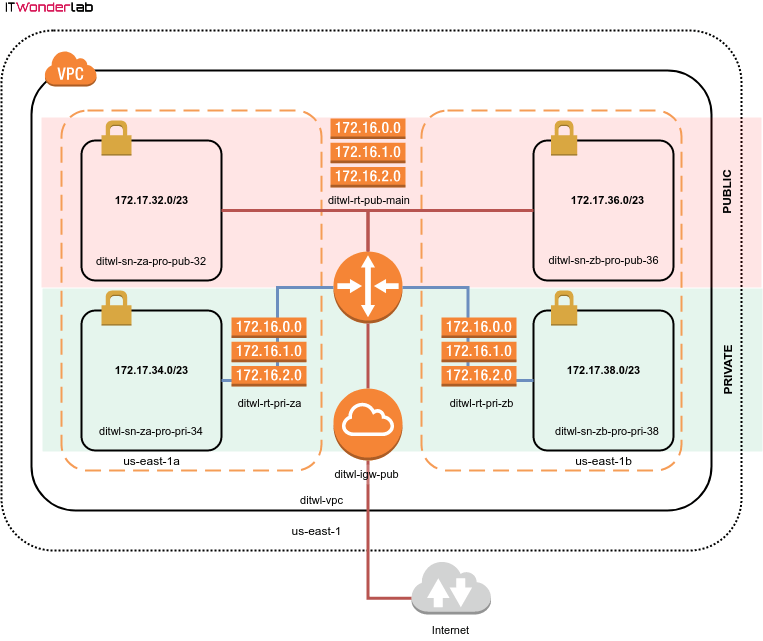
Best Practice: Create different routing tables for private and public subnets with Terraform.
Create different routing tables for private and public subnets to prevent access from public resources to internal, VPN, or private networks.
Follow the best practices for naming the resources using a pattern that indicates their intended use. See AWS and Terraform Naming Best Practices.
The names of the resources will follow a pattern:
- Cloud: a prefix specifying the unique name of this cloud across all available clouds and providers. In this case the prefix will be: ditwl that stands for Demo IT Wonder Lab in lowercase.
- Resource: a short name identifying the resource, in this case:
- rt: for routing table
- igw: for Internet gateway
- ir: for Internet route
- Visibility: for resources that can be either public or private, a 3 letter acronym for the visibility:
- pub: for public resources
- pri: for private resources
- Name: optional a name that describes the usage of the resource, for example the routing tables for private zones A and B will be za and zb.
Since we are provisioning a low-budget infrastructure, the private subnets will not have access to the Internet. Giving access to the Internet to a private subnet requires provisioning of NAT instances (or NAT Gateways, which are billed per hour) and it is recommended to place a NAT in each availability zone, therefore each zone will have its own routing table for private subnets.
Public subnets get access to the Internet using an Internet Gateway.
Routing is configured in the terraform.tfvars.
#------------------------
# VPC ROUTING
#------------------------

aws_main_route_table_name = "ditwl-rt-pub-main"
aws_internet_gw_name = "ditwl-igw-pub-main"
aws_internet_route = {
  name = "ditwl-ir"
  destination_cidr_block = "0.0.0.0/0"
}
aws_private_route_table_za_name = "ditwl-rt-pri-za"
aws_private_route_table_zb_name = "ditwl-rt-pri-zb"
Internet Access for Public Subnets #
The file aws_internet_gateway.tf creates the Internet Gateway using a Terraform module.
#----------------------
# AWS Internet Gateway
#----------------------

#Create an Internet GW
module "aws_internet_gw" {
  source = "./modules/aws/network/internet_gateway"
  vpc_id = module.aws_network_vpc.id
  name   = var.aws_internet_gw_name
}
Routing Tables for Subnets #
The actual routing tables are added in aws_vpc_routing.tf
The module “aws_main_route_table_public” in line 18 creates a new routing table, the created table is assigned as the default (or main) table using the “aws_main_route_table_association” resource at line 34.
The main table contains a local entry for the routing inside the VPC and a route to the Internet (0.0.0.0/0) whose target is the Internet Gateway “module.aws_internet_gw.id” created before and assigned as routing table route at line 25.
All the VPC subnets that are not assigned a specific routing table use the main routing table, therefore public subnets are not assigned to any specific routing table.
For private subnets, two routing tables are created on lines 49 and 56 and then assigned to the corresponding subnets in lines 63 and 69.
#-----------------------------------------
# MAIN Route Table (Default for all SUBNETS)
# Used for public zones / subnets
# It is the default route table if no other
# is specified
#-----------------------------------------

module "aws_main_route_table_public" {
  source = "./modules/aws/network/route/table"
  vpc_id = module.aws_network_vpc.id
  name   = var.aws_main_route_table_name
}

#Add an Internet GW to the VPC routing main table
module "aws_internet_route" {
  source                 = "./modules/aws/network/route/add"
  route_table_id         = module.aws_main_route_table_public.id
  gateway_id             = module.aws_internet_gw.id
  destination_cidr_block = var.aws_internet_route["destination_cidr_block"]
  name                   = var.aws_internet_route["name"]
}

# Set new main_route_table as main
resource "aws_main_route_table_association" "default" {
  vpc_id         = module.aws_network_vpc.id
  route_table_id = module.aws_main_route_table_public.id
}

#-----------------------------------------
# Private Route Table
# Used for private zone / subnet that have
# instances without a public IP address
# Each subnet should have its own route table
# as the NAT gateway lives in an availability
# zone
#-----------------------------------------

# For private networks in zone A
module "aws_private_route_table_za" {
  source = "./modules/aws/network/route/table"
  vpc_id = module.aws_network_vpc.id
  name   = var.aws_private_route_table_za_name
}

#For private networks in zone B
module "aws_private_route_table_zb" {
  source = "./modules/aws/network/route/table"
  vpc_id = module.aws_network_vpc.id
  name   = var.aws_private_route_table_zb_name
}

# Associate private networks in zone A to private route table
resource "aws_route_table_association" "route_sn_za_pro_pri_34" {
  subnet_id      = module.aws_sn_za_pro_pri_34.id
  route_table_id = module.aws_private_route_table_za.id
}

# Associate private networks in zone B to private route table
resource "aws_route_table_association" "aws_sn_zb_pro_pri_38" {
  subnet_id      = module.aws_sn_zb_pro_pri_38.id
  route_table_id = module.aws_private_route_table_zb.id
}
RDS Subnet Group #
Another type of Subnet is the one used for AWS RDS. In the example, we are using a MariaDB database as a service.
To configure the Database, an RDS Subnet Group has to be created, The RDS Subnet Group is an aggregation of VPC Subnets, and the same principles of resource distribution, high availability, and isolation of resources apply. See RDS Subnet Group for a description.
Best Practice: Use multiple Availability Zones for RDS.
Create an RDS Subnet with networks in different availability zones. A Database using AWS RDS will be able to run in any of the networks available in the RDS Subnet for Disaster Recovery and for software updates when using RDS in a Multi-AZ configuration
Following IT Wonder Lab best practices the RDS Subnet will have networks in two availability zones and the name of the resources will follow a naming pattern.
In this example we are adding subnets located in two Availability Zones for the RDS Subnet Group, this can have an impact on costs as AWS will launch the RDS Instance in an Availability zone that might be different from the Availability Zone of the EC2 instances using the RDS Instance. See aws_rds_sn_pro.tf for a solution.
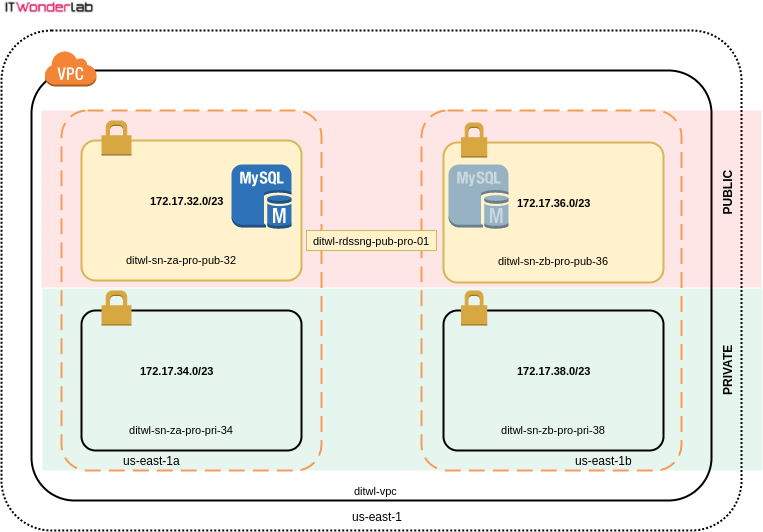
The ditwl-rdssn-pro-pub-01 RDS Subnet Group is shown in yellow, the RDS Database can be launched by AWS in any of the two sub-nets.
terraform.tfvars defines the RDS Subnet Group name and description. Unfortunately, Terraform’s tfvars doesn’t allow interpolations as values (references to other variables, modules or functions), so the subnet_ids have to be specified in the file creating the RDS Subnet Group aws_rds_sn_pro.tf
    #------------------------
    # For RDS instances
    #------------------------
    aws_rds_sn_pub_pro_01 = {
      name        = "ditwl-rds-sn-pub-pro-01"
      description = "ditwl-RDS-SN-pub-PRO-01"

      #See aws_rds_sn_pro.tf for subnet_ids
      #subnet_ids  = ${module.aws_sn_za_pro_pub_32.id},${module.aws_sn_zb_pro_pub_36.id
    }
aws_rds_sn_pub_pro_01.tf uses a module to create the RDS subnet and sets the subnet_ids to the output of the modules that created aws_sn_za_pro_pub_32 and aws_sn_zb_pro_pub_36.
You can comment on line 19 and uncomment line 21 if you want to use a single Availability Zone.
#----------------------
# SUBNET for RDS
#----------------------

  #----------------------
  # PRO
  #----------------------
  module "aws_rds_sn_pub_pro_01" {
    source      = "./modules/aws/rds/subnet"
    name        = var.aws_rds_sn_pub_pro_01["name"]
    description = var.aws_rds_sn_pub_pro_01["description"]

    # Add 2 PRIVATE Subnets from two availability zones
    subnet_ids  = [module.aws_sn_za_pro_pub_32.id, module.aws_sn_zb_pro_pub_36.id]
    # Add 1 PRIVATE Subnets from two availability zones
    #subnet_ids  = [module.aws_sn_za_pro_pub_32.id]
  }
Next Steps #
- AWS Terraform Essential Guide, a comprehensive tutorial that guides you step-by-step through creating infrastructure in AWS using Terraform
- Terraform AWS Tutorials
- Ansible Tutorials