# AWS VPC, Route 53, RDS MariaDB, EC2 using Ansible and Terraform (1/5)
> Tutorial and source code explaining how to provision and configure a VPC, Route 53, RDS MariaDB, Instances and security groups using Ansible and Terraform…
- Source: https://www.itwonderlab.com/terraform-ansible-aws-howto/
- Published: 2020-06-23
- Updated: 2026-10-05
- Author: Javier Ruiz Jiménez (https://www.javierruizjimenez.com/)
- Site: IT Wonder Lab (https://www.itwonderlab.com/)
---
## Terraform Setup and VPC Subnet Creation
In this **Terraform and Ansible demo for AWS** you can find all the code needed to create a VPC (Virtual Private Cloud) in AWS (Amazon Web Services) with an EC2 (Elastic Compute) instance connected to MariaDB database running in RDS (Relational Database Services) using a single Terraform 0.12 plan and installing and configuring an Ubuntu server with [Nginx](https://www.nginx.com/), [PHP](http://php.net/), and [Let’s Encrypt](https://letsencrypt.org/) to run [WordPress](https://wordpress.org/) with [Ansible.](https://www.ansible.com/)
This VPC can be used to install a simple web application like WordPress using Ansible, which will be shown in another post.
The demo follows some IT Wonder Lab best practices using only1 resources included in the AWS free tier plan.
**A real infrastructure should make use of some resources that are not included in the AWS free tier plan like NAT instances and IPSec VPNs. It should also have different VPCs or at least subnets for each environment, reuse Terraform modules, and store the tfstate in a shared location (AWS S3), …**
> [!NOTE]
> This is one of the original IT Wonder Lab tutorials, written for Terraform 0.12 (2018-2020) with the AWS provider of that time. The ideas and the structure are still valid, but some arguments and versions have changed. For a current, step-by-step version see [AWS with Terraform: The Essential Guide](https://www.itwonderlab.com/aws-terraform-tutorial-terraform-basics/), and use OpenTofu or a recent Terraform with the commands `tofu` or `terraform`.
The newer tutorial uses OpenTofu: [AWS with Terraform: The Essential Guide](https://www.itwonderlab.com/tag/aws-terraform-tutorial/).
### Updates
- 23 Jun 2020: Updated to Terraform 0.12
- 5 Oct 2026: Reviewed the text and added a note about current versions
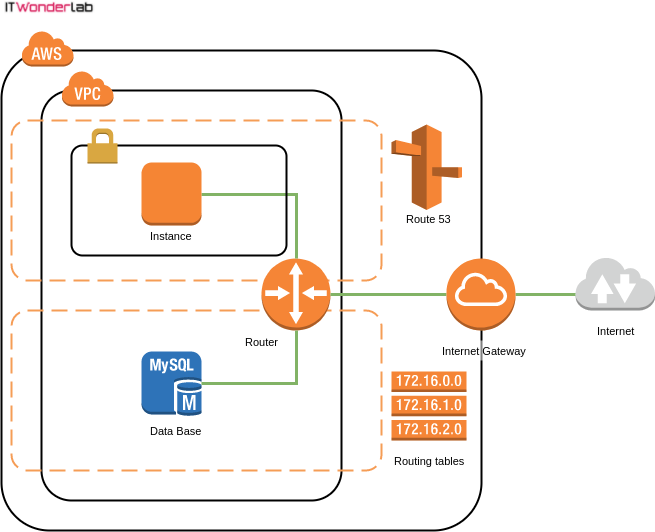
### General Diagram
The diagram shows the main elements that will be created by Terraform:
- 1 VPC
- 4 subnets
- 4 security groups
- 3 route tables
- 1 EC2 instance
- 1 Internet Gateway
- 1 Route 53 Hosted zone
- 1 DB Subnet Group
- 1 RDS MariaDB
### Apply
The following [asciicast](https://asciinema.org/) shows how Terraform creates all the resources in AWS. Applying the whole plan takes around 10 minutes \* (AWS RDS MariaDb creation takes more than 7 minutes).
Click on the play button to see the execution of the Terraform plan.
\* The asciicast has been edited to show everything in 2 minutes.
### Prerequisites
A workstation running an operating system compatible with the required software. We will use [Ubuntu](https://www.ubuntu.com/) for the demo.
1. [Create a **new** AWS account for the demo](https://www.itwonderlab.com/create-an-aws-account-for-demos/).
2. [Create an AWS IAM User for Demos](https://www.itwonderlab.com/create-an-aws-iam-user-for-demos/).
3. Make sure you understand the [AWS VPC Basic Elements](https://www.itwonderlab.com/aws-naming-best-practices/).
4. Install the required software to run the demo:
1. Terraform 0.12 (or [OpenTofu](https://www.itwonderlab.com/how-to-install-opentofu/) with a recent provider)
2. [GIT](https://git-scm.com/download/linux)
3. [Visual Studio Code](https://code.visualstudio.com/) or your favorite text editor
5. Read [Use your public Internet IP address in Terraform](https://www.itwonderlab.com/use-your-public-internet-ip-address-terraform/).
6. Read [Avoiding AWS instance destroy with Terraform](https://www.itwonderlab.com/avoiding-instance-destroy-aws-with-terraform/).
7. Download the source code for the demo from [IT Wonder Lab public GitHub repository](https://github.com/itwonderlab/terraform-aws-ec2-rds-basic-free).
8. Make whatismyip.sh executable using:
```bash
chmod 764 whatismyip.sh
```
### File Layout
Terraform configuration files are used to describe infrastructure and to set variables, most of the examples are found on the Internet using a single file or at most a few files to configure all the infrastructure.
**Best Practice: Terraform File Naming and Layout**: in this example to create an AWS VPC with an EC2 Instance and a MariaDB RDS Data Base you will find a Terraform layout that follows our best practice recommendation for defining multiple environments on the same VPC using Terraform modules
The example has the following files:
| Name | Description |
| --- | --- |
| modules | Terraform modules used by the demo |
| aws\_ds\_aws\_ami.tf | Data source to get the ID of the latest AMI for the selected OS |
| aws\_ec2\_pro\_wp.tf | Word Press Server, associated security groups, DNS registration |
| aws\_ec2\_pro\_wp\_vars.tf | Word Press Server variables |
| aws\_internet\_gateway.tf | Internet Gateway |
| aws\_internet\_gateway\_vars.tf | Internet Gateway variables |
| aws\_rds\_pro\_mariadb\_01.tf | RDS MariaDB and associated security groups |
| aws\_rds\_pro\_mariadb\_01\_vars.tf | RDS MariaDB variables |
| aws\_rds\_sn\_pro.tf | RDS subnets |
| aws\_rds\_sn\_pro\_vars.tf | RDS subnets variables |
| aws\_route53.tf | Route 53 (DNS) |
| aws\_route53\_vars.tf | Route 53 (DNS) variables |
| aws\_sec\_group\_ec2\_default.tf | Default security group to assign to all EC2 instances |
| aws\_sec\_group\_ec2\_default\_vars.tf | Default EC2 security group variables |
| aws\_sec\_group\_rds\_mariadb\_default.tf | Default security group to assign to all RDS MariaDB instances |
| aws\_sec\_group\_rds\_mariadb\_default\_vars.tf | Default RDS security group variables |
| aws\_vpc\_routing.tf | Routing tables for subnets |
| aws\_vpc\_routing\_vars.tf | Routing tables for subnets variables |
| aws\_vpc\_subnets.tf | VPC subnets |
| aws\_vpc\_subnets\_vars.tf | VPC subnets variables |
| aws\_vpc.tf | VPC |
| aws\_vpc\_vars.tf | VPC variables |
| external\_whatismyip.tf | Obtains current Public Internet IP for usage in firewall rules |
| provider\_aws.tf | Defines AWS provider |
| provider\_aws\_vars.tf | Defines AWS provider variables |
| terraform.tf | Defines terraform |
| terraform.tfvars | Values for all the variables in the demo |
| terraform\_vars.tf | Defines terraform variables |
| whatismyip.sh | Script to obtain current Public Internet IP |
| .gitignore | Defines the file and patterns that should not be pushed to git repository |
| .terraform | Working directory created by Terraform |
### Configure Terraform AWS Provider
Terraform needs to have the Account ID and the credentials for the AWS account that will be used to interact with AWS API.
AWS credentials will be stored outside Terraform in ~/.aws/credentials, using the [Shared Credentials file](https://www.terraform.io/docs/providers/aws/) option for Terraform.
**Best Practice: Terraform and AWS credentials**: Terraform AWS provider has other options for credential configuration, but this one is an IT Wonder Lab best practice as it stores the credentials outside the Terraform configuration, therefore reducing the risk of credential leaking and it also allows each user that checks out the code to run the Terraform plans with its own credentials.
Create or open the credentials file and add the following content:
```json title="~/.aws/credentials"
[ditwl_infradmin]
aws_access_key_id=A1B2C3D4E5F6G7H8I9J0
aws_secret_access_key=QwertYuiopASDFGHJKL123456789sadfghjkvcbn
```
The profile name is surrounded by square brackets \[ditwl\_infradmin\] and will be the name used in the Terraform configuration to identify the credentials to use.
aws\_access\_key\_id and aws\_secret\_access\_key are the ones obtained when creating the AWS IAM User for Demos.
You will also need to set other configurations related to AWS credentials in the file **terraform.tfvars** located in the root directory of the checked example:
```json title="terraform.tfvars"
#------------------------
# PROVIDERS
#------------------------
# DEFAULT AWS
provider_default_aws_profile = "ditwl_infradmin"
provider_default_aws_region = "us-east-1"
provider_default_aws_account_id = ["134567891011"]
provider_default_aws_shared_credentials_file = "~/.aws/credentials"
provider_default_aws_key_file = "~/keys/ditwl_kp_infradmin.pem"
```
- **provider\_default\_aws\_profile**: Corresponds to the profile name used in the credentials file.
- **provider\_default\_aws\_region**: us-east-1 corresponds to US East (N. Virginia) and it is the cheapest region. See choosing [your AWS Region wisely](https://www.concurrencylabs.com/blog/choose-your-aws-region-wisely/).
- **provider\_default\_aws\_account\_id**: It is the AWS account id, see [Create a **new** AWS account for the demo](https://www.itwonderlab.com/create-an-aws-account-for-demos/).
- **provider\_default\_aws\_shared\_credentials\_file**: the full path to the credentials file. Default path “~/.aws/credentials” is used.
- **provider\_default\_aws\_key\_file**: This is the full path to a private key file used for Terraform instance provisioning. It will be used by Ansible to connect to the instance to install the needed software.
The values from **terraform.tfvars** are used in **provider\_aws.tf** to configure the AWS Provider.
Setting the **allowed\_account\_ids** prevents Terraform from applying changes to a different AWS account.
**Best Practice: Redundancy in Configuration Files**: IT Wonder Lab’s best practice is to specify the provider\_default\_aws\_account\_id in the terraform.tfvars and use it to fill the allowed\_account\_ids in the AWS provider.
The aws\_access\_key\_id of an IAM user is used for AWS to identify the Account ID that the user belongs to, and all operations are applied to that Account, so there is technically no need to specify the Account ID again.
This is an intended redundancy, as many others that you will find in IT Wonder Lab, it is **a double check on the account to prevent catastrophic errors.**
```json title="provider_aws.tf"
provider "aws" {
shared_credentials_file = pathexpand(var.provider_default_aws_shared_credentials_file)
profile = var.provider_default_aws_profile
region = var.provider_default_aws_region
allowed_account_ids = var.provider_default_aws_account_id
version = "~> 2.0"
}
```
### VPC Subnet Creation
AWS creates a default VPC for each AWS Region when an account is created.
Deleting the default VPC is irreversible and you will need to contact AWS or recreate the account if you want to have a default VPC again.
Terraform provides a data source that lets you “adopt” the default VPC but that will not be used.
**Best Practice: Terraform managed AWS VPC**: An IT Wonder Lab best practice is to delete the default VPC and recreate everything using Terraform.
If you are going to be responsible for the Cloud Infrastructure, better know everything about it. You have to be in control of every piece of the infrastructure (like the chosen IP Range) and I like to be aware of all the details
The VPC will be created using the 172.17.32.0/19 private IPv4 address range (8192 IPs) divided into many smaller subnets of 512 hosts (subnet mask/23). See [ipv4 Subnet Calculator](https://www.site24x7.com/tools/ipv4-subnetcalculator.html).
**terraform.tfvars**
```json title="terraform.tfvars"
#------------------------
# VPC
#------------------------
aws_vpc_tag_name = "ditwl-vpc"
aws_vpc_block = "172.17.32.0/19" #172.17.32.1 - 172.16.67.254
```
For the demo, we will only provision 4 subnets.
**Best Practice: Multiple AWS Availability Zones**: An IT Wonder Lab’s best practice is to distribute sub-nets in more than one Availability Zone and have private and public zones.
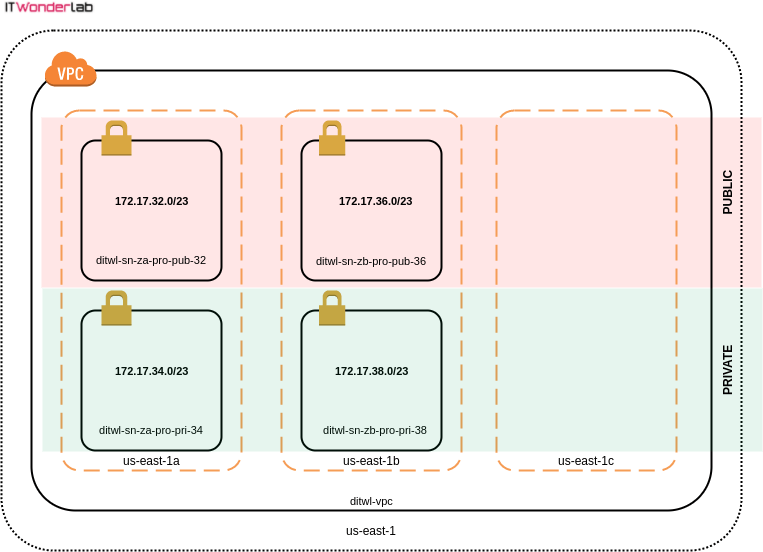
Instance placement has to take into account that data transfer between different Availability Zones has a cost, therefore achieving high availability by distributing infrastructure between Availability Zones has an impact on the total budget.
| CIDR | Host Address Range | Terraform name & Description |
| --- | --- | --- |
| 172.17.32.0/23 | 172.17.32.1 – 172.17.33.254 | aws\_sn\_**za**\_**pro**\_**pub**\_32
Zone: A Env: PRO Type: PUBLIC Code: 32 |
| 172.17.34.0/23 | 172.17.34.1 – 172.17.35.254 | aws\_sn\_**za**\_**pro**\_**pri**\_34
Zone: A Env: PRO Type: PRIVATE Code: 34 |
| 172.17.36.0/23 | 172.17.36.1 – 172.17.37.254 | aws\_sn\_zb\_pro\_pub\_36
Zone: B Env: PRO Type: PUBLIC Code: 36 |
| 172.17.38.0/23 | 172.17.38.1 – 172.17.39.254 | aws\_sn\_zb\_pro\_pri\_38
Zone: B Env: PRO Type: PRIVATE Code: 38 |
| 172.17.40.0/23 | 172.17.40.1 – 172.17.41.254 | aws\_sn\_z?\_pr?\_p??\_40 |
| 172.17.42.0/23 | 172.17.42.1 – 172.17.43.254 | aws\_sn\_z?\_pr?\_p??\_42 |
| 172.17.44.0/23 | 172.17.44.1 – 172.17.45.254 | aws\_sn\_z?\_pr?\_p??\_44 |
| 172.17.46.0/23 | 172.17.46.1 – 172.17.47.254 | aws\_sn\_z?\_pr?\_p??\_46 |
| 172.17.48.0/23 | 172.17.48.1 – 172.17.49.254 | aws\_sn\_z?\_pr?\_p??\_48 |
| 172.17.50.0/23 | 172.17.50.1 – 172.17.51.254 | aws\_sn\_z?\_pr?\_p??\_50 |
| 172.17.52.0/23 | 172.17.52.1 – 172.17.53.254 | aws\_sn\_z?\_pr?\_p??\_52 |
| 172.17.54.0/23 | 172.17.54.1 – 172.17.55.254 | aws\_sn\_z?\_pr?\_p??\_54 |
| 172.17.56.0/23 | 172.17.56.1 – 172.17.57.254 | aws\_sn\_z?\_pr?\_p??\_56 |
| 172.17.58.0/23 | 172.17.58.1 – 172.17.59.254 | aws\_sn\_z?\_pr?\_p??\_58 |
| 172.17.60.0/23 | 172.17.60.1 – 172.17.61.254 | aws\_sn\_z?\_pr?\_p??\_60 |
| 172.17.62.0/23 | 172.17.62.1 – 172.17.63.254 | aws\_sn\_z?\_pr?\_p??\_62 |
### Terraform Subnet Definition
**t**erraform.tfvars
```json title="terraform.tfvars"
#------------------------
# SUBNETS
#------------------------
#------------------------
# For EC2 instances
#------------------------
#Zone: A, Env: PRO, Type: PUBLIC, Code: 32
aws_sn_za_pro_pub_32={
cidr ="172.17.32.0/23" #172.17.32.1 - 172.17.33.254
name ="ditwl-sn-za-pro-pub-32"
az ="us-east-1a"
public = "true"
}
#Zone: A, Env: PRO, Type: PRIVATE, Code: 34
aws_sn_za_pro_pri_34={
cidr = "172.17.34.0/23" #172.17.34.1 - 172.17.35.254
name = "ditwl-sn-za-pro-pri-34"
az = "us-east-1a"
public = "false"
}
#Zone: B, Env: PRO, Type: PUBLIC, Code: 36
aws_sn_zb_pro_pub_36={
cidr = "172.17.36.0/23" #172.17.36.1 - 172.17.37.254
name = "ditwl-sn-zb-pro-pub-36"
az = "us-east-1b"
public = "false"
}
#Zone: B, Env: PRO, Type: PRIVATE, Code: 38
aws_sn_zb_pro_pri_38={
cidr = "172.17.38.0/23" #172.17.38.1 - 172.17.39.254
name = "ditwl-sn-zb-pro-pri-38"
az = "us-east-1b"
public = "false"
}
```
### Plan
Run the Terraform plan command often as it is the best way to check that everything is correct. Some errors are difficult to identify, our recommendation is to make changes to the Terraform configuration in small doses and test the plan.
The following asciicast shows the elements that Terraform will create in AWS.
Click on the play button to see the execution of the Terraform plan.
### Next Steps
- [AWS Terraform Essential Guide, a comprehensive tutorial that guides you step-by-step through creating infrastructure in AWS using Terraform](https://www.itwonderlab.com/tag/aws-terraform-essential-guide/)
- Terraform AWS Tutorials
- [Terraform Setup and AWS VPC Subnet Creation (1/5)](https://www.itwonderlab.com/terraform-ansible-aws-howto/)
- [VPC Subnet Routing and Internet Access with Terraform (2/5)](https://www.itwonderlab.com/using-terraform-to-create-an-aws-vpc-with-an-ec2-instance-and-a-mariadb-rds-data-base-ii/)
- [AWS Route 53, AMI Lookup and EC2 Creation with Terraform (3/5)](https://www.itwonderlab.com/terraform-route-53-ami-lookup/)
- [AWS RDS MariaDB Database and Resource Tags with Terraform (4/5)](https://www.itwonderlab.com/terraform-aws-mariadb-rds-database/)
- [EC2 Instances and Resource Security with Terraform (5/5)](https://www.itwonderlab.com/terraform-aws-ec2-security-rules/)
- Ansible Tutorials
- [Using Ansible for Terraform Managed AWS Infrastructure](https://www.itwonderlab.com/terraform-aws-ansible/)
1. The DNS zone is not included in the AWS Free Tier.