# How to Deploy Applications in Kubernetes using Terraform
> How to publish multiple replicas of an Application (from the Docker Registry) and create a NodePort in Kubernetes using Terraform (in 10 seconds)
- Source: https://www.itwonderlab.com/kubernetes-with-terraform/
- Published: 2023-11-13
- Updated: 2026-10-05
- Author: Javier Ruiz Jiménez (https://www.javierruizjimenez.com/)
- Site: IT Wonder Lab (https://www.itwonderlab.com/)
---
## Publishing Containers in Kubernetes with Terraform
Terraform is a great tool to programmatically define infrastructure (IaC or Infrastructure as Code) since Kubernetes Applications are containerized, its deployment can be done with a small Terraform configuration file that defines the resources that should be created in Kubernetes.
This tutorial shows how to publish an Application and create a NodePort in Kubernetes using Terraform. **It only takes 10 seconds**!
The application will be retrieved from the Docker Public Registry and Terraform will instruct Kubernetes to create 3 replicas and publish its services in a NodePort.
Updates:
- 13/Nov/2023: Updated Terraform code to release 1.5 and Kubernetes provider: hashicorp/kubernetes v2.23.0 (signed by HashiCorp)
> [!NOTE]
> See [Publishing Containers in Kubernetes with OpenTofu](https://www.itwonderlab.com/kubernetes-with-opentofu/) for an updated tutorial using OpenTofu / Terraform and K3s.
### Demo: Publishing Containers in Kubernetes with Terraform:
This demo shows how Terraform is used to deploy an application image from the Docker Public Registry into Kubernetes.
Click the ► play button to see the *asciinema* demo:
### Prerequisites
- Have access to a Kubernetes cluster. In this example, we use our [Local Kubernetes Cluster for Development](https://www.itwonderlab.com/ansible-kubernetes-vagrant-tutorial/).
- Have a local Kubernetes configuration file with a known config context.
- Download the source code from the [IT Wonder Lab Git Hub repository](https://github.com/itwonderlab/terraform-kubernetes-deploy-app) or create a new file with the code shown.
### Check Kubernetes Cluster Connection Context
For our example, we will use an existing Kubernetes cluster connection configuration available at the standard location `~/.kube/config`
The ~/.kube/config file can have many different contexts, a context defines a cluster, a user, and a name for the context.
Check the context file using the command `kubectl config view`:
```yaml
Zj7i2amef572KHsabWyPFnH0wSHhw80DJa3UMujA1mI3JyUYtCuqpeSceZTkNDyF3iNpcF79PrOFXfkCqLDKbZQQQ4tPGqfrxxvT7l5LSghyN1f0IjPYmARPlAbIQUisHk3clsuQOUDEA3W0gEjS2VlNh7uphTvQFh3Zj7i2amef572KHsabWyPFnH0wSHhw80DJa3UMujA1mI3JyUYtCuqpeSceZTkNDyF3iNpcF79PrOFXfkCqLDKbZQQQ4tPGqfrxxvT7l5LSghyN1f0IjPYmARPlAbIQUisHk3clsuQOUDEA3W0gEjS2VlNh7uphTvQFh3
$ kubectl config view
apiVersion: v1
clusters:
- cluster:
certificate-authority-data: DATA+OMITTED
server: https://192.168.50.11:6443
name: kubernetes
contexts:
- context:
cluster: kubernetes
user: kubernetes-admin
name: kubernetes-admin@ditwl-k8s-01
current-context: kubernetes-admin@ditwl-k8s-01
kind: Config
preferences: {}
users:
- name: kubernetes-admin
user:
client-certificate-data: REDACTED
client-key-data: REDACTED
```
The context named `kubernetes-admin@ditwl-k8s-01` is shown as it appears at `~/.kube/config` file:
```json
apiVersion: v1
clusters:
- cluster:
certificate-authority-data: LS0tLS1CRUdJTiBDRVJUSUZJQ0FURS0tLS0tCk1JSUN5RENDQWJDZ0F3SUJBZ0lCQURBTkJna3Foa2lH....Q0VSVElGSUNBVEUtLS0tLQo=
server: https://192.168.50.11:6443
name: kubernetes
contexts:
- context:
cluster: kubernetes
user: kubernetes-admin
name: kubernetes-admin@ditwl-k8s-01
current-context: kubernetes-admin@ditwl-k8s-01
kind: Config
preferences: {}
users:
- name: kubernetes-admin
user:
client-certificate-data: LS0tLS1CRUdJTiBDRVJUSUZJQ0FURS0tLS0tCk1JSUM4akNDQWRxZ0F3SUJBZ0lJWTJsaU5WWjVrZ1V3....U4rbW9qL1l6V0NJdURnSXZBRU1NZDVIMnBOaHMvcz0KLS0tLS1FTkQgQ0VSVElGSUNBVEUtLS0tLQo=
client-key-data: LS0tLS1XRUdJTiBSU0EgUFJJVkFURSBLRVktLS0tLQpWSUlFcFFJQkFBS0NBUUVBK295RXBYVTZu.....BLRVktLS0tLQo=
```
We will use the context kubernetes-admin@ditwl-k8s-01 in our Terraform provider definition for Kubernetes.
If your context differs either update the Terraform file or rename the context using the commands:
```bash
kubectl config get-contexts
kubectl config rename-context
```
In the following example, an existing context named kubernetes-admin@kubernetes is renamed to kubernetes-admin@ditwl-k8s-01
```shell
$ kubectl config get-contexts
CURRENT NAME CLUSTER AUTHINFO NAMESPACE
* kubernetes-admin@kubernetes kubernetes kubernetes-admin
$ kubectl config rename-context kubernetes-admin@kubernetes kubernetes-admin@ditwl-k8s-01
Context "kubernetes-admin@kubernetes" renamed to "kubernetes-admin@ditwl-k8s-01".
$ kubectl config get-contexts
CURRENT NAME CLUSTER AUTHINFO NAMESPACE
* kubernetes-admin@ditwl-k8s-01 kubernetes kubernetes-admin
```
### Test Kubernetes Cluster Connectivity
Please make sure that your Kubernetes configuration file has the correct credentials by connecting to the cluster with the `kubectl` command.
```
jruiz@XPS13:~/git/github/terraform-kubernetes-deploy-app$ kubectl get nodes
NAME STATUS ROLES AGE VERSION
k8s-m-1 Ready master 3h33m v1.18.6
k8s-n-1 Ready 3h30m v1.18.6
k8s-n-2 Ready 3h27m v1.18.6
```
### Write Terraform file for Application Deployment in Kubernetes
Create or download from GitHub the file **terraform.tf**:
```json
# Copyright (C) 2018 - 2023 IT Wonder Lab (https://www.itwonderlab.com)
#
# This software may be modified and distributed under the terms
# of the MIT license. See the LICENSE file for details.
# -------------------------------- WARNING --------------------------------
# IT Wonder Lab's best practices for infrastructure include modularizing
# Terraform configuration.
# In this example, we define everything in a single file.
# See other tutorials for Terraform best practices for Kubernetes deployments.
# -------------------------------- WARNING --------------------------------
terraform {
required_version = "> 1.5"
}
#-----------------------------------------
# Default provider: Kubernetes
#-----------------------------------------
provider "kubernetes" {
#kubeconfig file, if using K3S set the path
#config_path = "/etc/rancher/k3s/k3s.yaml"
#Context to choose from the config file. Change if not default.
config_context = "kubernetes-admin@ditwl-k8s-01"
}
#-----------------------------------------
# KUBERNETES: Deploy App
#-----------------------------------------
resource "kubernetes_deployment" "color" {
metadata {
name = "color-blue-dep"
labels = {
app = "color"
color = "blue"
} //labels
} //metadata
spec {
selector {
match_labels = {
app = "color"
color = "blue"
} //match_labels
} //selector
#Number of replicas
replicas = 3
#Template for the creation of the pod
template {
metadata {
labels = {
app = "color"
color = "blue"
} //labels
} //metadata
spec {
container {
image = "itwonderlab/color" #Docker image name
name = "color-blue" #Name of the container specified as a DNS_LABEL. Each container in a pod must have a unique name (DNS_LABEL).
#Block of string name and value pairs to set in the container's environment
env {
name = "COLOR"
value = "blue"
} //env
#List of ports to expose from the container.
port {
container_port = 8080
}//port
resources {
requests = {
cpu = "250m"
memory = "50Mi"
} //requests
} //resources
} //container
} //spec
} //template
} //spec
} //resource
#-------------------------------------------------
# KUBERNETES: Add a NodePort
#-------------------------------------------------
resource "kubernetes_service" "color-service-np" {
metadata {
name = "color-service-np"
} //metadata
spec {
selector = {
app = "color"
} //selector
session_affinity = "ClientIP"
port {
port = 8080
node_port = 30085
} //port
type = "NodePort"
} //spec
} //resource
```
Line 12 defines the required version for Terraform. We will be using Terraform 1.5 or above.
Lines 18 to 25 define the configuration for the **Terraform Kubernetes provider**
- **config\_path** (optional): sets the path for the kubeconfig file if it differs from the standard location
- **config\_context** (optional): sets the name of the Kubernetes context to use, if differs from default. We will use kubernetes-admin@ditwl-k8s-01 that corresponds to our `~/.kube/config` file.
Lines 31 to 83 define a Terraform Kubernetes deployment resource named color with the following properties:
- Name = “color-blue-dep”
- Labels
- app=”color”
- color=”blue”
- Replicas: 3
- All replicas use a container template for the PODs that:
- Pulls the Docker image “itwonderlab/color” from the public Docker registry (https://hub.docker.com/u/itwonderlab)
- Sets an environment variable in the Docker container COLOR with the value “blue”
- Publish container port 8080 (the HTTP port used by our color application)
- Sets CPU and memory limits.
Since we use our [Local Kubernetes Cluster using Vagrant and Ansible](https://www.itwonderlab.com/ansible-kubernetes-vagrant-tutorial/) tutorial, a [NodePort](https://www.itwonderlab.com/nodeport-kubernetes-cluster/) must be created to expose the application port outside the VirtualBox network.
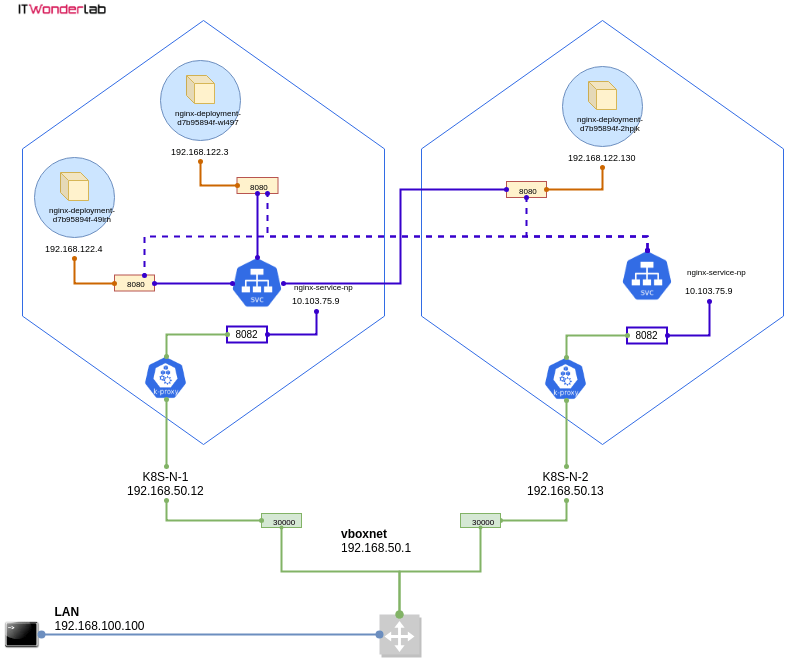
Lines 91 to 106 create a NodePort that publishes app “color” port 8080 as Node Port 30085 in all Kubernetes nodes’ public IPs. See [Using a NodePort in a Kubernetes Cluster on top of VirtualBox](https://www.itwonderlab.com/nodeport-kubernetes-cluster/) for more information.
### Initialize Terraform Kubernetes Providers
Initialize the Terraform Kubernetes Provider by running `terraform init`. It will download the required plugins. This step is needed when a new provider has been added to the Terraform plan.
```shell
$ terraform init
Initializing the backend...
Initializing provider plugins...
- Finding latest version of hashicorp/kubernetes...
- Installing hashicorp/kubernetes v2.23.0...
- Installed hashicorp/kubernetes v2.23.0 (signed by HashiCorp)
Terraform has created a lock file .terraform.lock.hcl to record the provider
selections it made above. Include this file in your version control repository
so that Terraform can guarantee to make the same selections by default when
you run "terraform init" in the future.
...
```
### Publish the Application In Kubernetes and its NodePort with Terraform
Publish the application by applying the Terraform plan.
Run `terraform plan`
```shell
$ terraform plan
Terraform used the selected providers to generate the following execution plan. Resource actions are indicated with the following symbols:
+ create
Terraform will perform the following actions:
# kubernetes_deployment.color will be created
+ resource "kubernetes_deployment" "color" {
+ id = (known after apply)
+ wait_for_rollout = true
+ metadata {
+ generation = (known after apply)
+ labels = {
+ "app" = "color"
+ "color" = "blue"
}
+ name = "color-blue-dep"
+ namespace = "default"
+ resource_version = (known after apply)
+ uid = (known after apply)
}
+ spec {
+ min_ready_seconds = 0
+ paused = false
+ progress_deadline_seconds = 600
+ replicas = "3"
+ revision_history_limit = 10
+ selector {
+ match_labels = {
+ "app" = "color"
+ "color" = "blue"
}
}
+ template {
+ metadata {
+ generation = (known after apply)
+ labels = {
+ "app" = "color"
+ "color" = "blue"
}
+ name = (known after apply)
+ resource_version = (known after apply)
+ uid = (known after apply)
}
+ spec {
+ automount_service_account_token = true
+ dns_policy = "ClusterFirst"
+ enable_service_links = true
+ host_ipc = false
+ host_network = false
+ host_pid = false
+ hostname = (known after apply)
+ node_name = (known after apply)
+ restart_policy = "Always"
+ scheduler_name = (known after apply)
+ service_account_name = (known after apply)
+ share_process_namespace = false
+ termination_grace_period_seconds = 30
+ container {
+ image = "itwonderlab/color"
+ image_pull_policy = (known after apply)
+ name = "color-blue"
+ stdin = false
+ stdin_once = false
+ termination_message_path = "/dev/termination-log"
+ termination_message_policy = (known after apply)
+ tty = false
+ env {
+ name = "COLOR"
+ value = "blue"
}
+ port {
+ container_port = 8080
+ protocol = "TCP"
}
+ resources {
+ limits = (known after apply)
+ requests = {
+ "cpu" = "250m"
+ "memory" = "50Mi"
}
}
}
}
}
}
}
# kubernetes_service.color-service-np will be created
+ resource "kubernetes_service" "color-service-np" {
+ id = (known after apply)
+ status = (known after apply)
+ wait_for_load_balancer = true
+ metadata {
+ generation = (known after apply)
+ name = "color-service-np"
+ namespace = "default"
+ resource_version = (known after apply)
+ uid = (known after apply)
}
+ spec {
+ allocate_load_balancer_node_ports = true
+ cluster_ip = (known after apply)
+ cluster_ips = (known after apply)
+ external_traffic_policy = (known after apply)
+ health_check_node_port = (known after apply)
+ internal_traffic_policy = (known after apply)
+ ip_families = (known after apply)
+ ip_family_policy = (known after apply)
+ publish_not_ready_addresses = false
+ selector = {
+ "app" = "color"
}
+ session_affinity = "ClientIP"
+ type = "NodePort"
+ port {
+ node_port = 30085
+ port = 8080
+ protocol = "TCP"
+ target_port = (known after apply)
}
}
}
Plan: 2 to add, 0 to change, 0 to destroy.
```
Run `terraform apply` to make the necessary changes in the Kubernetes cluster:
```shell
$ $ terraform apply
Terraform used the selected providers to generate the following execution plan. Resource actions are indicated with the following symbols:
+ create
Terraform will perform the following actions:
# kubernetes_deployment.color will be created
+ resource "kubernetes_deployment" "color" {
+ id = (known after apply)
+ wait_for_rollout = true
+ metadata {
+ generation = (known after apply)
+ labels = {
+ "app" = "color"
+ "color" = "blue"
}
+ name = "color-blue-dep"
+ namespace = "default"
+ resource_version = (known after apply)
+ uid = (known after apply)
}
+ spec {
+ min_ready_seconds = 0
+ paused = false
+ progress_deadline_seconds = 600
+ replicas = "3"
+ revision_history_limit = 10
+ selector {
+ match_labels = {
+ "app" = "color"
+ "color" = "blue"
}
}
+ template {
+ metadata {
+ generation = (known after apply)
+ labels = {
+ "app" = "color"
+ "color" = "blue"
}
+ name = (known after apply)
+ resource_version = (known after apply)
+ uid = (known after apply)
}
+ spec {
+ automount_service_account_token = true
+ dns_policy = "ClusterFirst"
+ enable_service_links = true
+ host_ipc = false
+ host_network = false
+ host_pid = false
+ hostname = (known after apply)
+ node_name = (known after apply)
+ restart_policy = "Always"
+ scheduler_name = (known after apply)
+ service_account_name = (known after apply)
+ share_process_namespace = false
+ termination_grace_period_seconds = 30
+ container {
+ image = "itwonderlab/color"
+ image_pull_policy = (known after apply)
+ name = "color-blue"
+ stdin = false
+ stdin_once = false
+ termination_message_path = "/dev/termination-log"
+ termination_message_policy = (known after apply)
+ tty = false
+ env {
+ name = "COLOR"
+ value = "blue"
}
+ port {
+ container_port = 8080
+ protocol = "TCP"
}
+ resources {
+ limits = (known after apply)
+ requests = {
+ "cpu" = "250m"
+ "memory" = "50Mi"
}
}
}
}
}
}
}
# kubernetes_service.color-service-np will be created
+ resource "kubernetes_service" "color-service-np" {
+ id = (known after apply)
+ status = (known after apply)
+ wait_for_load_balancer = true
+ metadata {
+ generation = (known after apply)
+ name = "color-service-np"
+ namespace = "default"
+ resource_version = (known after apply)
+ uid = (known after apply)
}
+ spec {
+ allocate_load_balancer_node_ports = true
+ cluster_ip = (known after apply)
+ cluster_ips = (known after apply)
+ external_traffic_policy = (known after apply)
+ health_check_node_port = (known after apply)
+ internal_traffic_policy = (known after apply)
+ ip_families = (known after apply)
+ ip_family_policy = (known after apply)
+ publish_not_ready_addresses = false
+ selector = {
+ "app" = "color"
}
+ session_affinity = "ClientIP"
+ type = "NodePort"
+ port {
+ node_port = 30085
+ port = 8080
+ protocol = "TCP"
+ target_port = (known after apply)
}
}
}
Plan: 2 to add, 0 to change, 0 to destroy.
Do you want to perform these actions?
Terraform will perform the actions described above.
Only 'yes' will be accepted to approve.
Enter a value: yes
kubernetes_service.color-service-np: Creating...
kubernetes_deployment.color: Creating...
kubernetes_service.color-service-np: Creation complete after 0s [id=default/color-service-np]
kubernetes_deployment.color: Creation complete after 3s [id=default/color-blue-dep]
Apply complete! Resources: 2 added, 0 changed, 0 destroyed.
```
The application has been published.
### Access the App using the NodePort
Open the URL [http://192.168.50.11:30085/](http://192.168.50.11:30085/) to access the Color App (All Nodes in Kubernetes expose the same NodePort, you can use any of the Cluster IPs as explained in [Using a NodePort in a Kubernetes Cluster on top of VirtualBox.](https://www.itwonderlab.com/nodeport-kubernetes-cluster/)
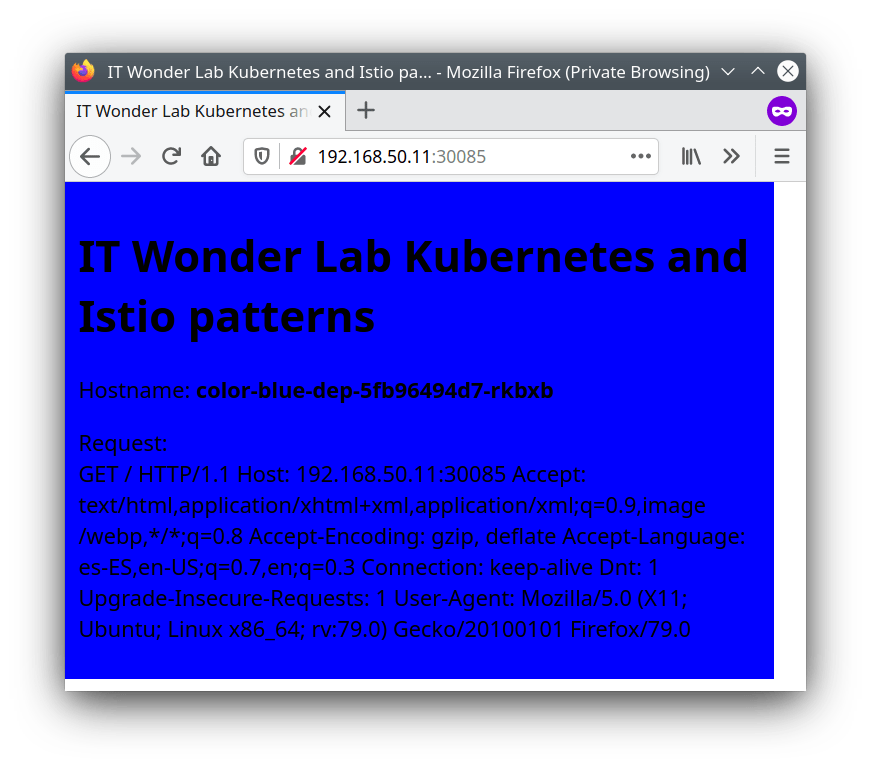
Now that you have accessed one of the Color App replicas, you can explore the changes that Terraform did in Kubernetes using the Kubernetes Dashboard, you can also modify the Terraform configuration, and apply changes to the deployed application.
### Use the Kubernetes Dashboard to Review the Deployment
If using the tutorial for a [local Kubernetes cluster,](https://www.itwonderlab.com/ansible-kubernetes-vagrant-tutorial/) access the Kubernetes Dashboard with the URL [https://192.168.50.11:30002/](https://192.168.50.11:30002/)
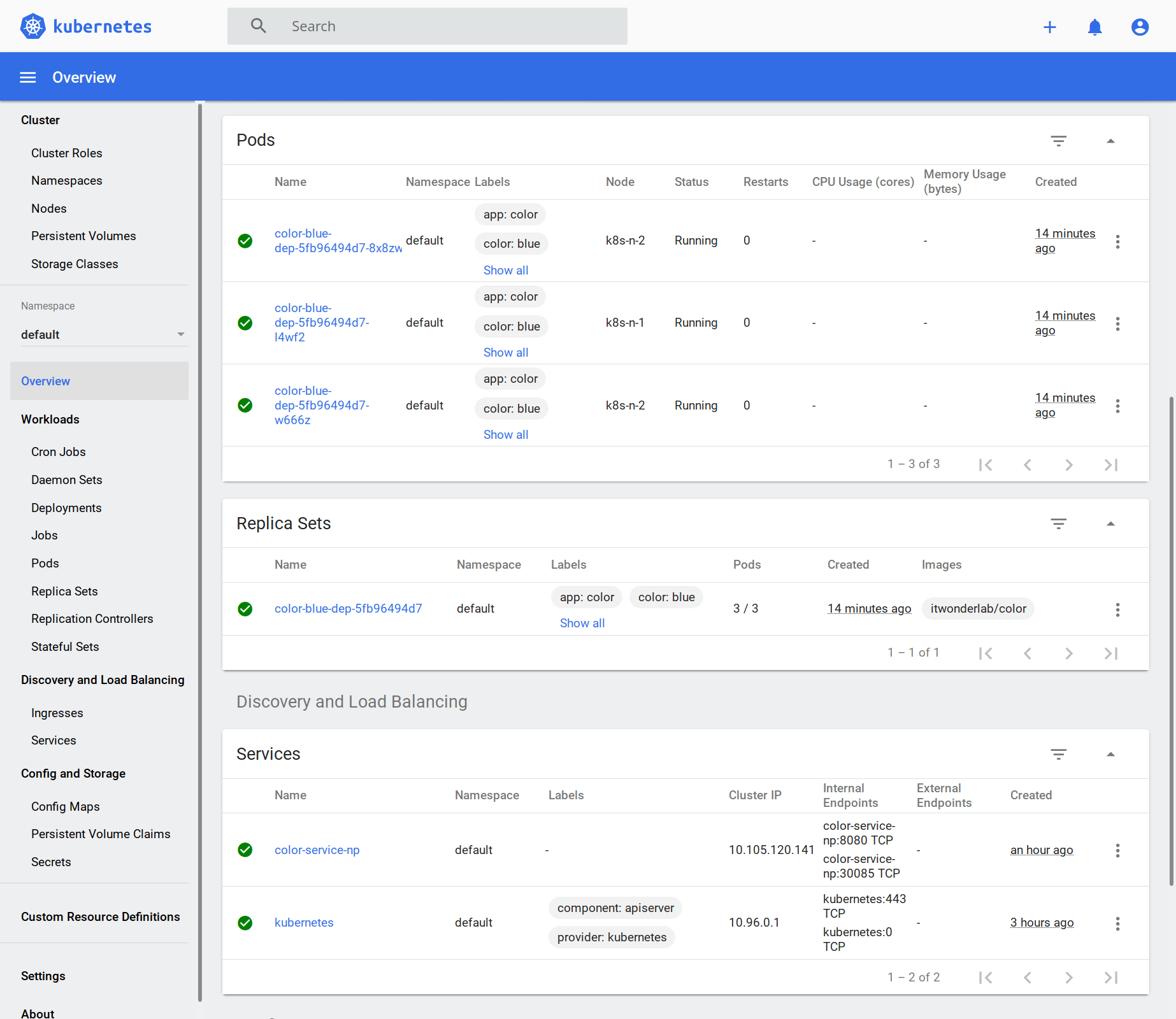
The Dashboard shows the 3 replicas or PODS of the application, a replica set that tells Kubernetes the number of PODs that it has to keep alive, and a Service with the NodePort.
### Modify the number of replicas to 1
See how Terraform and Kubernetes modify the application number of replicas without disturbing existing connections by using a rolling update strategy.
Modify the terraform.tf file to change the number of replicas:
```
replicas = 1
```
Run `terraform plan` to see what will change:
```shell
$ terraform plan
kubernetes_service.color-service-np: Refreshing state... [id=default/color-service-np]
kubernetes_deployment.color: Refreshing state... [id=default/color-blue-dep]
Terraform used the selected providers to generate the following execution plan. Resource actions are indicated with the following symbols:
~ update in-place
Terraform will perform the following actions:
# kubernetes_deployment.color will be updated in-place
~ resource "kubernetes_deployment" "color" {
id = "default/color-blue-dep"
# (1 unchanged attribute hidden)
~ spec {
~ replicas = "3" -> "1"
# (4 unchanged attributes hidden)
# (3 unchanged blocks hidden)
}
# (1 unchanged block hidden)
}
Plan: 0 to add, 1 to change, 0 to destroy.
```
Run `terraform apply` to make the change:
```
$ $ terraform apply
kubernetes_service.color-service-np: Refreshing state... [id=default/color-service-np]
kubernetes_deployment.color: Refreshing state... [id=default/color-blue-dep]
Terraform used the selected providers to generate the following execution plan. Resource actions are indicated with the following symbols:
~ update in-place
Terraform will perform the following actions:
# kubernetes_deployment.color will be updated in-place
~ resource "kubernetes_deployment" "color" {
id = "default/color-blue-dep"
# (1 unchanged attribute hidden)
~ spec {
~ replicas = "3" -> "1"
# (4 unchanged attributes hidden)
# (3 unchanged blocks hidden)
}
# (1 unchanged block hidden)
}
Plan: 0 to add, 1 to change, 0 to destroy.
Do you want to perform these actions?
Terraform will perform the actions described above.
Only 'yes' will be accepted to approve.
Enter a value: yes
kubernetes_deployment.color: Modifying... [id=default/color-blue-dep]
kubernetes_deployment.color: Modifications complete after 1s [id=default/color-blue-dep]
Apply complete! Resources: 0 added, 1 changed, 0 destroyed.
```
Terraform has instructed Kubernetes to change the number of replicas from 3 to 1, if you look at the dashboard or monitor the Kubernetes cluster during the change you will notice how Kubernetes applies a rolling update.
### Next Steps
Check other [Terraform tutorials](https://www.itwonderlab.com/tutorials/terraform/) and [Terraform best practices](https://www.itwonderlab.com/best-practices/terraform-best-practices/), or deploy to the cloud with [Terraform AWS EKS](https://www.itwonderlab.com/terraform-eks/).