
This tutorial shows how to use Kubernetes Persistent Volumes to store data using an NFS external server. Kubernetes Persistent Volumes (PVs) are storage resources abstracted from the underlying storage details. They allow decoupling storage configuration from pod specifications, providing a way to manage and use storage resources by applications running in Kubernetes clusters.
This tutorial uses an NFS-based Persistent Volumes to store Postgres data directory. The database server (Pod) is deployed as a stateful application (StatefulSet).
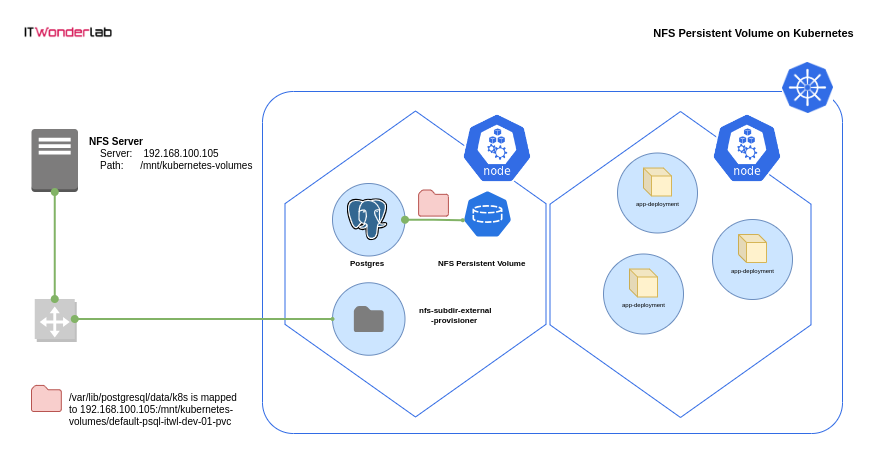
Using Persistent Volumes for Postgres ensures data persistence, scalability, and better management within Kubernetes clusters.
Using NFS (Network File System) in Kubernetes offers a centralized and shared storage solution. It enables multiple pods or nodes to access the same storage volume concurrently, facilitating data sharing and allowing for simpler management of storage across the cluster.
How to run Postgres with a NFS Persistent Volume on Kubernetes
Kubernetes Cluster, Helm, NFS Server.
If you don’t have an existing NFS Server, create a local NFS server.
Install an external NFS provisioner in Kubernetes
Kubernetes doesn’t include an internal NFS storage class anymore, an external provisioner needs to be installed.
Deploy Postgres on Kubernetes using an NFS Persistent Volumes
Deploy the needed resources to create a Postgres server on Kubernetes.
Use a Postgres client to connect to the database create a table a insert data.
Debug NFS Subdir External Provisioner on Kubernetes
Debug the different components that provide NFS volumes to Kubernetes
A Kubernetes cluster or install one.
Helm for managing Kubernetes package deployments:
An existing NFS Server and share to store the data
If you don’t have an existing NFS Server, create a local NFS server for the Kubernetes Cluster.
Install the Ubuntu needed packages and create a local directory /mnt/kubernetes-volumes:
sudo apt install nfs-kernel-server
sudo mkdir -p /mnt/kubernetes-volumes
sudo mkdir -p /mnt/kubernetes-volumes/data
sudo chown nobody:nogroup /mnt/kubernetes-volumes/data
sudo chmod 777 /mnt/kubernetes-volumes/data
Edit the /etc/exports file to add the exported local directory and limit the share to the CIDR used by the Kubernetes Cluster nodes for external access.
If using the local K3s cluster use your local IP, e.g. 192.168.100.105/32 which corresponds to the network used by the K3s nodes to access the external networks. You can start with * to match and allow all clients and limit later.
Edit /etc/exports and add the NFS share /mnt/kubernetes-volumes configuration:
$ cat /etc/exports
# /etc/exports: the access control list for filesystems which may be exported
#               to NFS clients.  See exports(5).
#
# Example for NFSv2 and NFSv3:
# /srv/homes       hostname1(rw,sync,no_subtree_check) hostname2(ro,sync,no_subtree_check)
#
# Example for NFSv4:
# /srv/nfs4        gss/krb5i(rw,sync,fsid=0,crossmnt,no_subtree_check)
# /srv/nfs4/homes  gss/krb5i(rw,sync,no_subtree_check)
#

/mnt/kubernetes-volumes *(rw,sync,no_subtree_check,insecure,no_root_squash)
Restart the NFS server and verify exported volumes:
# sudo exportfs -a
# sudo systemctl restart nfs-kernel-server
# sudo exportfs -v
/mnt/kubernetes-volumes
                 <world>(sync,wdelay,hide,no_subtree_check,sec=sys,rw,insecure,no_root_squash,no_all_squash)
Use the command showmount to list exported shares:
$ showmount -e 192.168.100.105
Export list for 192.168.100.105:
/mnt/kubernetes-volumes *
Kubernetes doesn’t include an internal NFS provisioner. You need to use an external provisioner to create a StorageClass for NFS.
Check Kubernetes available StorageClasses:
$ kubectl get storageclasses
NAME                   PROVISIONER             RECLAIMPOLICY   VOLUMEBINDINGMODE      ALLOWVOLUMEEXPANSION   AGE
local-path (default)   rancher.io/local-path   Delete          WaitForFirstConsumer   false                  18h
nfs-subdir-external-provisioner will be configured and used to provide NFS storage to PersistentVolumeClaims.
Add the nfs-subdir-external-provisioner repository to Helm and Install the NFS provisioner:
The default installation instructions have been modified to change the naming (pathPattern) of the NFS sub-directories created and preserve directories (onDelete) making it possible to reuse the volumes across Pods restarts.
(add –kubeconfig /etc/rancher/k3s/k3s.yaml to the helm command if using K3s)
helm repo add nfs-subdir-external-provisioner https://kubernetes-sigs.github.io/nfs-subdir-external-provisioner/

$ helm install nfs-subdir-external-provisioner nfs-subdir-external-provisioner/nfs-subdir-external-provisioner \
    --set nfs.server=192.168.100.105 \
    --set nfs.path=/mnt/kubernetes-volumes \
    --set storageClass.onDelete=retain \
    --set storageClass.pathPattern='/${.PVC.namespace}-${.PVC.name}' \
    --kubeconfig /etc/rancher/k3s/k3s.yaml
Check that a new nfs-client storage class is available:
$ kubectl get storageclasses
NAME                   PROVISIONER                                     RECLAIMPOLICY   VOLUMEBINDINGMODE      ALLOWVOLUMEEXPANSION   AGE
local-path (default)   rancher.io/local-path                           Delete          WaitForFirstConsumer   false                  19h
nfs-client             cluster.local/nfs-subdir-external-provisioner   Delete          Immediate              true                   15s
Create a Kubernetes resources definition file specifying the Postgres installation, its NFS volume, and a Load Balancer to publish the database server.
The following resources are created:
A Kubernetes StatefulSet ensures stable, unique network identifiers and persistent storage for each pod, making it ideal for applications like databases that require stable hostnames, persistent storage, and ordered deployment/scaling.
apiVersion: v1
kind: ConfigMap
metadata:
  name: psql-itwl-dev-01-cm
data:
  POSTGRES_DB: db
  POSTGRES_USER: user
  POSTGRES_PASSWORD: pass
  PGDATA: /var/lib/postgresql/data/k8s

---

apiVersion: v1
kind: PersistentVolumeClaim
metadata:
  name: psql-itwl-dev-01-pvc
spec:
  accessModes:
    - ReadWriteMany
  storageClassName: nfs-client
  resources:
    requests:
      storage: 1Gi
---

apiVersion: apps/v1
kind: StatefulSet
metadata:
  name: psql-itwl-dev-01
  labels:
    app: psql
    ver: itwl-dev-01
spec:
  replicas: 1
  selector:
    matchLabels:
      app: psql
      ver: itwl-dev-01
  serviceName: "itwl-dev-01"
  template: #For the creation of the pod
    metadata:
      labels:
        app: psql
        ver: itwl-dev-01
    spec:
      containers:
        - name: postgres
          image: postgres:latest
          imagePullPolicy: "IfNotPresent"
          ports:
            - containerPort: 5432
          envFrom:
            - configMapRef:
                name: psql-itwl-dev-01-cm
          volumeMounts:
            - mountPath: /var/lib/postgresql/data
              name: pgdatavol
      volumes:
        - name: pgdatavol
          persistentVolumeClaim:
            claimName: psql-itwl-dev-01-pvc
---

apiVersion: v1
kind: Service
metadata:
  name: postgres-service-lb
spec:
  type: LoadBalancer
  selector:
    app: psql
  ports:
    - name: psql
      port: 5432
      targetPort: 5432
      nodePort: 30101
      protocol: TCP
Use kubectl to create the resources defined:
kubectl apply -f postgres.yaml
Use the Postgres client psql (sudo apt-get install -y postgresql-client) to connect to the Postgres server, use the Kubernetes cluster IP (e.g. 192.168.100.105) and the LoadBalancer port (e.g. 30101):
Password is pass
$ psql db -h 192.168.100.105 -p 30101 -U user
Password for user user:
psql (14.9 (Ubuntu 14.9-0ubuntu0.22.04.1), server 16.0 (Debian 16.0-1.pgdg120+1))
WARNING: psql major version 14, server major version 16.
         Some psql features might not work.
Type "help" for help.

db=#(use \q to exit Postgres client)
CREATE TABLE COLOR(
    ID SERIAL PRIMARY KEY   NOT NULL,
    NAME           TEXT     NOT NULL UNIQUE,
    RED            SMALLINT NOT NULL,
    GREEN          SMALLINT NOT NULL,
    BLUE           SMALLINT NOT NULL
);

INSERT INTO COLOR (NAME,RED,GREEN,BLUE) VALUES('GREEN',0,128,0);
INSERT INTO COLOR (NAME,RED,GREEN,BLUE) VALUES('RED',255,0,0);
INSERT INTO COLOR (NAME,RED,GREEN,BLUE) VALUES('BLUE',0,0,255);
INSERT INTO COLOR (NAME,RED,GREEN,BLUE) VALUES('WHITE',255,255,255);
INSERT INTO COLOR (NAME,RED,GREEN,BLUE) VALUES('YELLOW',255,255,0);
INSERT INTO COLOR (NAME,RED,GREEN,BLUE) VALUES('LIME',0,255,0);
INSERT INTO COLOR (NAME,RED,GREEN,BLUE) VALUES('BLACK',255,255,255);
INSERT INTO COLOR (NAME,RED,GREEN,BLUE) VALUES('GRAY',128,128,128);

SELECT * FROM COLOR;
 id |  name  | red | green | blue
----+--------+-----+-------+------
  1 | GREEN  |   0 |   128 |    0
  2 | RED    | 255 |     0 |    0
  3 | BLUE   |   0 |     0 |  255
  4 | WHITE  | 255 |   255 |  255
  5 | YELLOW | 255 |   255 |    0
  6 | LIME   |   0 |   255 |    0
  7 | BLACK  | 255 |   255 |  255
  8 | GRAY   | 128 |   128 |  128
(8 rows)

\q
Test Postgress restart and Delete
Test that the Postgres server keeps the data across restarts and even if the deployment is removed and created again.
$ kubectl delete -f postgres.yaml
configmap/psql-itwl-dev-01-cm created
persistentvolumeclaim/psql-itwl-dev-01-pvc created
deployment.apps/psql-itwl-dev-01 created
service/postgres-service-lb created

$ ls -l /mnt/kubernetes-volumes/
total 4
drwxrwxrwx 3 root root 4096 nov  7 20:10 default-psql-itwl-dev-01-pvc

$ kubectl apply -f postgres.yaml
configmap/psql-itwl-dev-01-cm created
persistentvolumeclaim/psql-itwl-dev-01-pvc created
deployment.apps/psql-itwl-dev-01 created
service/postgres-service-lb created

$ psql db -h 192.168.100.105 -p 30101 -U user
Password for user user: pass
psql (14.9 (Ubuntu 14.9-0ubuntu0.22.04.1), server 16.0 (Debian 16.0-1.pgdg120+1))
WARNING: psql major version 14, server major version 16.
         Some psql features might not work.
Type "help" for help.

db=# SELECT * FROM COLOR;
 id |  name  | red | green | blue
----+--------+-----+-------+------
  1 | GREEN  |   0 |   128 |    0
  2 | RED    | 255 |     0 |    0
  3 | BLUE   |   0 |     0 |  255
  4 | WHITE  | 255 |   255 |  255
  5 | YELLOW | 255 |   255 |    0
  6 | LIME   |   0 |   255 |    0
  7 | BLACK  | 255 |   255 |  255
  8 | GRAY   | 128 |   128 |  128
(8 rows)
Use kubectl to access Kubernetes logs.
Get the pods and identify the name for the NFS Subdir External Provisioner
$ kubectl get all
NAME                                                  READY   STATUS      RESTARTS      AGE
pod/test-pod                                          0/1     Completed   0             4h
pod/nfs-subdir-external-provisioner-55ddd76dc-vk5j9   1/1     Running     1 (32m ago)   119m
pod/psql-itwl-dev-01-0                                1/1     Running     0             68s

NAME                          TYPE           CLUSTER-IP     EXTERNAL-IP       PORT(S)          AGE
service/kubernetes            ClusterIP      10.43.0.1      <none>            443/TCP          23h
service/postgres-service-np   NodePort       10.43.79.224   <none>            5432:30100/TCP   3h55m
service/postgres-service-lb   LoadBalancer   10.43.33.127   192.168.100.105   5432:30101/TCP   68s

NAME                                              READY   UP-TO-DATE   AVAILABLE   AGE
deployment.apps/nfs-subdir-external-provisioner   1/1     1            1           119m

NAME                                                        DESIRED   CURRENT   READY   AGE
replicaset.apps/nfs-subdir-external-provisioner-55ddd76dc   1         1         1       119m

NAME                                READY   AGE
statefulset.apps/psql-itwl-dev-01   1/1     68s
Check the pod/nfs-subdir-external-provisioner
$ kubectl describe pod/nfs-subdir-external-provisioner-55ddd76dc-vk5j9
Name:             nfs-subdir-external-provisioner-55ddd76dc-vk5j9
Namespace:        default
Priority:         0
Service Account:  nfs-subdir-external-provisioner
Node:             xps13/192.168.100.105
Start Time:       Tue, 07 Nov 2023 20:11:26 +0800
Labels:           app=nfs-subdir-external-provisioner
                  pod-template-hash=55ddd76dc
                  release=nfs-subdir-external-provisioner
Annotations:      <none>
Status:           Running
IP:               10.42.0.57
IPs:
  IP:           10.42.0.57
Controlled By:  ReplicaSet/nfs-subdir-external-provisioner-55ddd76dc
Containers:
  nfs-subdir-external-provisioner:
    Container ID:   containerd://66682abf991ea2297ebe0c7019202dd086b9dca352acf987ac2cbf695e10f63b
    Image:          registry.k8s.io/sig-storage/nfs-subdir-external-provisioner:v4.0.2
    Image ID:       registry.k8s.io/sig-storage/nfs-subdir-external-provisioner@sha256:63d5e04551ec8b5aae83b6f35938ca5ddc50a88d85492d9731810c31591fa4c9
    Port:           <none>
    Host Port:      <none>
    State:          Running
      Started:      Tue, 07 Nov 2023 21:38:39 +0800
    Last State:     Terminated
      Reason:       Error
      Exit Code:    255
      Started:      Tue, 07 Nov 2023 20:11:27 +0800
      Finished:     Tue, 07 Nov 2023 21:38:38 +0800
    Ready:          True
    Restart Count:  1
    Environment:
      PROVISIONER_NAME:  cluster.local/nfs-subdir-external-provisioner
      NFS_SERVER:        192.168.100.105
      NFS_PATH:          /mnt/kubernetes-volumes
    Mounts:
      /persistentvolumes from nfs-subdir-external-provisioner-root (rw)
      /var/run/secrets/kubernetes.io/serviceaccount from kube-api-access-ntzfj (ro)
Conditions:
  Type              Status
  Initialized       True
  Ready             True
  ContainersReady   True
  PodScheduled      True
Volumes:
  nfs-subdir-external-provisioner-root:
    Type:      NFS (an NFS mount that lasts the lifetime of a pod)
    Server:    192.168.100.105
    Path:      /mnt/kubernetes-volumes
    ReadOnly:  false
  kube-api-access-ntzfj:
    Type:                    Projected (a volume that contains injected data from multiple sources)
    TokenExpirationSeconds:  3607
    ConfigMapName:           kube-root-ca.crt
    ConfigMapOptional:       <nil>
    DownwardAPI:             true
QoS Class:                   BestEffort
Node-Selectors:              <none>
Tolerations:                 node.kubernetes.io/not-ready:NoExecute op=Exists for 300s
                             node.kubernetes.io/unreachable:NoExecute op=Exists for 300s
Events:
  Type    Reason   Age                 From     Message
  ----    ------   ----                ----     -------
  Normal  Pulled   33m (x2 over 121m)  kubelet  Container image "registry.k8s.io/sig-storage/nfs-subdir-external-provisioner:v4.0.2" already present on machine
  Normal  Created  33m (x2 over 121m)  kubelet  Created container nfs-subdir-external-provisioner
  Normal  Started  33m (x2 over 121m)  kubelet  Started container nfs-subdir-external-provisioner
Identify the list of PersistentVolumeClaims (PVC)
$ kubectl get PersistentVolumeClaim
NAME                   STATUS   VOLUME                                     CAPACITY   ACCESS MODES   STORAGECLASS   AGE
test-claim             Bound    pvc-cdb6bc6a-47a2-4003-8b4b-b60a66d83d94   1Mi        RWX            nfs-client     115m
psql-itwl-dev-01-pvc   Bound    pvc-73536ecd-7a33-4b5e-9449-65416f1ec26d   1Gi        RWX            nfs-client     2m18s
Access the log of the PersistentVolumeClaim
$ kubectl describe PersistentVolumeClaim/psql-itwl-dev-01-pvc
Name:          psql-itwl-dev-01-pvc
Namespace:     default
StorageClass:  nfs-client
Status:        Bound
Volume:        pvc-73536ecd-7a33-4b5e-9449-65416f1ec26d
Labels:        <none>
Annotations:   nfs.io/storage-path: psql-itwl-dev-01-pvc
               pv.kubernetes.io/bind-completed: yes
               pv.kubernetes.io/bound-by-controller: yes
               volume.beta.kubernetes.io/storage-provisioner: cluster.local/nfs-subdir-external-provisioner
               volume.kubernetes.io/storage-provisioner: cluster.local/nfs-subdir-external-provisioner
Finalizers:    [kubernetes.io/pvc-protection]
Capacity:      1Gi
Access Modes:  RWX
VolumeMode:    Filesystem
Used By:       psql-itwl-dev-01-9d8d4b8d5-vxcg2
Events:
  Type    Reason                 Age                  From                                                                                                                                Message
  ----    ------                 ----                 ----                                                                                                                                -------
  Normal  ExternalProvisioning   104s (x3 over 111s)  persistentvolume-controller                                                                                                         waiting for a volume to be created, either by external provisioner "cluster.local/nfs-subdir-external-provisioner" or manually created by system administrator
  Normal  Provisioning           103s                 cluster.local/nfs-subdir-external-provisioner_nfs-subdir-external-provisioner-55ddd76dc-9j7kh_6e3d5fde-4cd1-4c66-aaf0-7a256b2e1d9c  External provisioner is provisioning volume for claim "default/psql-itwl-dev-01-pvc"
  Normal  ProvisioningSucceeded  102s                 cluster.local/nfs-subdi
Review the log of the Application using the PersistentVolumeClaim, in this example Postgres
$ kubectl describe pod/psql-itwl-dev-01-0
Name:             psql-itwl-dev-01-0
Namespace:        default
Priority:         0
Service Account:  default
Node:             xps13/192.168.100.105
Start Time:       Tue, 07 Nov 2023 22:10:05 +0800
Labels:           app=psql
                  controller-revision-hash=psql-itwl-dev-01-6bb947769c
                  statefulset.kubernetes.io/pod-name=psql-itwl-dev-01-0
                  ver=itwl-dev-01
Annotations:      <none>
Status:           Running
IP:               10.42.0.65
IPs:
  IP:           10.42.0.65
Controlled By:  StatefulSet/psql-itwl-dev-01
Containers:
  postgres:
    Container ID:   containerd://edb90feae561895d3d37efcc86dbddef293ebb963cf25e57a229229bd5ac2260
    Image:          postgres:latest
    Image ID:       docker.io/library/postgres@sha256:a80d0c1b119cf3d6bab27f72782f16e47ab8534ced937fa813ec2ab26e1fd81e
    Port:           5432/TCP
    Host Port:      0/TCP
    State:          Running
      Started:      Tue, 07 Nov 2023 22:10:06 +0800
    Ready:          True
    Restart Count:  0
    Environment Variables from:
      psql-itwl-dev-01-cm  ConfigMap  Optional: false
    Environment:           <none>
    Mounts:
      /var/lib/postgresql/data from pgdatavol (rw)
      /var/run/secrets/kubernetes.io/serviceaccount from kube-api-access-f8j9r (ro)
Conditions:
  Type              Status
  Initialized       True
  Ready             True
  ContainersReady   True
  PodScheduled      True
Volumes:
  pgdatavol:
    Type:       PersistentVolumeClaim (a reference to a PersistentVolumeClaim in the same namespace)
    ClaimName:  psql-itwl-dev-01-pvc
    ReadOnly:   false
  kube-api-access-f8j9r:
    Type:                    Projected (a volume that contains injected data from multiple sources)
    TokenExpirationSeconds:  3607
    ConfigMapName:           kube-root-ca.crt
    ConfigMapOptional:       <nil>
    DownwardAPI:             true
QoS Class:                   BestEffort
Node-Selectors:              <none>
Tolerations:                 node.kubernetes.io/not-ready:NoExecute op=Exists for 300s
                             node.kubernetes.io/unreachable:NoExecute op=Exists for 300s
Events:
  Type     Reason            Age    From               Message
  ----     ------            ----   ----               -------
  Warning  FailedScheduling  3m31s  default-scheduler  0/1 nodes are available: pod has unbound immediate PersistentVolumeClaims. preemption: 0/1 nodes are available: 1 Preemption is not helpful for scheduling..
  Normal   Scheduled         3m29s  default-scheduler  Successfully assigned default/psql-itwl-dev-01-0 to xps13
  Normal   Pulled            3m29s  kubelet            Container image "postgres:latest" already present on machine
  Normal   Created           3m29s  kubelet            Created container postgres
  Normal   Started           3m29s  kubelet            Started container postgres
Check the NFS root directory on the NFS server
$ ls -l /mnt/kubernetes-volumes/
total 4
drwxrwxrwx 3 root root 4096 nov  7 20:04 default-psql-itwl-dev-01-pvc
Delete the resources and start again
If you want to delete the resources and start again, use these commands:
helm delete nfs-subdir-external-provisioner --kubeconfig /etc/rancher/k3s/k3s.yaml
kubectl delete -f postgres.yaml




IT Wonder Lab tutorials are based on the diverse experience of Javier Ruiz, who founded and bootstrapped a SaaS company in the energy sector. His company, later acquired by a NASDAQ traded company, managed over €2 billion per year of electricity for prominent energy producers across Europe and America. Javier has over 25 years of experience in building and managing IT companies, developing cloud infrastructure, leading cross-functional teams, and transitioning his own company from on-premises, consulting, and custom software development to a successful SaaS model that scaled globally.